
Most support teams I’ve talked to didn’t leave Intercom because it stopped working. They left because it no longer made sense. The bills kept climbing, simple workflows took too long to configure, and somewhere along the way, customer conversations started feeling transactional.
If that sounds familiar, you are already thinking about Intercom alternatives, whether you realize it or not. I’ve spent time testing and comparing tools that actually solve these problems, and I’m going to share everything about them with you: from their unique use cases to how they are better than Intercom.
Here are the best Intercom alternatives and competitors worth your attention if you want faster response times, lower costs, and more personal support.
Why Are Businesses Looking for Intercom Alternatives?
Intercom works well for many teams, but it is not a perfect fit for everyone. As businesses grow and support needs shift, certain gaps become difficult to ignore. Teams evaluating intercom competitors often point to the same friction points.
Here are five reasons teams start looking elsewhere:
1. Pricing Gets Expensive Fast
Intercom’s costs scale with the number of contacts and seats, which catches many growing teams off guard. What starts as a manageable expense can quickly become a significant budget line, pushing businesses to find tools that offer similar value at a more predictable price.
2. Setup and Configuration Takes Time
Getting Intercom fully configured requires meaningful time and technical effort. For smaller teams without dedicated ops or engineering support, that complexity becomes a real barrier to getting value from the platform quickly and without ongoing maintenance overhead.
3. Ticketing Capabilities Feel Limited
Intercom is built around conversations, not tickets. Teams that need structured issue tracking, SLA management, or formal escalation workflows often find that Intercom’s ticketing falls short compared to platforms designed with help desk functionality at their core.
4. Chatbot Customization Has a Learning Curve
Building and maintaining chatbot flows in Intercom can feel restrictive without technical knowledge. Teams that want to automate support quickly using existing content, without writing code or hiring developers, often find more flexible and beginner-friendly options elsewhere.
5. Customer Support From Intercom Can Be Inconsistent
Several users report that getting timely help from Intercom’s support team is hit-or-miss. Customer service quality also directly impacts loyalty. According to Forbes, 96% of consumers say customer service plays a key role in their loyalty to a brand. For businesses that need quick vendor support during outages, this inconsistency can lead them to consider other options.
What Are the Top 10 Intercom Alternatives for Faster Customer Support?
I spent the last few months diving into live chat and customer support tools to build this list. I went through real user reviews on G2 and Capterra, tested platforms in real scenarios, and compared how they perform across teams and use cases.
This isn’t just a roundup. It’s a list of Intercom alternatives I’d actually recommend, each solving key gaps like cost, simplicity, or scalability.
Before getting into the details, here is a quick look at all the intercom alternatives.
| Intercom Alternatives | Best For | Pricing | User Rating |
|---|---|---|---|
| ProProfs Chat | 24/7 delightful customer support with AI chatbots | Free plan available. Paid plan starts at $19.99/user/month] | 4.8/5 (Capterra) |
| Kommunicate | Integrating human and bot support | Starts at $34/month | 4.6/5 (G2) |
| HelpCrunch | Email marketing, live chat, and knowledge base | Starts at $12/month | 4.7/5 (G2) |
| Tidio | Live chat with built-in ticketing functionality | Starts at $29/month | 4.7/5 (Capterra) |
| Tawk.to | Freemium live chat with basic features | Free for all users | 4.6/5 (G2) |
| Zendesk Chat | Zendesk suite users needing omnichannel support | Starts at $55/agent/month | 4.3/5 (G2) |
| Olark | Simple and straightforward chat solutions | Starts at $29/seat/month | 4.3/5 (G2) |
| Drift | Conversational marketing and sales engagement | Starts at $2,500/month | 4.4/5 (G2) |
| Smartsupp | Automated customer engagement and service | Starts at $19.50/month | 4.4/5 (Capterra) |
| Cliengo | Sales and marketing automation | Starts at $39/month | 4.1/5 (G2) |
1. ProProfs Chat – Best for 24/7 Delightful Customer Support with AI Chatbots
I started using ProProfs Chat when I needed a live chat tool that could keep customers engaged around the clock without adding pressure on my team. The AI chatbot feature has been a big win. It handles common questions instantly, even after business hours, helping maintain a consistent, friendly customer experience.
What I appreciate most is how simple everything feels. Setup took very little time, and I could easily control chat placement, language, and appearance. Training the chatbot using my knowledge base and website content was straightforward and saved my team from having to answer the same questions repeatedly.
ProProfs Chat also brings solid reporting, mobile access, and multilingual support into one dashboard. With GDPR compliance, SSL encryption, and flexible customization, it feels like a dependable solution that genuinely helps improve customer satisfaction as the business grows.
Pros:
- Real-time visitor tracking that helps engage customers at the right moment
- Proactive chat invitations that encourage engagement and improve conversions
- Smart chat routing that seamlessly connects customers to human agents when needed
- Built-in Google Meet integration for quick, face-to-face video support when required
Cons:
- Cloud-only — no offline access
- No dark theme option
How ProProfs Chat Compares to Intercom:
Compared to Intercom, ProProfs Chat feels much lighter and easier to use, especially for teams that want quick setup and AI-powered chat without heavy configuration. While Intercom is built for product-led growth and complex messaging workflows, ProProfs Chat focuses on real-time engagement, automation, and simplicity, making it a better fit for teams prioritizing fast, friendly customer interactions without the steep learning curve or escalating costs.
User Rating: 4.8 (Capterra)
Pricing: A free plan is available for growing teams. Paid plan starts at $19.99/user/month.
2. Kommunicate – Best for Integrating Human and Bot Support
Kommunicate is an AI-powered chatbot and live chat platform that automates customer queries across web, mobile, and messaging apps, with built-in logic to escalate complex conversations to human agents in real time.
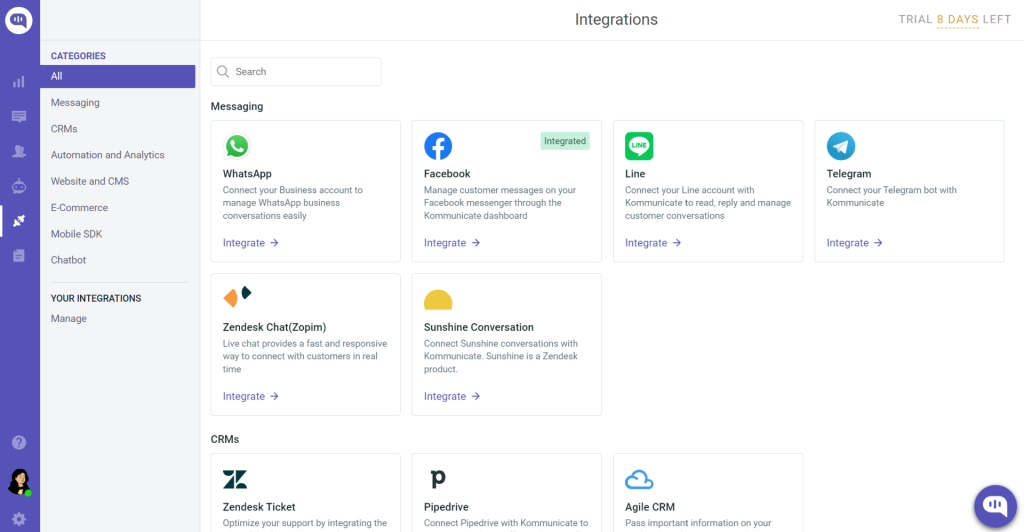
I found it easy to resolve common questions by customizing the bot with existing content — no technical background required. It works across web, mobile, and messaging platforms, so customers get consistent support wherever they are.
What I admire most about Kommunicate is its flexibility and scalability. Its chatbot comes with a variety of rich messaging templates that enhance the support experience, and the platform handles growing volumes without breaking a sweat. More importantly, when the bot can’t handle a query, it automatically transfers the conversation to a human agent, keeping the customer experience seamless.
Pros:
- In-chat lead collection forms to gather customer details during conversations
- User-friendly dashboard for seamless management and resolution of queries
- Platform APIs to build customized customer support workflows
- Automatic transfer of complex queries to human agents when needed
Cons:
- Responses can be delayed at times
- Limited integrations with WhatsApp compared to other tools
How Kommunicate Compares to Intercom:
Kommunicate takes a more bot-first approach than Intercom, making it a better fit for teams that want to automate the majority of interactions before involving a human agent. While Intercom offers a richer suite of outbound messaging and product engagement tools, Kommunicate keeps things focused on efficient, scalable bot-to-human handoffs at a simpler setup and cleaner pricing structure.
User Rating: 4.6/5 (G2)
Pricing: Starts at $34/month.
3. HelpCrunch – Best for Email Marketing, Live Chat, and Knowledge Base
HelpCrunch is a multichannel customer communication platform combining live chat, email automation, AI chatbot, and a self-service knowledge base — designed for teams that want support and marketing workflows in one place.
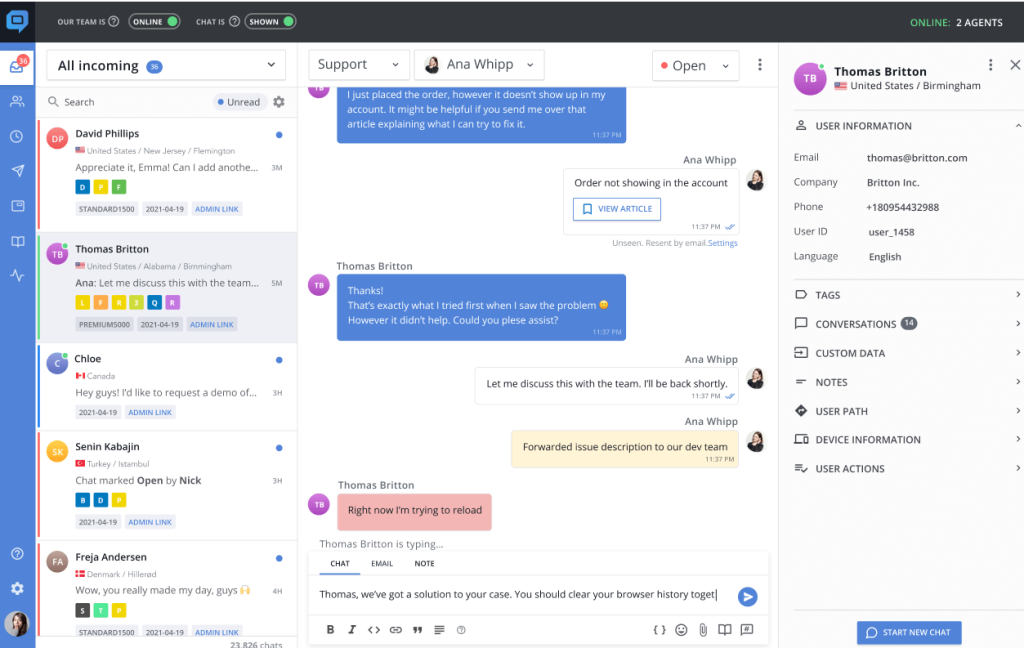
What I like most is how quickly you can get a full-fledged support setup running. Using its WYSIWYG editor, I generated informative help center content, optimized it for SEO, and launched a comprehensive knowledge base in very little time. The multichannel chat widget, automated email sequences, and chatbot scenarios mean teams can engage customers across every touchpoint from a single dashboard.
Pros:
- Stylish pop-ups to generate more leads and capture visitor attention
- Automated email sequences and one-off newsletters to increase conversions
- Seamless management of chats, emails, and messages from Facebook, Instagram, Telegram, and Viber
- WYSIWYG editor to build a full help center quickly without technical skills
Cons:
- Phone support and video chat options are not available
- Some features may not be accessible in certain regions or languages
How HelpCrunch Compares to Intercom:
HelpCrunch covers similar ground to Intercom, live chat, email automation, and a knowledge base, but at a much more accessible price point. Where Intercom leans into product-led engagement and in-app messaging, HelpCrunch focuses on keeping multichannel communication simple and affordable. It is a better choice for teams that want a well-rounded support and marketing toolkit without paying enterprise-level costs.
User Rating: 4.7/5 (G2)
Pricing: Starts at $12/month.
4. Tidio – Best for Live Chat With Ticketing Functionality
Tidio combines real-time chat, AI chatbots, and a built-in ticketing system, helping small and mid-sized businesses manage both instant conversations and longer support workflows from one tool.
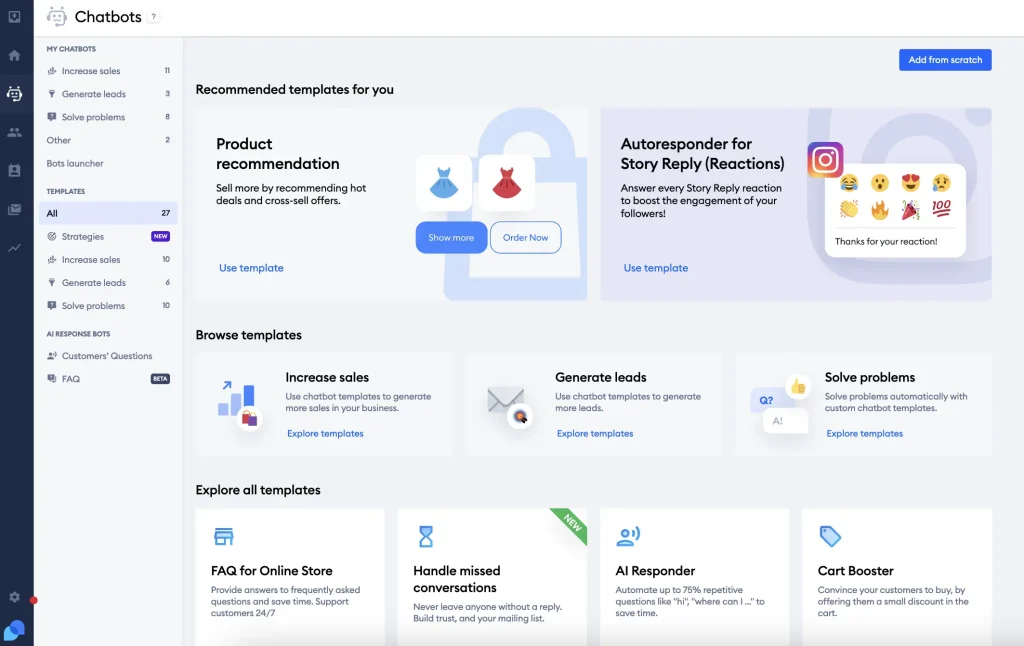
I found the balance between speed and structure especially helpful. Teams can respond instantly through live chat while keeping everything organized behind the scenes. This makes it easier to manage quick questions and ongoing issues without switching between tools.
Tidio also does a good job supporting customer satisfaction at scale. Its AI chatbot handles frequent inquiries about products, services, or return policies using existing support content, reducing the need for human intervention while keeping responses feel human.
Pros:
- Chatbots to handle FAQs and after-hours conversations automatically
- Multi-language support to assist customers across regions
- Visual chatbot builder to create automated flows without any coding
- Live typing preview to see messages before customers send them
Cons:
- Reports and analytics are not available on the free plan
- Some users encounter challenges with managing chat history or updating agent profiles
How Tidio Compares to Intercom:
Tidio offers a simpler live chat and ticketing experience compared to Intercom’s feature-heavy platform. While Intercom handles complex automation, product messaging, and large-scale engagement better, Tidio works well for businesses that want live chat, basic ticketing, and automation without a steep learning curve or high starting costs.
User Rating: 4.7/5 (Capterra)
Pricing: Starts at $29/month.
5. Tawk.to – Best for Freemium Live Chat With Basic Features
Tawk.to is a free live chat platform that enables businesses to monitor and engage website visitors in real time, with optional paid add-ons for voice, video, and AI chatbot functionality.
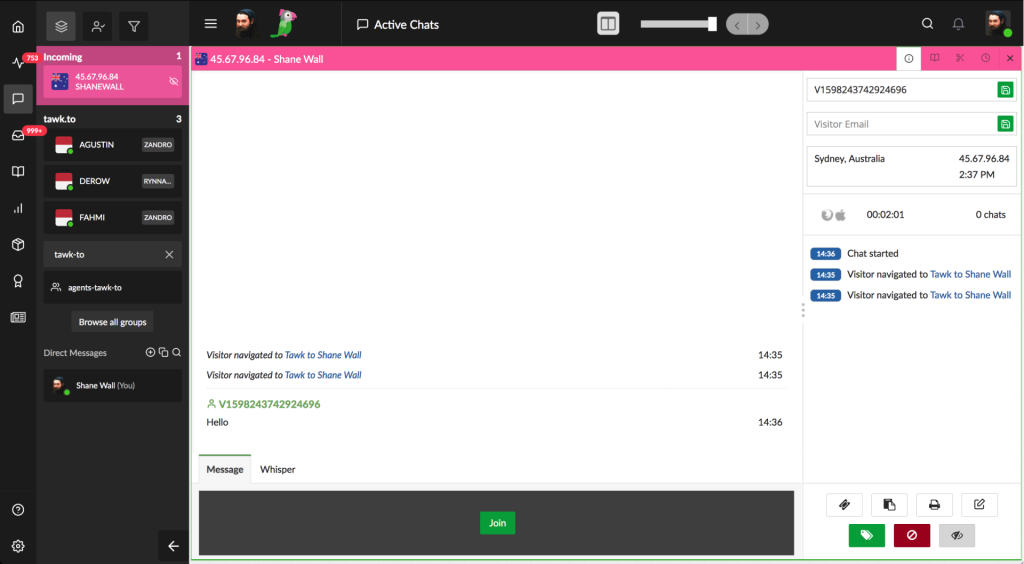
What I loved most is its ability to add video and voice add-ons, which made communication with customers more personal and effective. Tawk.to also supports multiple languages and has a strong JavaScript API, making it easy to customize the platform to fit specific needs without needing a developer on call.
For businesses looking for a free, straightforward way to add live chat to their website, Tawk.to is hard to beat. It covers the essentials well and removes the cost barrier entirely.
Pros:
- Customizable live chat widget that is easy to embed on any website
- Ticketing system to manage customer queries that come in via email
- Knowledge base for creating and sharing helpful articles with customers and the team
- Team chat to communicate internally with team members directly within the dashboard
Cons:
- Some users may require technical assistance to use the JavaScript API or certain integrations
- Lacks some advanced features and analytics that paid platforms offer
How Tawk.to Compares to Intercom:
Tawk.to and Intercom sit at opposite ends of the pricing spectrum. Where Intercom is a premium, feature-rich platform built for growing product teams, Tawk.to is a free, no-frills live chat tool focused on the basics. It is a better choice for small businesses or early-stage teams that need real-time chat without the budget for an enterprise platform.
User Rating: 4.6/5 (G2)
Pricing: Free for all users
6. Zendesk Chat – Best for Zendesk Suite Users
Zendesk Chat is a real-time messaging and live chat tool built natively into the Zendesk customer service suite, offering omnichannel support across chat, email, phone, and social media within a single, enterprise-ready platform.

What sets Zendesk Chat apart is its ability to automate tasks, streamline operations, and enable quick responses across all communication channels. It offers robust features for creating and managing self-service content, connecting with customers through phone calls and social messaging apps, and customizing the support experience to feel genuinely personal.
Pros:
- Knowledge base and chatbots to offer reliable self-service options
- Browser-based call center to make and receive phone calls without extra tools
- Customization of the existing platform with apps and integrations
- In-depth reports to analyze support performance across channels
Cons:
- Self-service customer portals are absent in the basic plan
- Some users have reported delays in receiving timely help from Zendesk’s own support team
How Zendesk Chat Compares to Intercom:
Zendesk Chat takes a more structured, ticket-centric approach than Intercom’s conversational messaging model. Where Intercom excels at in-app engagement and proactive customer outreach, Zendesk Chat works better in organized, high-volume help desk environments with strong SLA and reporting needs. It is the better choice for teams already using Zendesk who want to extend their setup rather than introduce an entirely new platform.
User Rating: 4.3/5 (G2)
Pricing: Starts at $55/agent/month.
7. Olark – Best for Simple and Straightforward Chat Solutions
Olark is a lightweight live chat software focused on real-time customer conversations, chat automation, and CRM data capture, designed for teams that want dependable chat functionality without a complex feature set.
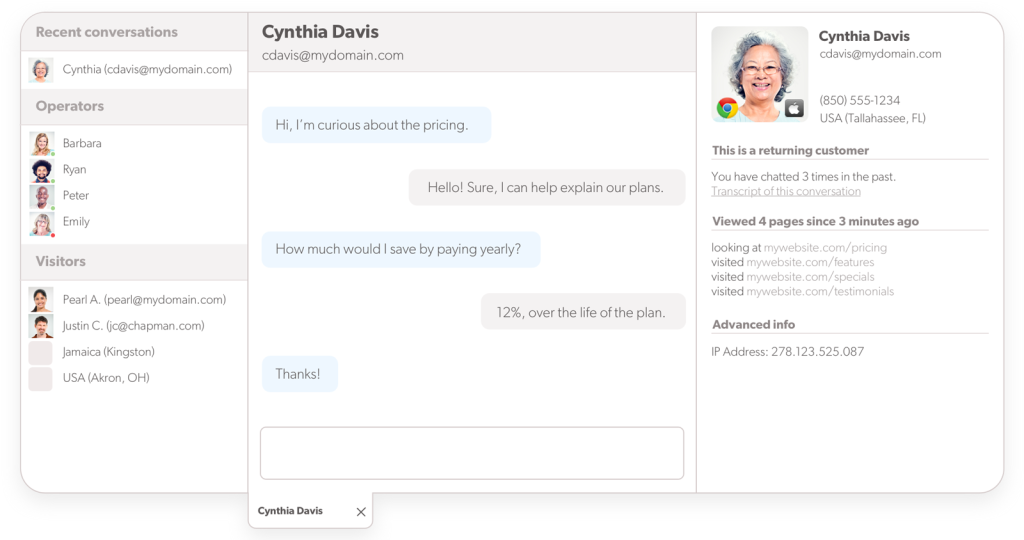
What I appreciate most about Olark is its chat commands and controls. Shortcuts make it easy to handle everyday tasks like transferring chats or sending canned responses, and more advanced controls like blocking visitors or setting availability are just as simple to configure.
Pros:
- Customization of the chat widget’s color, size, position, language, and text
- Offline messaging to ensure visitor queries never go unanswered
- Easy-to-configure live chat automation to boost workflow efficiency
- Custom chatbox forms to collect visitor information before a conversation starts
Cons:
- No native mobile app for agents
- Occasional technical glitches and bugs reported by some users
How Olark Compares to Intercom:
Olark is a much simpler, more focused tool than Intercom. While Intercom offers a broad suite of engagement, automation, and product messaging features, Olark sticks to the core of live chat, keeping it clean, accessible, and easy to manage. It is a better fit for small teams that want reliable chat without a complex platform or a feature set they may never use.
User Rating: 4.3/5 (G2)
Pricing: Starts at $29/seat/month.
8. Drift – Best for Conversational Marketing and Sales Engagement
Drift is a conversational marketing and sales platform that replaces static lead forms with real-time chat, AI chatbots, and automated meeting booking, enabling revenue teams to engage high-intent website visitors the moment they arrive.

With custom chatbots, you can quickly engage visitors with personalized messages. The Drift Fastlane feature converts lead forms into real-time interactions, helping connect with potential buyers right away and keeping the sales pipeline active. I especially admire how Drift builds conversational landing pages designed to start conversations from the very first moment a visitor arrives.
Pros:
- Conversational landing pages to boost customer engagement and drive pipeline from the start
- Video messaging feature to personalize conversations at scale
- Automated meeting booking to increase qualified appointments without back-and-forth
- AI-driven lead qualification to prioritize high-intent visitors for the sales team
Cons:
- Pricing is significantly higher than most alternatives on this list
- AI-powered chatbots are not available on the entry-level plan
How Drift Compares to Intercom:
Drift and Intercom share a conversational philosophy but serve different primary goals. Intercom leans toward customer support and retention, while Drift is built primarily around sales pipeline and marketing conversion. If the priority is turning website visitors into qualified leads and booked meetings rather than managing ongoing customer support, Drift is the stronger fit, though at a considerably higher price point.
User Rating: 4.4/5 (G2)
Pricing: Starts at $2,500/month.
9. Smartsupp – Best for Automated Customer Engagement and Service
Smartsupp is a live chat and chatbot platform built for e-commerce teams, offering real-time visitor monitoring, automated chat responses, and unique session recording features to help businesses understand and engage customers more effectively.
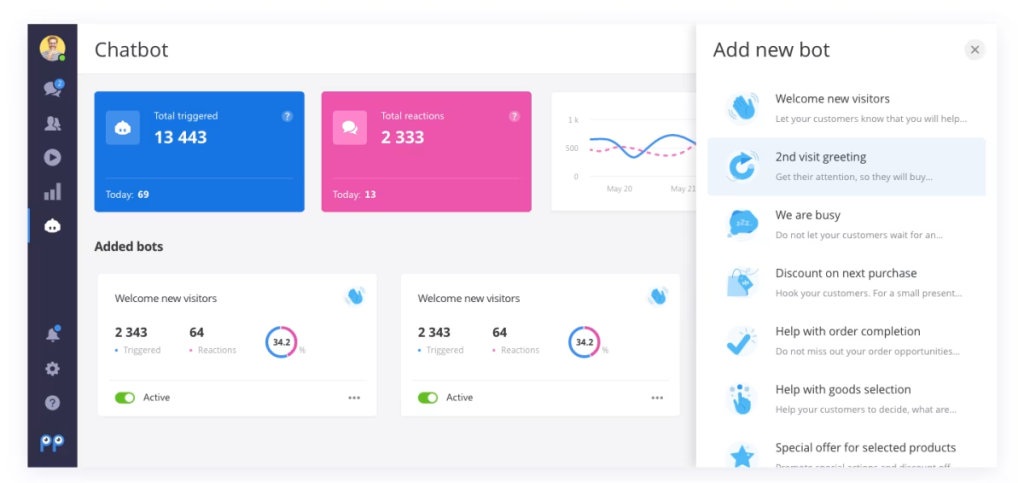
I used this tool and found it particularly effective for forwarding routine queries to chatbots, allowing the support team to focus on more complex issues. Its real-time visitor monitoring shows exactly who is on the site and what they are browsing — increasing the chances of successful interactions. Video recordings of user sessions add a behavioral insight layer that most chat tools simply do not offer.
Pros:
- Video recordings of user sessions to analyze customer behavior and improve support
- Integration with popular e-commerce platforms such as Shopify and WooCommerce
- Real-time visitor monitoring to increase the chances of successful interactions
- Multi-language support to expand your customer base across regions
Cons:
- Plans can be expensive for small businesses
- Customization options are more limited compared to some other tools
How Smartsupp Compares to Intercom:
Smartsupp focuses more on behavioral insights and e-commerce automation than Intercom’s broader product engagement model. While Intercom is better suited for SaaS teams looking to embed support within their product experience, Smartsupp works well for online retailers that want automated chat, visitor tracking, and session recordings in one affordable package.
User Rating: 4.4/5 (Capterra)
Pricing: Starts at $19.50/month.
10. Cliengo – Best for Sales and Marketing Automation
Cliengo is an AI chatbot and sales automation platform that captures, qualifies, and follows up with leads through automated chat and WhatsApp conversations — with built-in CRM integration to keep sales teams informed in real time.

What I like most about Cliengo is how quickly it allows a human advisor to take over a chat or WhatsApp conversation the moment it identifies a potential lead. It also centralizes all client information, making it easy to share insights with the sales team and keep everyone aligned. The tool links campaign performance directly to sales results — providing a clear picture of ROI that many chat tools simply do not.
Pros:
- AI chatbots for quick, personalized conversations that capture leads automatically
- Easy integration with CRMs and other major platforms for centralized data
- Real-time monitoring of chat conversations for sales performance analysis
- Automated responses to avoid the loss of sales opportunities outside business hours
Cons:
- Checking and managing leads in the CRM can be challenging at times
- The free plan supports only WhatsApp, limiting flexibility for new users
How Cliengo Compares to Intercom:
Cliengo takes a narrower, sales-first approach compared to Intercom’s full-featured engagement platform. While Intercom covers the full customer lifecycle from acquisition to support to retention, Cliengo focuses specifically on converting conversations into leads and sales. It is a better fit for teams that want a simple, effective automation tool for sales pipelines rather than a broad customer communication platform.
User Rating: 4.1/5 (G2)
Pricing: Starts at $39/month.
Which Intercom Alternative Is Right for You: My Top 3 Picks
Still undecided? These three picks deserve a closer look.
1. ProProfs Chat
ProProfs Chat delivers 24/7 AI-powered support that instantly handles common questions, even after hours. Setup is quick, and training the chatbot using existing content takes very little effort. With detailed reporting, multilingual support, mobile access, and strong security features, it is a reliable tool for improving customer satisfaction without increasing team workload..
2. HelpCrunch
HelpCrunch brings live chat, email marketing, and a knowledge base together in one platform. It keeps multichannel communication simple and affordable, with proactive chat triggers and a centralized inbox helping teams stay responsive and organized. For businesses that want support and marketing to work hand in hand, it is a genuinely well-rounded choice.
3. Kommunicate
Kommunicate is designed for teams that want AI-powered automation to handle the majority of queries before a human steps in. Its no-code chatbot builder, rich messaging templates, and seamless bot-to-human handoff make it easy to deliver fast, consistent support at scale — without adding pressure on the support team.
What Problems Do Intercom Alternatives Solve?
Many teams begin exploring alternatives when support operations become harder to manage as their business grows.
Common challenges include:
- Rising costs as customer contact lists expand
- Difficulty organizing conversations without structured ticketing
- Manual responses to repetitive customer questions
- Limited automation for scaling support operations
Intercom alternatives address these issues by combining AI chatbots, automated workflows, help desk ticketing, and analytics dashboards into a single platform. This helps teams respond faster, reduce manual work, and deliver more relevant support. That matters because a McKinsey study found that 71% of customers expect personalized interactions throughout their journey.
The table below maps each tool to the specific operational problem it solves so you can skip straight to what’s relevant for your team.
| If Your Team Struggles With… | Start With… |
|---|---|
| Repetitive questions consuming agent time | ProProfs Chat, Tidio, Kommunicate |
| Missed conversations outside business hours | ProProfs Chat, Tawk.to, Cliengo |
| Managing chats across WhatsApp, Instagram, email | HelpCrunch, Tidio, Zendesk Chat |
| Disconnected CRM and chat data | Cliengo, Drift, Kommunicate |
| High Intercom cost with limited ROI | HelpCrunch, Tawk.to, Smartsupp |
| Bot-to-human handoff failures | Kommunicate, ProProfs Chat |
| No visibility into agent or chat performance | ProProfs Chat, Zendesk Chat, Tidio, |
FREE. All Features. FOREVER!
Try our Forever FREE account with all premium features!
Evaluation Criteria for Intercom Alternatives
When I started testing these tools, I quickly realized that comparing feature lists gets you nowhere fast. Finding the best alternative to Intercom really comes down to whether a tool fits how your team works today and where you are headed.
Here is the exact criteria I used to evaluate every tool on this:
| What I Evaluated | Why It Mattered to Me | What to Watch Out For |
|---|---|---|
| Ease of Setup and Use | I prioritize platforms where the core setup is done in hours, not sprints, and where agents can start using it without a training program. A tool that takes weeks to configure is a problem before it is a solution. | Ask vendors how long a typical deployment takes for a team your size. "Easy setup" in marketing copy often means easy for technical users. |
| AI and Automation | I pay close attention to how well a tool handles repetitive queries without human input. If the chatbot requires constant maintenance to stay useful, it is not saving anyone time. | Test whether the bot can pull answers from your existing documentation or FAQs out of the box. Many require significant training before they're useful. |
| Customization and Branding | I check whether you can adjust colors, language, placement, and tone to match your brand without needing a developer every time something needs to change. | Check if white-labeling or widget customization is locked behind higher tiers — it often is. |
| Scalability and Pricing | I look at how pricing actually scales with seat count, contact volume, and feature access. If the cost doubles the moment you grow, that is worth knowing upfront. | Watch for per-resolution AI pricing models — they can spike costs unpredictably as volume grows. Fixed-seat pricing is easier to forecast. |
| Integrations | I check whether the tool connects cleanly with the CRMs, help desks, and e-commerce platforms a team already uses. Switching tools should not mean rebuilding your entire workflow. | Verify native integrations for your specific stack — Salesforce, Zoho, Monday, Slack, Shopify. "Zapier-only" integrations add latency and another subscription. |
| Reporting and Analytics | I look for platforms that surface metrics that actually help you improve — like response times, resolution rates, and satisfaction scores — without burying them behind complex dashboards. | Check whether agent-level performance data is available on your plan. Many tools reserve this for enterprise tiers. |
| Security and Compliance | I check for GDPR compliance, SSL encryption, and industry-specific certifications like HIPAA. This is not optional for regulated industries and should not be an afterthought for anyone else. | If you handle healthcare or financial data, ask specifically about HIPAA or SOC 2 certifications before trialing any tool. |
| Customer Support Quality | I factor in how responsive the vendor's own support team is, because slow vendor support creates a second problem on top of whatever you were already trying to fix. | Run a test during your trial — email or chat support and measure response time. Vendor support quality at trial stage usually reflects post-sale experience. |
Start with an Intercom Alternative Built for Faster Support
Customer expectations for speed and personalization keep rising, and bloated support tools no longer cut it. Many businesses that once relied on Intercom are now rethinking how customer conversations should feel as those expectations evolve. The competitors of Intercom listed here reflect a clear shift toward faster, more personal support without added complexity.
When choosing an alternative, focus on ease of use, automation that genuinely helps, and pricing that scales comfortably with growth. It is also important to evaluate integrations, reporting, and the quality of vendor support before making a decision.
For teams looking to balance AI-powered automation with real human interaction, ProProfs Chat is a strong choice. It offers 24/7 support through AI chatbots, quick setup, and flexible features that help deliver consistent, satisfying customer experiences.
Frequently Asked Questions

Can chatbots handle customer support outside business hours?
Yes. AI chatbots can provide instant responses to common questions, collect customer details, and create support requests even when agents are offline. This ensures visitors receive immediate assistance and reduces the risk of missed conversations.
Do Intercom alternatives support omnichannel customer communication?
Many alternatives support omnichannel messaging, allowing support teams to manage conversations from website chat, email, messaging apps, and social media within a single dashboard. This helps teams respond faster while maintaining visibility across all communication channels.
Can I use an Intercom alternative to capture leads from website visitors?
Yes. Many live chat platforms include lead capture forms, automated greetings, and chatbot workflows that collect visitor information during conversations. This allows businesses to identify potential customers and route qualified leads to the sales team.
What role does a knowledge base play in chatbot automation?
A knowledge base allows chatbots to pull answers directly from existing documentation, FAQs, or help articles. This enables automated responses to be more accurate and helps reduce the number of repetitive questions handled by support agents.
Do Intercom alternatives offer real-time visitor monitoring?
Yes, tools such as ProProfs Chat include visitor tracking features that show which pages customers are browsing on your website. This allows support teams to proactively offer help at the right moment and engage visitors before they leave.
Do Intercom alternatives support integrations with e-commerce platforms?
Yes. Many customer support platforms connect with e-commerce systems, allowing support teams to view order details, track shipments, and assist customers directly within chat conversations.
Can Intercom alternatives help reduce support workload?
Automation features such as chatbots, automated routing, and knowledge base integration help support teams manage large volumes of questions more efficiently. This reduces manual responses and allows agents to focus on more complex customer issues.
Is it difficult to migrate from Intercom to another platform?
Many customer support tools offer migration assistance or data import features that help move contacts, chat history, and help documentation. Planning the migration carefully and testing integrations beforehand can make the transition smoother for support teams.
Which Intercom alternative is best for AI chatbot automation?
For businesses prioritizing AI-driven automation, ProProfs Chat is often considered a strong option. Its chatbot can answer common questions, pull information from knowledge base content, and seamlessly transfer conversations to human agents when necessary, helping teams maintain fast and personalized customer support.
FREE. All Features. FOREVER!
Try our Forever FREE account with all premium features!

 We'd love your feedback!
What did you like & how can we make it even better?

 Thanks for your feedback!
 Ask Your Question
Have a question? Get expert help to make your decision easier.