
If you are hunting for LiveChat alternatives because your agents are juggling calls and chats at the same time, you are definitely in the right place. LiveChat is a solid tool, but it leans on human agents to answer every chat, and that gets heavy when your team is stretched thin.
I wanted AI that answers routine questions from my own content, hands tricky ones to a human with context, and plugs into the stack I already use without extra developer work. So I compared ten tools against exactly those jobs, checking setup effort, integrations, and channels through hands-on testing and verified user reviews.
This guide covers why teams switch, pros and cons per tool, the top ten options, how I judged them, my top three, and a trial checklist.
Why Are Support Teams Looking for LiveChat Alternatives?
LiveChat is a polished chat tool, but stretched teams tend to outgrow a setup built around humans answering every message. When I looked at alternatives to LiveChat, the same seven reasons kept coming up, so I am laying them out clearly to show you exactly what a replacement should fix.
- Agent-first AI: I keep hearing that teams want AI that resolves routine questions on its own from their website and help center, not only agent assist like reply suggestions and chat summaries.
- Seat-based costs: Costs that grow with every agent hurt when chat volume spikes. I always price out 3, 5, and 10 agents before I commit to any tool.
- Add-on creep: Chatbots, deeper reporting, and branding removal can sit outside the base setup. I ask what is included before I budget, and so should you.
- Channel gaps: If you want website chat, WhatsApp, Instagram, and Facebook Messenger in one inbox, I confirm which channels are native and which rely on integrations.
- Call-chat overload: When agents handle phone calls and live chats at once, service quality drops. I look for AI that takes the first layer so humans handle the exceptions.
- Unreliable answers: A bot that cannot learn from your website, help center, and PDFs, or hides its sources, loses customer trust fast. I test accuracy on real questions first.
- Integration gaps: I want chats to create leads and tickets, not just contacts, inside the CRM, ticketing tool, and CMS you already use, with support that responds quickly during setup.
10 Best LiveChat Alternatives for Support Teams
I ranked these ten by how well they take routine chats off a stretched team, then by integrations, channels, and ease of setup. Start with the table, then jump to the tool that matches your use case.
| LiveChat Alternatives | Best For | Starting Price | User Rating |
| ProProfs Chat | Easy Live Chat & AI Customer Service Agent for Instant, Automated Support | Forever free for 1 operator. Paid starts at $19.99/operator/month | 4.5/5 (G2) |
| Tidio | Chat, Ticketing & AI Agent in One Inbox | Starts at $24.17/month | 4.6/5 (G2) |
| Intercom | Omnichannel Platform With Messenger & App | Starts at $29/seat/month | 4.5/5 (G2) |
| Kommunicate | Integrating Human and Bot Support | Starts at $34/month | 4.8/5 (G2) |
| Smartsupp | Online Shops Needing Chat With Visitor Insights | Starts at $17/month | 4.7/5 (G2) |
| LiveAgent | Help Desk With Built-In Call Center | Starts at $15/agent/month | 4.5/5 (G2) |
| Freshchat | Freshworks Suite Users | Starts at $19/agent/month | 4.4/5 (G2) |
| HelpCrunch | Real-Time Visitor Monitoring | Starts at $15/user/month | 4.7/5 (G2) |
| tawk.to | Free Live Chat for Budget-Conscious Small Businesses | Starts at $0/month (free core plan) | 4.5/5 (G2) |
| Zendesk | Ticket-Heavy Teams Already Using Zendesk | Starts at $19/agent/month | 4.3/5 (G2) |
1. ProProfs Chat: Easiest Live Chat & AI Customer Service Agent for Instant, Automated Support
If you want one of the most practical LiveChat alternatives for a stretched support team, ProProfs Chat is where I would start. Setup is quick. I entered my website URL, and the AI support agent built an AI customer support agent from my existing site content almost immediately.
The AI agent also trains on my help center, FAQs, and uploaded files, and every answer cites its source, so I can see exactly where a reply came from. When a question gets complicated, the chat moves to a human agent with the full conversation context, which means customers never repeat themselves.
It also connects with ProProfs Knowledge Base and ProProfs Help Desk, so self-service, live chat, and follow-up tickets stay in one connected setup. It works around the clock, so after-hours questions still get a quick answer. Sentiment analysis helps me spot frustrated visitors early, so my team steps in before a small issue grows.
Pros:
- Proactive chat invitations engage visitors based on behavior, such as time on page or the pages they view
- Intelligent chat routing sends each chat to the least busy operator or the right department using custom rules
- Canned responses give agents one-click answers to common questions, keeping every reply consistent
- 100+ integrations cover CRMs such as Salesforce, Microsoft Dynamics 365, and Zoho CRM, plus WordPress, Wix, and Shopify
- Multilingual support in 70+ languages lets the chat window speak to visitors in their own language
Cons:
- Cloud-only, so there is no offline access
- No dark theme option
How ProProfs Chat Compares With LiveChat: LiveChat is chat-first with a polished agent app, and its AI features lean toward reply suggestions and chat summaries for agents. ProProfs Chat puts an AI agent in front of customers, trained on your website, help center, and files, so routine questions get answered before an agent steps in. It then connects to Knowledge Base and Help Desk for follow-up.
User Rating: 4.5/5 (G2)
Pricing: Forever free for 1 operator. Paid starts at $19.99/operator/month
2. Tidio: Best for Chat, Ticketing & AI Agent in One Inbox
I tried Tidio on a test store because I wanted to see how far a single dashboard could go. Live chat, email, Instagram, Messenger, and WhatsApp conversations all landed in one inbox, so switching apps was never needed.
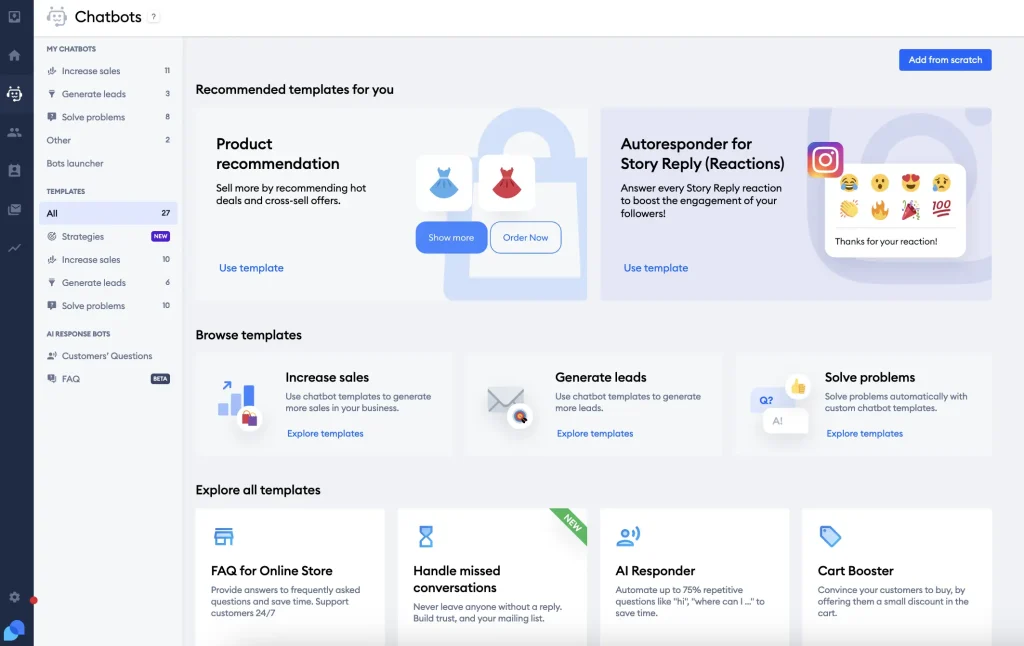
Its AI agent, Lyro, answered from my help content and handed the chat to a person whenever it felt unsure, which made it feel safe to leave running. I also built a small flow with the drag-and-drop builder, and the ready-made ecommerce templates saved me from starting with a blank canvas.
For Shopify stores, seeing the cart and order history inside the chat is genuinely handy, and agents can even update or refund an order without leaving the conversation. When something needs follow-up, a chat converts into a ticket with tags and priority. Overall, it felt like a tidy all-in-one desk for a small online shop with growing chat volume.
Pros:
- Live typing preview lets agents prepare an answer before the message is even sent
- Abandoned cart recovery sends timed messages that bring shoppers back to checkout
- Visibility settings let you show or hide the widget by time of day or device
- Offline messaging captures visitor details when nobody is online, so leads are not lost
- Canned responses and an AI reply assistant speed up agent answers
Cons:
- Automation setup can feel daunting for teams without prior chatbot experience
- Customization options feel limited for teams that want deeper workflow control
How Tidio Compares With LiveChat: LiveChat keeps its focus on chat, while Tidio bundles live chat, ticketing, Flows automation, and its Lyro AI agent in one dashboard. For an online store, Tidio’s Shopify order tools mean agents can answer order questions without opening another tab.
User Rating: 4.6/5 (G2)
Pricing: Starts at $24.17/month
3. Intercom: Best for Omnichannel Platform With Messenger & App
A friend who leads support at a small software company moved her team to Intercom, and the Fin AI agent was what she kept raving about. Fin reads the help center, answers in natural language, and passes the conversation to a person with full context when things get tricky.
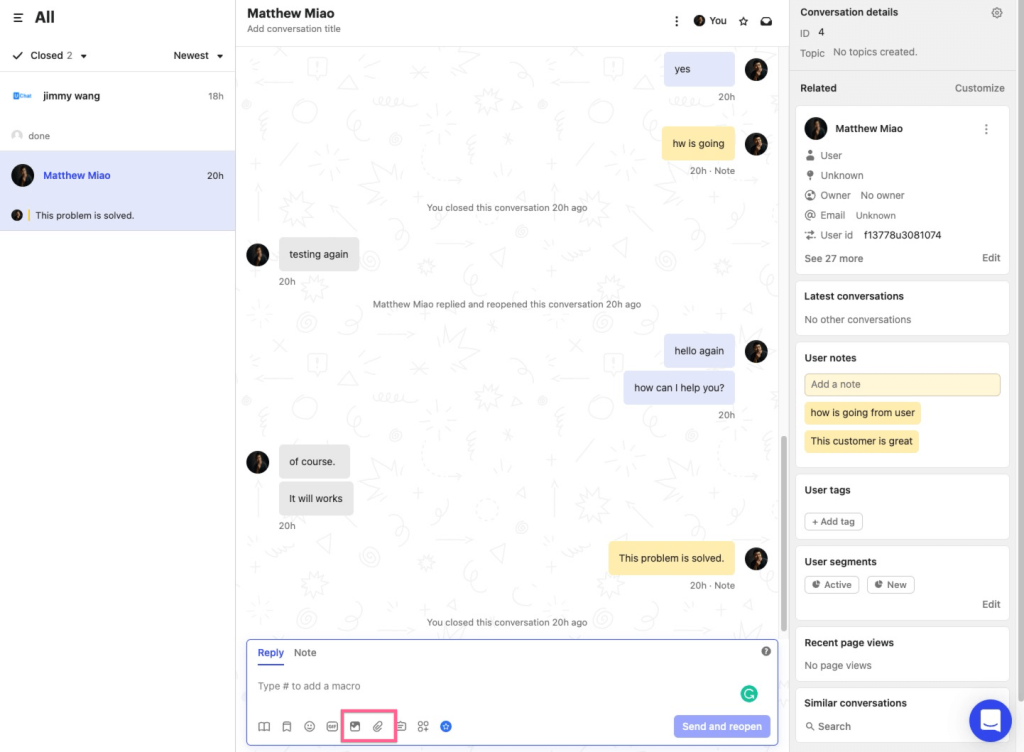
She also liked that email, chat, and social messages sit in one shared inbox. A visual workflow builder routes, tags, and escalates conversations automatically, so her team spends less time sorting and more time solving. Beyond support, she used interactive product tours to guide new users through features.
The tradeoff she mentioned was a learning curve, since there is plenty to configure before everything feels natural. For software teams that want support and onboarding under one roof, her verdict was that the setup time was worth it. If your team wants AI and rich messaging together, it deserves a serious look.
Pros:
- Fin AI Copilot helps every agent reply faster with instant AI-powered assistance
- A built-in help center lets you publish public or private articles for self-service
- Workflows automate routing, SLAs, and follow-ups without manual tracking
- A mobile SDK pushes targeted in-app messages and surveys to users
- Multichannel support covers live chat, email, SMS, WhatsApp, and more
Cons:
- The interface has a learning curve for teams new to workflow automation tools
- Some users find the reporting features limited
How Intercom Compares With LiveChat: LiveChat is built around live agents answering website chats, while Intercom aims wider with an AI agent, a shared inbox, in-app messaging, and product tours. That breadth suits software teams, though it also means more to configure than a chat-first tool.
User Rating: 4.5/5 (G2)
Pricing: Starts at $29/seat/month
4. Kommunicate: Best for Integrating Human and Bot Support
My main reason for exploring Kommunicate was to see how cleanly it hands a conversation from bot to human. The bot takes the routine questions, and when a person is needed, the handover happens inside the same conversation, so nobody starts over. I connected website chat, WhatsApp, and Facebook Messenger, and everything showed up in one dashboard, which kept me from hunting through separate apps.
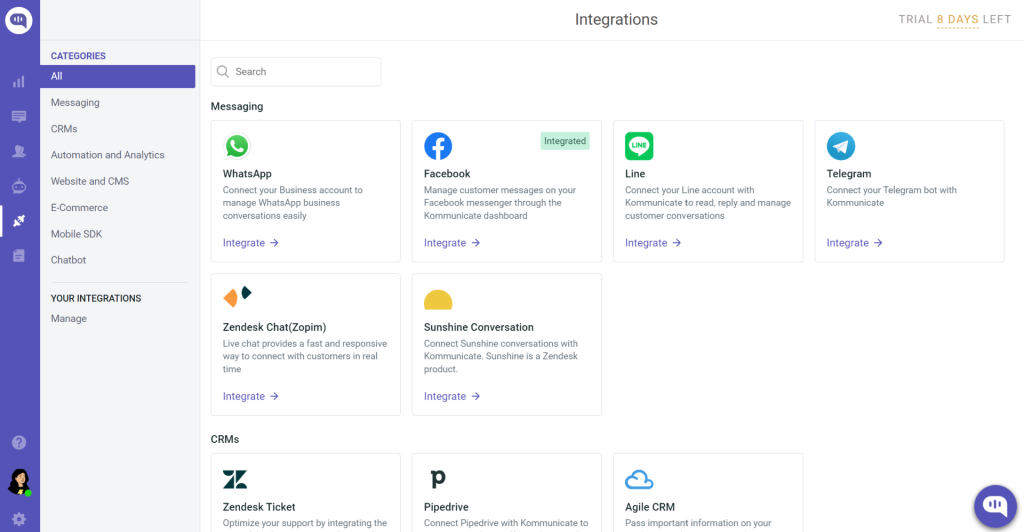
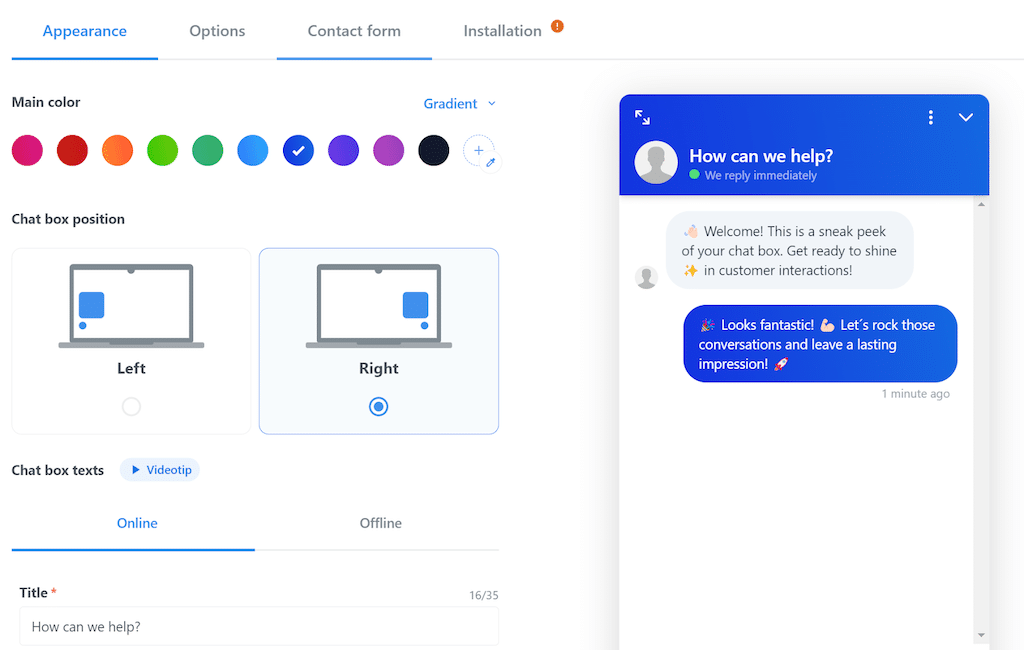
The interface is friendly, and customizing the chat widget to match a brand took very little effort. I also noticed that it works with helpdesk and CRM platforms, including a Zendesk and Salesforce knowledge connector, so answers can draw on content that already exists.
It suits teams that want AI to carry routine chats while keeping humans close. If your team wants a bot that handles the first layer and humans who handle the rest, this split is easy to run and easy to explain.
Pros:
- In-app support lets you help customers inside your mobile app
- Natural language understanding helps the bot interpret how customers actually phrase questions
- API integration lets developers connect the bot to internal systems and centralize replies
- Personalization features tailor bot replies to each visitor
- Easy chatbot creation means non-developers can build and adjust flows
Cons:
- Fewer third-party integrations than larger platforms
- The knowledge base features need improvement
How Kommunicate Compares With LiveChat: LiveChat centers on human agents working through a queue. Kommunicate is designed around the bot taking the first layer and passing to a person when needed, which suits teams whose main goal is to cut repetitive chats while keeping human support available.
User Rating: 4.8/5 (G2)
Pricing: Starts at $34/month
5. Smartsupp: Best for Online Shops Needing Chat With Visitor Insights
Someone I know who handles customer support for a small web shop recommended Smartsupp after trying a few chat tools. She loved how quickly she got started, since the interface is clear and the widget went live without developer help. Visitor insights showed what shoppers were browsing, so she knew when a conversation might help.
An AI shopping assistant joins the live chat, and email, Facebook Messenger, and WhatsApp conversations sit together in one panel. Multilingual support also helped her answer shoppers in their own language. She did say the AI options felt limited when she wanted deeper customization and richer analytics.
Her last tip was to launch chat on a few key product pages first and then expand later. For a store owner who wants simple chat built around online sales, her recommendation was a quick yes. For heavier support operations, she suggested looking at tools with more depth.
Pros:
- Chatbots with different skills and templates speed up building answers for common shop questions
- Session recordings show where shoppers hesitate before they start a chat
- Automatic messages greet visitors without an agent needing to type
- Conversation history keeps earlier chats visible so agents never start blind
- Automated workflows reduce repetitive replies during busy periods
Cons:
- AI options feel limited when you want deeper customization and analytics
- Chat management options are limited for larger teams
How Smartsupp Compares With LiveChat: LiveChat is a general-purpose chat tool for support, sales, and ecommerce teams, with a wide integration catalog. Smartsupp narrows in on online shops, with visitor insights, an AI shopping assistant, and session recordings in one tool, which suits store owners more than larger support desks.
User Rating: 4.7/5 (G2)
Pricing: Starts at $17/month
6. LiveAgent: Best for Help Desk With Built-In Call Center
Chat, email, social messages, and phone calls inside one help desk is what pulled me toward LiveAgent. Everything becomes a ticket in a single queue, so nothing slips between channels. The built-in call center covers inbound and outbound calls, with call recording and transfers, which is a relief for agents who juggle phones and chats at once.

Automation rules route and prioritize tickets, and a self-service portal with articles, FAQs, and forums reduces repeat questions. One feature made me smile: gamification adds friendly competition and rewards to keep agents motivated. The setup took more patience than a simple chat widget, and the long feature list can feel overwhelming on day one.
I would pilot it with one channel first, then add phone and social once the team feels comfortable with the queue. Still, if your agents handle calls and chats together, having one system for both is a real advantage.
Pros:
- A ticketing system tracks every inquiry from any channel through to resolution
- Reporting and analytics highlight performance gaps across channels and agents
- Third-party integrations connect the help desk with apps your team already uses
- A customizable, responsive chat widget fits your brand on any device
- Social media channels feed into the same queue as chat and email
Cons:
- The mobile app has limited functionality compared with the desktop version
- Initial setup and configuration can be complex and time-consuming
How LiveAgent Compares With LiveChat: LiveChat concentrates on website chat. LiveAgent works as a full help desk, with phone, email, social messages, ticketing, and a knowledge base alongside chat, which suits teams whose agents already handle several channels at the same time.
User Rating: 4.5/5 (G2)
Pricing: Starts at $15/agent/month
7. Freshchat: Best for Freshworks Suite Users
A friend of mine who supports a SaaS product picked Freshchat because her team already used other Freshworks tools. The Freddy AI layer detects sentiment, handles several languages, and nudges urgent chats toward a human instead of letting them wait. She said the visitor profiles gave her agents useful context before replying, and in-thread satisfaction surveys collected feedback right where the chat happened.
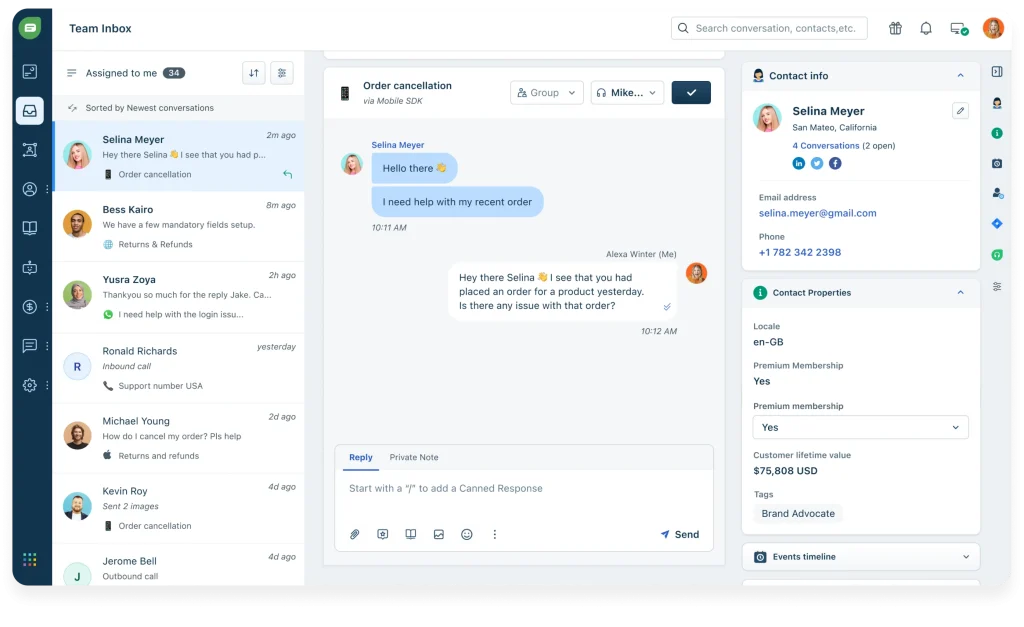
Building bot flows without code worked well for her, because pre-trained FAQ templates got the first bot live quickly. The catch she mentioned was that Freshchat feels best when you stay inside the Freshworks family, since syncing across several products can occasionally lag.
Her advice was to map your existing Freshworks setup first, then decide how much automation to enable. If you already run Freshdesk or Freshsales, she would call it a natural fit and an easy way to connect chat with the rest of the stack.
Pros:
- An omnichannel inbox covers web, mobile, WhatsApp, and Apple Business Chat on one screen
- Freddy AI suggests replies and tags intent automatically
- Trigger campaigns based on user journey and page behavior support timely engagement
- Native links with Freshworks apps give agents CRM-level context instantly
- A unified inbox lets marketing, support, and success teams work from the same view
Cons:
- Occasional lag reported when syncing across several Freshworks products at once
- Setup for advanced bot flows can feel less intuitive than simpler standalone tools
How Freshchat Compares With LiveChat: LiveChat is a standalone chat product, while Freshchat sits inside the Freshworks family and shares customer context with tools like Freshdesk and Freshsales. If you already run those apps, the connection is built in, though a standalone tool may feel simpler.
User Rating: 4.4/5 (G2)
Pricing: Starts at $19/agent/month
8. HelpCrunch: Best for Real-Time Visitor Monitoring
Real-time visitor monitoring was the reason I tested HelpCrunch. The visitor list shows who is on the site, where they come from, and which pages they browse, so I could start a conversation with someone who looked genuinely interested. The chat widget looks modern, and it matched a site’s design with little tweaking.
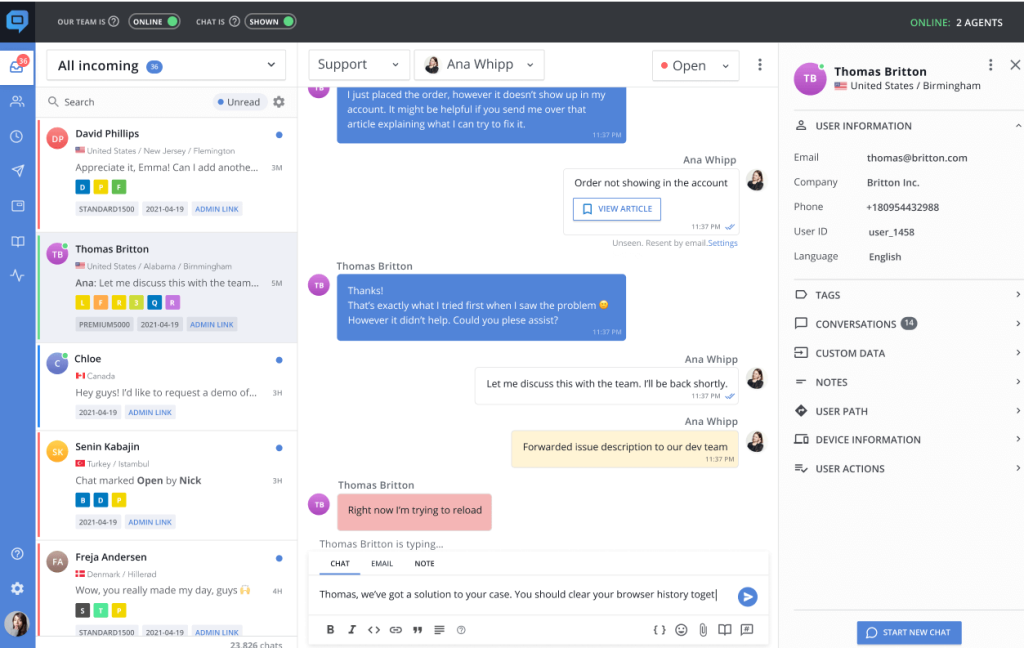
Automated messages fire based on visitor behavior, which helps capture leads while you focus on other work. I also liked that live chat and email automation sit together, so follow-ups never feel scattered. Replies can feel slow at times, and some advanced customization is limited, so I would test both before committing.
I would watch the visitor list for a week, then add automated messages to your key pages. For teams that value proactive outreach over passive waiting, it earns a place on the shortlist, especially when conversations start from what a visitor is doing right now.
Pros:
- A shared inbox keeps every customer conversation in one place
- A knowledge base gives customers self-service articles
- Popups capture attention for announcements and lead forms
- Mobile apps and an SDK provide in-app support and on-the-go replies
- Help desk tools keep follow-up tickets organized
Cons:
- Advanced customization options can feel restricted
- Response times can sometimes be slow
How HelpCrunch Compares With LiveChat: LiveChat focuses on chat conversations, while HelpCrunch combines live chat with email automation, a help desk, a knowledge base, and popups. Its visitor monitoring is built to start conversations proactively, which suits teams that want to reach out rather than wait.
User Rating: 4.7/5 (G2)
Pricing: Starts at $15/user/month
9. tawk.to: Best for Free Live Chat for Budget-Conscious Small Businesses
Live chat without any developer help was exactly what a friend who coordinates a volunteer group’s website inquiries wanted, so she tried tawk.to. She pasted one script onto the homepage and was live within minutes.
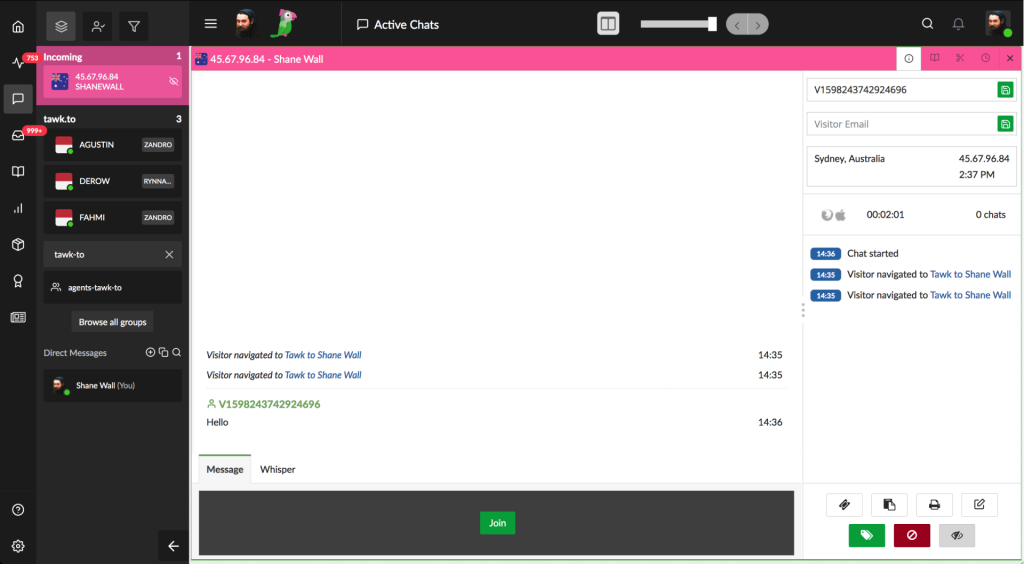
Inside a single dashboard, she got live chat, a basic ticketing inbox, and a small knowledge base, so she was not juggling separate tools. Honestly, writing a friendly greeting message took her far longer than the entire technical setup ever did. She also matched the widget to her group’s colors in a few clicks, keeping the page consistent.
The admin area confused her at first, and she felt the AI side was not as advanced as tools built around AI agents. Still, for a small team that mainly needs a dependable chat box, she called it hard to beat. Her only advice was to test it on a quiet day before announcing it to everyone.
Pros:
- iOS and Android apps make on-the-go replies simple
- Real-time visitor analytics show exactly who is browsing your site
- Multilingual support helps you chat with visitors in other languages
- A hosted knowledge base site puts your help articles online without extra tooling
- A lightweight widget keeps the setup simple for small sites
Cons:
- AI features feel less advanced compared with purpose-built AI chatbot tools
- The admin area can feel confusing for first-time users
How tawk.to Compares With LiveChat: LiveChat offers a polished agent app and a wide integration catalog. tawk.to keeps things simpler, with chat, ticketing, and a small knowledge base in one lightweight dashboard, which suits small teams that mainly need a dependable chat box more than deep AI automation.
User Rating: 4.5/5 (G2)
Pricing: Starts at $0/month (free core plan)
10. Zendesk: Best for Ticket-Heavy Teams Already Using Zendesk
What changes when chat lives inside the same workspace as your tickets? I looked at Zendesk to find out. The Advanced Bot sits in the agent workspace, pulls answers from Guide articles, and updates tickets in real time as conversations happen.
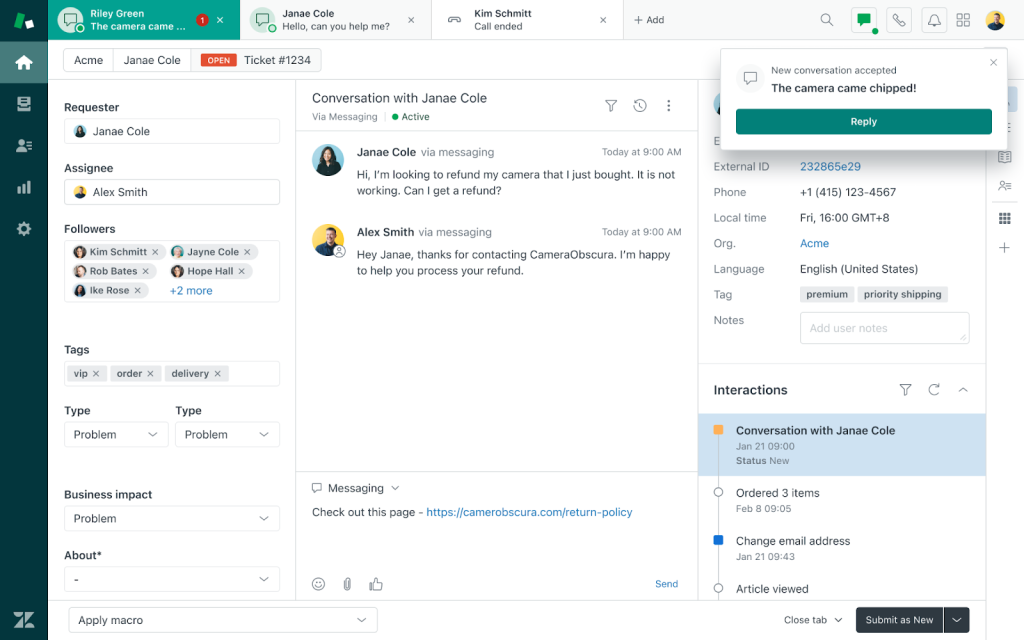
Setup was mostly point-and-click, since I chose which articles to train on, set fallback rules, and mapped handoff triggers. When the bot cannot help, the transcript and user data pass to the agent, so the context is already there. Multilingual article detection serves answers in the visitor’s language, and unresolved chats can turn into follow-up tickets automatically.
Reporting rolls into Explore dashboards, and a large app marketplace covers most integrations. I would start with your top ten repetitive questions and test how the bot answers them. The platform takes time to learn, and advanced settings can feel heavy, but for ticket-heavy teams it is a strong fit.
Pros:
- A unified agent workspace brings every customer interaction into one place
- Omnichannel support covers email, chat, phone, and social channels
- Triggers, macros, and workflows automate repetitive ticket handling
- Zendesk QA and Workforce Management help evaluate agent performance and plan staffing
- Integrations with tools such as Jira and Salesforce extend the workspace
Cons:
- Initial setup and configuration can take longer for teams new to Zendesk
- Reporting can feel confusing and limited in flexibility
How Zendesk Compares With LiveChat: LiveChat is chat-first, while Zendesk is a full ticketing platform with chat, a bot, reporting, and a large app marketplace. It suits ticket-heavy teams that want chat inside the same workspace as every other channel, though it takes longer to learn.
User Rating: 4.3/5 (G2)
Pricing: Starts at $19/agent/month
How I Chose These LiveChat Alternatives
When I evaluate LiveChat alternatives for this list, I don’t just rely on feature lists or marketing claims. I look at how these LiveChat competitors actually perform in real-world scenarios. Here’s the framework I used to make sure every recommendation is practical, reliable, and worth considering:
- User Reviews / Ratings: I start by looking at real user feedback from platforms like G2. This gives me a clear picture of how teams actually experience the tool day-to-day, what they love, and where it falls short.
- Core Features & Functionality: I focus on what truly matters in live chat software with AI. This includes training the AI on your own content, bot-to-human handoff, routing, integrations, and omnichannel inboxes. If a tool cannot handle these well, it does not make the cut.
- Ease of Use: I pay close attention to how intuitive the platform feels. A tool might be powerful, but if your team struggles to adopt it, it defeats the purpose. Clean interface, simple navigation, and quick setup are non-negotiable for me.
- Customer Support: From my experience, setup is where many tools fail. I evaluate how responsive and helpful the support team is, especially during onboarding and ongoing use. Fast, reliable support makes a big difference in adoption.
- Value for Money: I compare pricing with what the tool actually delivers. This is not about picking the cheapest option, but about whether the features, flexibility, and performance justify the cost, including how costs behave as chat volume grows.
- Personal Experience / Expert Insights: Wherever possible, I rely on my own hands-on experience with these tools. I also consider insights from support managers, operations teams, and marketing leads who use live chat in real environments. This helps me go beyond surface-level reviews and highlight what actually works.
Top 3 LiveChat Alternatives
After comparing all ten tools against each other, three came out on top for different reasons. The right one for you depends on what your current setup is missing.
1. ProProfs Chat
ProProfs Chat is my top overall pick for teams that need AI to take routine chats off a stretched team. I like that it builds an AI support agent from your website URL, trains on your help center and files, cites its sources, and hands off to a human with the full chat context. Knowledge Base and Help Desk connections keep follow-ups in one place.
2. Tidio
Tidio earns its place for online stores that want chat, tickets, and an AI agent in one inbox. Lyro answers from your help content, and the Shopify order tools let agents handle cart and order questions without leaving the conversation.
3. Intercom
Intercom is the right choice if you want an AI agent, a shared inbox, and product tours in one platform. Fin hands over to a person with full context, so customers never repeat themselves, which suits software teams that also care about onboarding.
FREE. All Features. FOREVER!
Try our Forever FREE account with all premium features!
How to Test a LiveChat Alternative Before You Commit
A demo tells you very little, so I run every shortlist through the same short pilot. Use this checklist with any alternatives to LiveChat software you are considering, and let your own content and your own agents do the judging.
- Real content: I train the AI on real website URLs, help center articles, and PDFs, then ask 20 real customer questions and note every wrong or outdated answer.
- Escalation test: A question the bot clearly cannot answer is my next test, and I check that the full chat history reaches the agent. For sensitive topics, I set keyword rules, where the tool supports them, so those chats reach a human fast.
- Integration check: Connecting the CRM, ticketing tool, or CMS comes next, and I confirm chats create leads and tickets, not just contacts. I also ask whether Slack or Microsoft Teams connect natively or through Zapier or an API, and test one real order status call.
- Channel coverage: WhatsApp, Instagram, and Facebook Messenger get switched on where offered, and I send a test message from each to confirm all of them land in one inbox.
- Support speed: During the trial, I send one real support question and time the reply, because fast help during setup predicts how the vendor behaves later.
- Cost behavior: Usage rules matter too, so I ask what counts as an AI conversation or resolution, what happens at the limit, and which features need a higher tier or add-on, then model my real monthly chat volume.
- Switching plan: To plan the switch, I export chat history, copy canned replies, note widget settings, and run the old and new tools side by side for a week before cutting over.
Pick the LiveChat Alternative That Takes Chats Off Your Plate
Moving on from LiveChat does not mean settling for less. Whether you need AI that answers from your own content, a help desk that handles calls and chats together, or a simple starter, I found a stronger fit for each of those jobs in this list.
If instant, automated support is your goal, I would start with ProProfs Chat. It trains on your website, help center, or PDFs in one click, hands off with full chat context, and connects with Knowledge Base and Help Desk. The forever-free plan for one operator lets you test it properly before you decide.
Pick one workflow this week, run it through the trial checklist above, and see how it performs.
Frequently Asked Questions
How many operators or seats does a small team actually need?
Count the people who will take live handoffs at the same time, not total headcount. Start with that number, then add operators once handoff volume proves the need.
Is a free plan enough to replace LiveChat?
A free plan works when chat volume is low, and the need is basic live chat. Before relying on it, check what triggers the first upgrade, such as branding removal, AI usage caps, conversation limits, or agent limits.
Can chat history move over from LiveChat to a new tool?
It depends on the vendor. Ask whether past chats can be imported or exported through CSV or an API, and keep an archive of old transcripts either way so agents can still look up earlier conversations.
How do these tools connect with Slack or Microsoft Teams?
Ask each vendor whether the connection is a native app or runs through Zapier or an API, since that changes setup effort. For ProProfs Chat, Slack and Microsoft Teams connect through Zapier or an API rather than a native app.
What should agencies check before choosing a chat tool for clients?
Confirm white-label options and multi-site or multi-client management before onboarding anyone, because retrofitting them later is difficult. ProProfs Chat supports white-labeling by removing the Powered by ProProfs branding.
Do these tools meet GDPR or HIPAA requirements?
Ask every vendor for its compliance documents before sharing customer data. ProProfs Chat documents GDPR and CCPA compliance but has no publicly documented HIPAA BAA, so healthcare teams should confirm their requirements first.
Can a chatbot book appointments or capture leads, not just answer FAQs?
Many can, though depth varies by tool. ProProfs Chat includes chatbot templates for lead generation and appointment booking, so test the flow with a real booking before rollout.
FREE. All Features. FOREVER!
Try our Forever FREE account with all premium features!

 We'd love your feedback!
What did you like & how can we make it even better?

 Thanks for your feedback!
 Ask Your Question
Have a question? Get expert help to make your decision easier.