Every business has a version of this story. A visitor lands on your site, browses for a few minutes, and has one question left before they decide. But it is 10 PM and no one is around. So they leave. That sale, that lead, that customer goes somewhere else. A free chat widget sitting on your site could have stopped all of that in under 30 seconds.
I have seen this pattern more times than I can count while working with support teams across industries. The solution is rarely more headcount. It is smarter automation that works around the clock without burning out your team.
I spent months hands-on testing the tools on this list across real support environments. Some impressed me. Some frustrated me. All of them taught me something about what separates a widget that actually converts from one that just sits in the corner looking busy.
Here are the 12 best free AI chat widgets worth your time in 2026.
What Is a Free AI Chat Widget?
With a free AI chat widget, businesses can automate customer support by answering frequently asked questions, qualifying leads, and guiding users through various processes, all while being available 24/7. These widgets are typically easy to set up and customize, enabling users to align the chat interface with their brand’s look and feel.

Moreover, many free online chat widgets for websites offer features such as AI agents, real-time visitor monitoring, in-depth analytics, which help businesses track user interactions and refine their customer service strategies over time. Overall, an AI chat widget is an essential resource for improving communication and providing seamless support to customers without incurring additional expenses.
Top 12 Free AI Chat Widgets to Consider in 2026
Here’s a comprehensive analysis of the best free chat widgets that I’ve either personally tried or am currently using. We’ll look into the pros and cons of each to equip you with the information you need for a smart selection.
Here’s a quick look at the top 10 tools:
| AI Chat Widget | Best for | Pricing | User Ratings |
| ProProfs Chat | Easy live chat & AI customer service agent for instant, automated support | Offers a free forever plan for 1 operator with all premium features included. Paid plans start at $19.99/operator/month (billed annually). | 4.8/5 (Capterra) |
| Tawk.to | Budget-Friendly Live Chat for Small Teams | Free for all users with no usage limits or paid tiers required. | 4.6/5 (Capterra) |
| Botsify | Conversational Forms and Lead Qualification | No free plan. Offers a 14-day free trial with full feature access. Paid plans start at $49/month. | 4.3/5 (G2) |
| Kommunicate | Human-Bot Hybrid Support Across Devices | Offers a free trial with no credit card required. Paid plans start at $40/month. | 4.8/5 (G2/Capterra) |
| Landbot | No-Code Chatbot Builder With Deep Analytics | Offers a free plan with limited monthly chat volume. Paid plans start at $45/month. | 4.7/5 (G2) |
| Smartsupp | Automated Support for Online Retail | Offers a free plan for 1 operator with up to 25 conversations per month. Paid plans start at $17/month. | 4.7/5 (G2) |
| Chatling | Personalized AI Support Without Coding | Offers a free plan with unlimited chats and basic features. Paid plans with advanced AI start at $25/month. | 4.7/5 (G2) |
| IntelliTicks | Conversational Lead Capture and Qualification | Offers a free plan with up to 60 chats per month. Paid plans start at $20/month. | 4.4/5 (Capterra) |
| Zendesk | Enterprise Teams Already Running Zendesk | No free plan. Free trial available. Paid plans start at $55/agent/month (billed annually). | 4.3/5 (G2) |
| ChatBot | AI-Generated Support With Visual Flow Builder | No free plan. Free trial available. Paid plans start at $50/month. | 4.4/5 (G2) |
| HubSpot | CRM-Connected Live Chat for Sales Teams | Offers a free plan with limited features. Paid plans start at $15/month. | 4.5/5 (G2) |
| Chatango | Free Community Chat for Websites | Free for all users with no paid tiers required. | 4.2/5 (G2) |
1. ProProfs Chat — Easiest Live Chat & AI Customer Service Agent for Instant, Automated Support
I started using ProProfs Chat when our team needed round-the-clock coverage without adding headcount. What surprised me was how fast the AI became genuinely useful. Not after weeks of training, but within a day.
You train the AI support agent by pointing it at your website URL, uploading help articles, or connecting your knowledge base directly. The sentiment analysis capability reads customer tone in real time, so the bot knows when a frustrated visitor needs a human rather than another automated response. Once trained, it handles FAQs, qualifies leads with branching question flows, books appointments, and escalates to a human operator with full conversation context intact. No coding required at any step.
See a free chatbot in action. Try it now!
What I found particularly useful was the risk prediction feature. It flags high-risk conversations before they escalate, giving operators a chance to intervene proactively rather than inheriting an already-frustrated customer. For teams managing multiple sites or brands, ProProfs Chat supports multi-domain deployment with white-label options and integrates with Salesforce, HubSpot, Zoho, Zendesk, Shopify, and more than 100 other tools.
The AI bot performance analytics dashboard is where the feedback loop closes. Unresolved query logs, transfer rates, sentiment trends, and customer ratings sit in one place, so every training improvement is driven by actual data rather than guesswork. ProProfs Chat also connects with ProProfs Help Desk, ProProfs Knowledge Base, and ProProfs Survey Maker, giving you a full support stack if you need it.
Pros:
- Train AI agents using your website URL, uploaded files, or knowledge base with no coding involved
- Sentiment analysis detects customer frustration in real time and triggers timely human handoff
- Risk prediction flags high-stakes conversations before they escalate to complaints
- AI bot performance analytics show exactly what the bot resolved, transferred, and missed
- Proactive chat invitations trigger based on visitor behavior to boost engagement and conversions
Cons:
- Cloud-only deployment; no on-premise option
- No dark theme for the operator interface
User Rating: 4.8/5 (Capterra)
Pricing: Offers a free forever plan for 1 operator with all premium features included. Paid plans start at $19.99/operator/month (billed annually).
2. Tawk.to — Best for Budget-Friendly Live Chat for Small Teams
Tawk.to is the go-to for small businesses that need a working live chat solution at zero cost. The core product is genuinely free. Not a trial, not a stripped-down demo. You get real-time visitor monitoring, conversation tagging, team assignment, and a customizable knowledge base without spending a dollar.
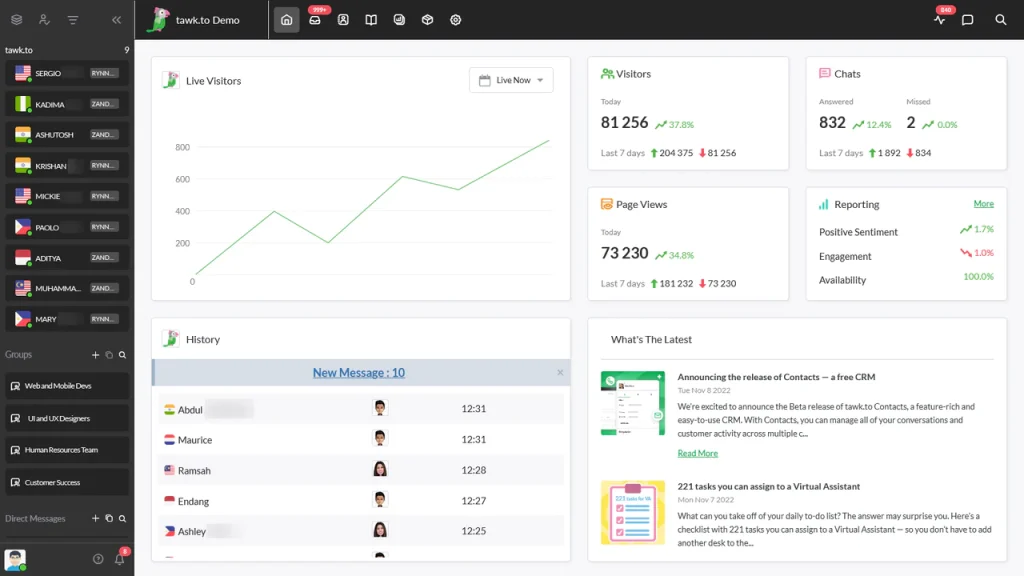
What I appreciate about Tawk.to is how reliable it is for what it promises. If your primary need is a live chat widget that lets you talk to website visitors in real time, it delivers that cleanly. You can monitor visitor activity, assign conversations to team members, and see what customers are typing before they hit send.
The limitations show up quickly when you need AI-powered automation or deep integrations. There is no built-in AI chatbot, and connecting Tawk.to to your existing CRM or help desk typically requires workarounds. For teams that need automation and scalability, it is worth evaluating alongside ProProfs Chat’s free plan, which includes AI chatbot capability at the same price point.
Pros:
- Completely free with no hidden usage limits or trial expiration
- Real-time visitor monitoring to track behavior and browsing patterns
- Free customizable knowledge base for self-service support
- Video and voice add-ons available for richer customer interactions
Cons:
- No built-in AI chatbot on the free plan
- Limited integration options with third-party CRMs and help desks
User Rating: 4.6/5 (Capterra)
Pricing: Free for all users with no usage limits or paid tiers required.
3. Botsify — Best for Conversational Forms and Lead Qualification
Botsify is built around conversational forms. The idea is that qualifying a lead through a natural back-and-forth exchange converts better than a static web form. Create a form, customize the conversation flow, deploy it across Facebook, WhatsApp, Instagram, or your website, and the bot starts capturing leads without a human involved.
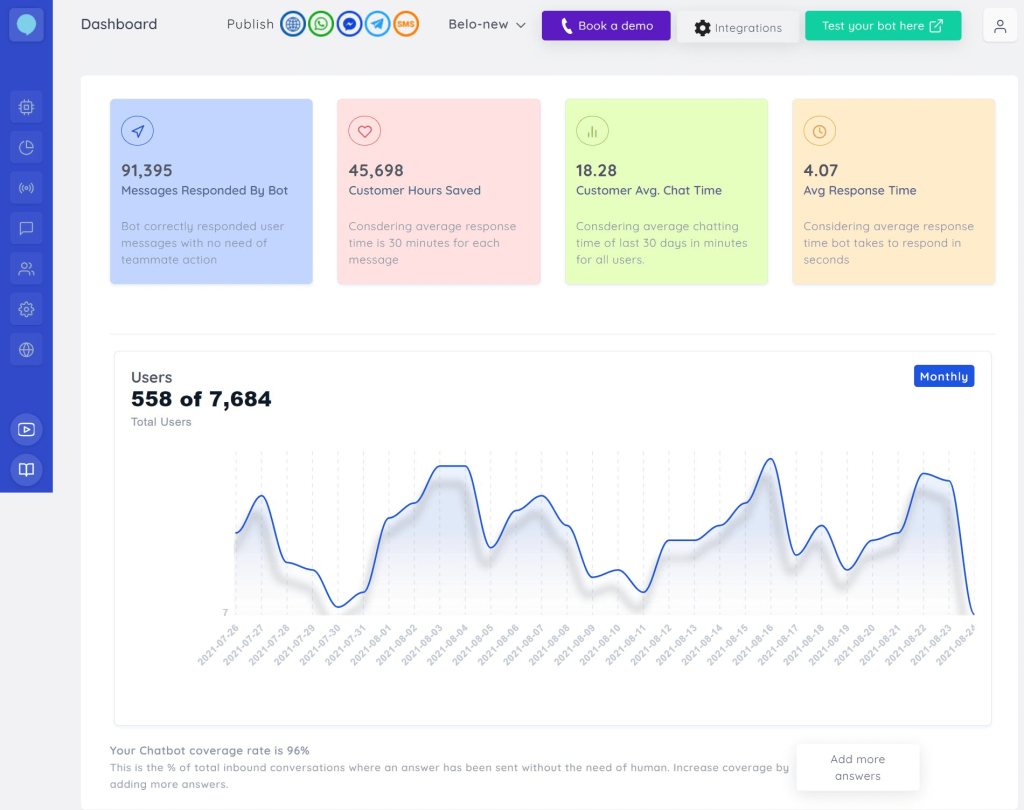
The omnichannel setup is genuinely straightforward. I had a bot running across two channels within a few hours of signing up. The human takeover feature works well too. When a conversation reaches a point that needs judgment, a live agent can step in without the visitor experiencing a jarring transition.
Where I found friction was in the AI training process. Getting the bot to handle edge cases accurately takes time and iteration. If you are comfortable with that investment, Botsify is solid. If you need something production-ready in a day, you may want to start with a simpler platform.
Pros:
- Conversational forms that qualify leads in a natural dialogue format
- Human takeover for seamless bot-to-agent transitions
- Story Tree builder for visualizing and testing conversation branches
- Native integrations with Facebook, WhatsApp, and Instagram
Cons:
- AI training process requires meaningful time investment before the bot performs well
- Occasional interface glitches in the chatbot builder
- No free plan; trial is limited to 14 days
User Rating: 4.3/5 (G2)
Pricing: No free plan available. Offers a 14-day free trial with full feature access. Paid plans start at $49/month.
4. Kommunicate — Best for Human-Bot Hybrid Support Across Devices
Kommunicate is built for teams that want AI handling the routine while keeping humans close enough for the complicated. When the bot cannot answer, you set custom handoff rules that route the conversation to the right agent automatically, without the visitor having to repeat themselves.
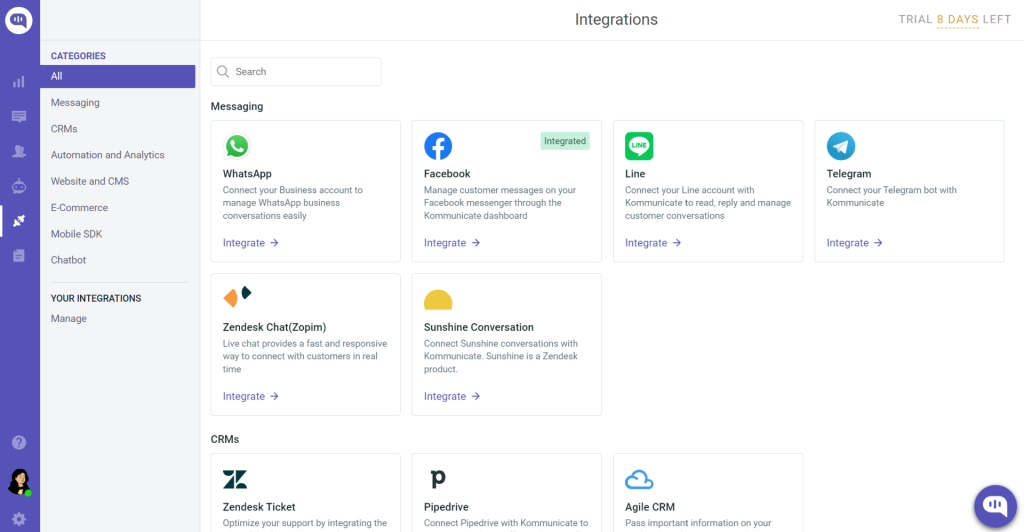
The multilingual support is one of Kommunicate’s genuine differentiators. With coverage across 100+ languages and clean compatibility across web, mobile apps, and tablets, it is a practical choice for teams serving a global audience from a single platform. The chat widget customization is also deeper than most tools at this price point. You can align the look and feel closely with your brand without touching code.
The tradeoff is cost. Kommunicate sits at the higher end of this list for pricing, which makes it a harder sell for small teams. Some users have also reported inconsistencies in customer support response times, worth knowing before committing.
Pros:
- Intelligent human handoff with customizable escalation rules
- Multilingual support across 100+ languages for global customer bases
- Compatible across web, iOS, Android, and tablet without additional setup
- Deep chat widget customization to match brand identity
Cons:
- Pricing starts high relative to other tools on this list
- Some users have reported slow responses from the support team
User Rating: 4.8/5 (G2/Capterra)
Pricing: Offers a free trial with no credit card required. Paid plans start at $40/month.
5. Landbot — Best for No-Code Chatbot Builder With Deep Analytics
Landbot’s drag-and-drop builder is one of the cleaner no-code experiences I have tested. You design branching conversation flows visually, publish them as website pop-ups, landing pages, or WhatsApp bots, and the whole process requires no developer involvement.
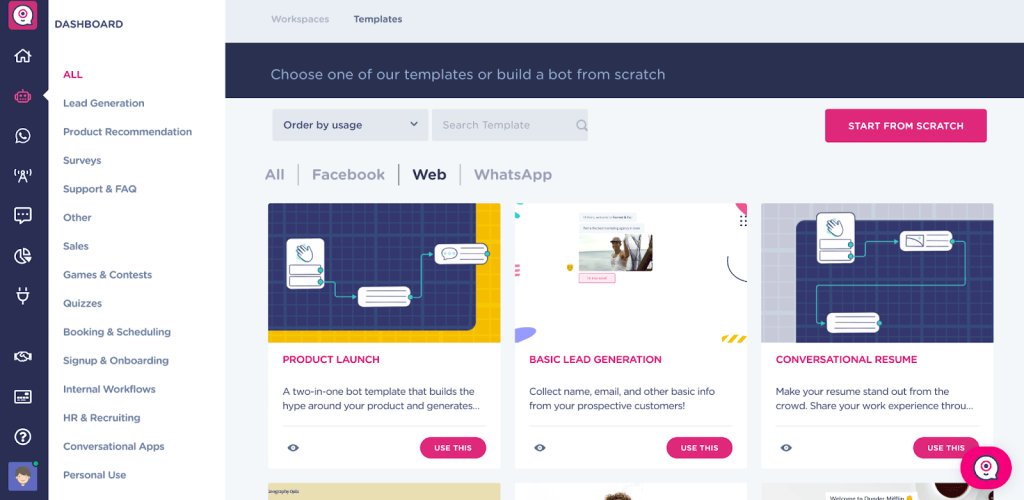
What makes Landbot worth considering for data-driven teams is the analytics layer. Conversation performance data, drop-off rates, and completion metrics are surfaced clearly, which means you can identify exactly where visitors abandon a flow and improve it. For teams running multiple lead generation campaigns through different bots, that visibility adds real value.
The pricing structure is the main friction point. The free plan limits you to a small number of chats per month, and the jump to a paid plan is noticeable. Smaller teams or businesses with lower traffic may find better value elsewhere.
Pros:
- Visual drag-and-drop builder with no coding required for complex conversation flows
- Analytics dashboard with clear performance metrics and drop-off visibility
- Native WhatsApp and Facebook Messenger integration
- Stripe and PayPal integration for accepting payments directly through chat
- Pre-built templates to speed up initial deployment
Cons:
- Free plan has limited monthly chat volume
- Pricing escalates quickly as usage grows
User Rating: 4.7/5 (G2)
Pricing: Offers a free plan with limited monthly chat volume. Paid plans start at $45/month.
6. Smartsupp — Best for Automated Support for Online Retail
Smartsupp is built specifically for online stores, and that focus shows. Mira, its AI shopping assistant, handles up to 80% of common customer questions and escalates to a live agent when something goes beyond its training. The real-time visitor list shows you everyone on your site: which page they are on, where they came from, and how long they have been browsing, so operators can step in proactively before a shopper abandons.
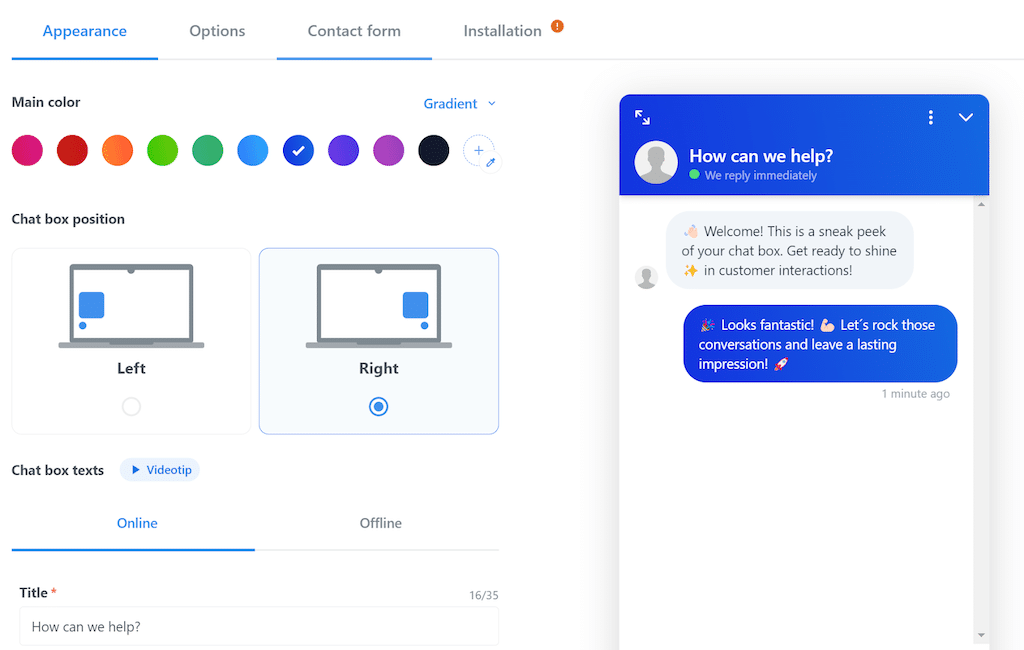
The cart abandonment protection is the feature I found most compelling. When a visitor shows exit intent, Smartsupp can trigger an automated message to re-engage them, even if no agent is online. For eCommerce teams, that translates directly to recovered revenue.
The free plan caps conversations at 25 per month, which is enough to test but not to run production traffic. Analytics and reporting are also thinner than tools like Landbot or ProProfs Chat, which is worth factoring in if performance visibility matters to your team.
Pros:
- AI shopping assistant handles up to 80% of common support questions automatically
- Real-time visitor list with browsing behavior data for proactive engagement
- Micro-chatbot templates for faster setup across common retail scenarios
- Automated cart abandonment messaging to recover potential lost sales
- Video recording of visitor sessions to understand browsing behavior
Cons:
- Free plan is limited to 25 conversations per month
- Reporting and analytics are basic compared to dedicated analytics-focused tools
- No in-app payment functionality
User Rating: 4.7/5 (G2)
Pricing: Offers a free plan for 1 operator with up to 25 conversations per month. Paid plans start at $17/month.
7. Chatling — Best for Personalized AI Support Without Coding
Chatling sits in the growing category of AI chatbot builders that prioritize training accuracy over flow complexity. You feed it your documents, website URL, and other data sources, and the bot builds its own knowledge base automatically. From there, it handles inbound questions with surprisingly natural responses. Reviewers consistently note that Chatling’s answers read like a real person wrote them.
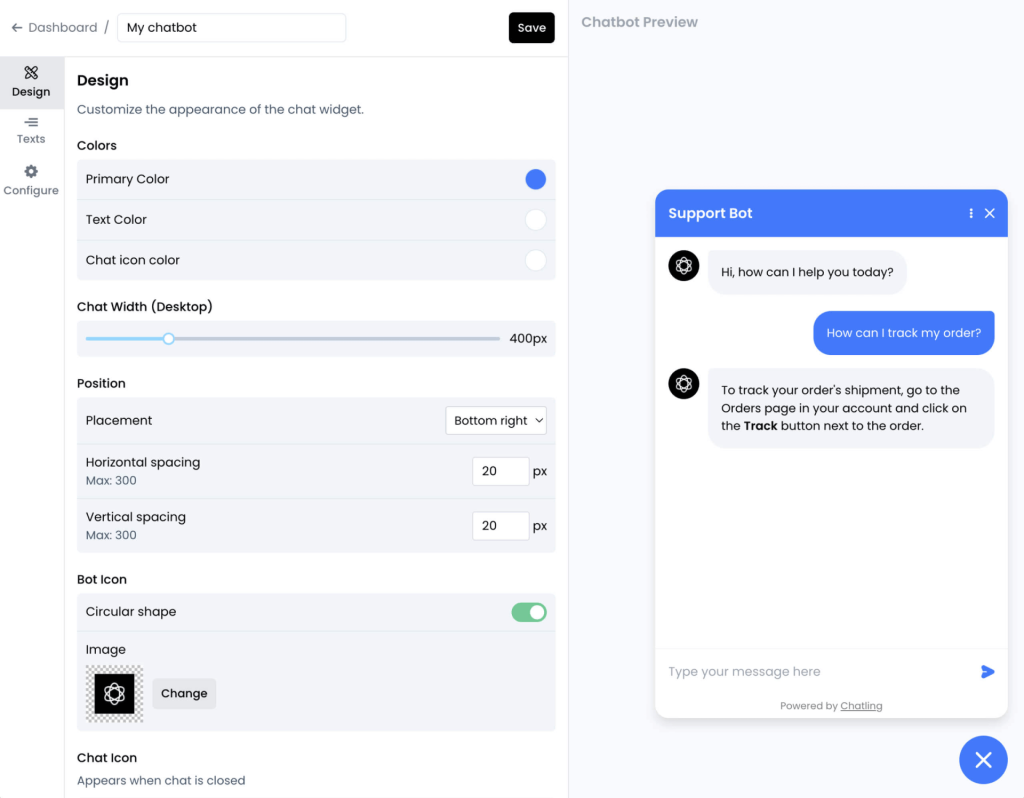
The drag-and-drop interface is clean and does not require technical knowledge. Lead capture is built into the flow natively, so you are not adding a separate form builder on top of the chatbot. The analytics dashboard tracks performance over time so you can see what the bot is resolving and where it needs more training.
The integration options are narrower than some competitors, and the search and filter tools for saved conversations could be better. For teams that do not need deep third-party integrations and want AI quality over everything else, Chatling is a strong choice.
Pros:
- AI that trains automatically from your website, documents, and uploaded data sources
- Drag-and-drop builder with no coding required
- Conversational AI that reads as natural rather than scripted
- Built-in lead capture within the chat flow
- Analytics dashboard for ongoing performance tracking
Cons:
- Fewer third-party integration options compared to more established platforms
- Search and filter tools for saved conversations are limited
User Rating: 4.7/5 (G2)
Pricing: Offers a free plan with unlimited chats and basic features. Paid plans with advanced AI features start at $25/month.
8. IntelliTicks — Best for Conversational Lead Capture and Qualification
IntelliTicks replaces static landing page forms with live conversational flows that qualify visitors in real time. The bot engages visitors the moment they land, asks the right questions to determine fit, and pushes qualified leads directly to your CRM. No sales rep gets involved until the conversation is already warm.
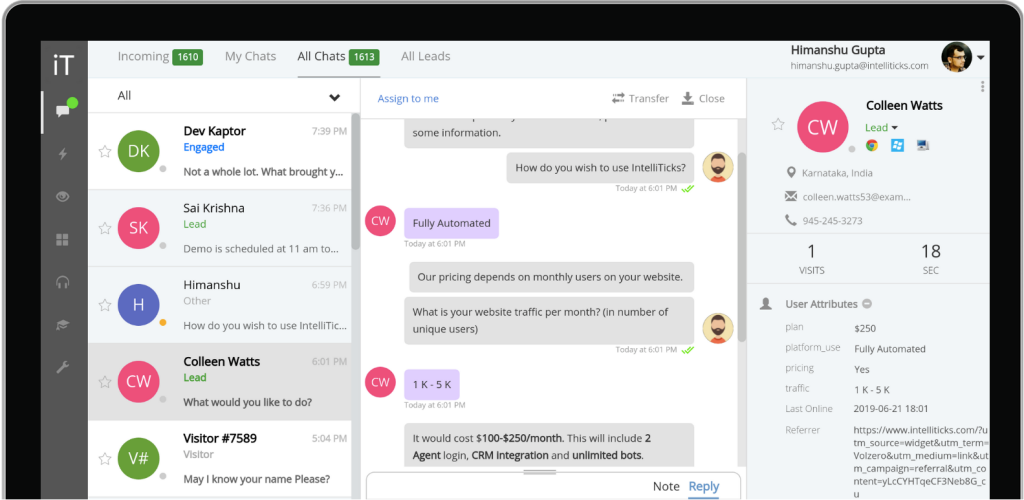
The CRM integration was what made IntelliTicks genuinely useful for our sales team. Seeing the full conversation history alongside a new lead record gave us context that a standard form submission never provides. The instant lead alerts across desktop, mobile, and email meant high-intent visitors got a follow-up within minutes rather than hours.
The free plan limits you to 60 chats per month, which is workable for testing but not production. The bot also cannot send emails directly, so any automated follow-up email sequences need to run through your CRM rather than IntelliTicks itself.
Pros:
- Conversational landing pages that engage visitors and qualify leads in real time
- Instant lead alerts across desktop, mobile, and email for rapid follow-up
- CRM integration that provides full conversation context alongside lead records
- AI-to-human transfer for complex queries that need personal attention
Cons:
- Free plan limited to 60 chats per month
- Bot cannot send emails directly; email follow-up requires CRM configuration
User Rating: 4.4/5 (Capterra)
Pricing: Offers a free plan with up to 60 chats per month. Paid plans start at $20/month.
9. Zendesk — Best for Enterprise Teams Already Running Zendesk
Zendesk’s AI chat capabilities are embedded inside its broader support suite, which is exactly where they earn their value. For teams already running Zendesk as their ticketing backbone, the AI layer adds automated triage, intent detection, and self-service resolution without requiring a separate platform or a new workflow.
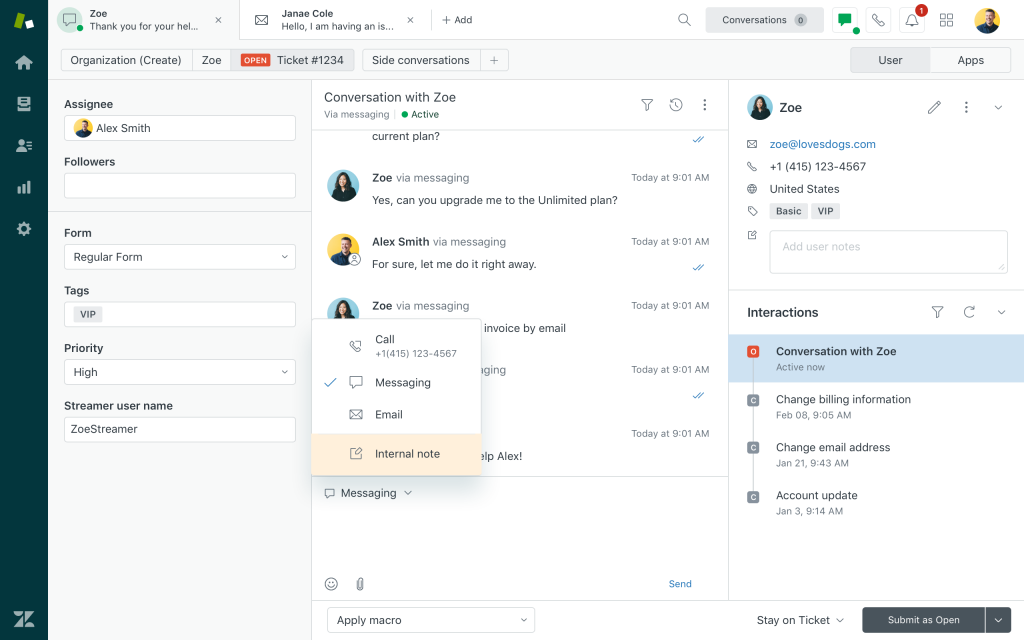
Incoming queries get triaged automatically, articles get surfaced based on intent, and complex cases route to the right agent. All of this happens without manual intervention. The omnichannel routing ensures that queries from email, chat, and social media flow through the same AI logic, keeping response quality consistent.
Outside of the Zendesk ecosystem, this tool is hard to justify. The base plan pricing is high, AI features add meaningful cost on top of that, and much of the value depends on existing Zendesk infrastructure. If you are not already using Zendesk, the tools earlier on this list offer better value for the same outcome.
Pros:
- Tight native integration with Zendesk tickets, macros, and workflows
- AI-powered intent detection and automatic triage out of the box
- Omnichannel routing across email, chat, and social from a single system
- Strong compliance and enterprise security posture
- Self-service options that reduce ticket volume at scale
Cons:
- AI features are gated behind higher-tier plans at additional cost
- Setup and routing configuration can be complex for new users
User Rating: 4.3/5 (G2)
Pricing: No free plan available. Free trial offered. Paid plans start at $55/agent/month (billed annually).
10. ChatBot — Best for AI-Generated Support With Visual Flow Builder
ChatBot’s visual editor is one of the more intuitive flow builders on this list. You see the conversation structure laid out as a diagram, which makes it easier to spot gaps, test edge cases, and hand the setup off to a non-technical team member. The platform supports training from knowledge base articles, lets you create surveys and data collection forms within the flow, and tracks conversions and purchases as performance metrics.
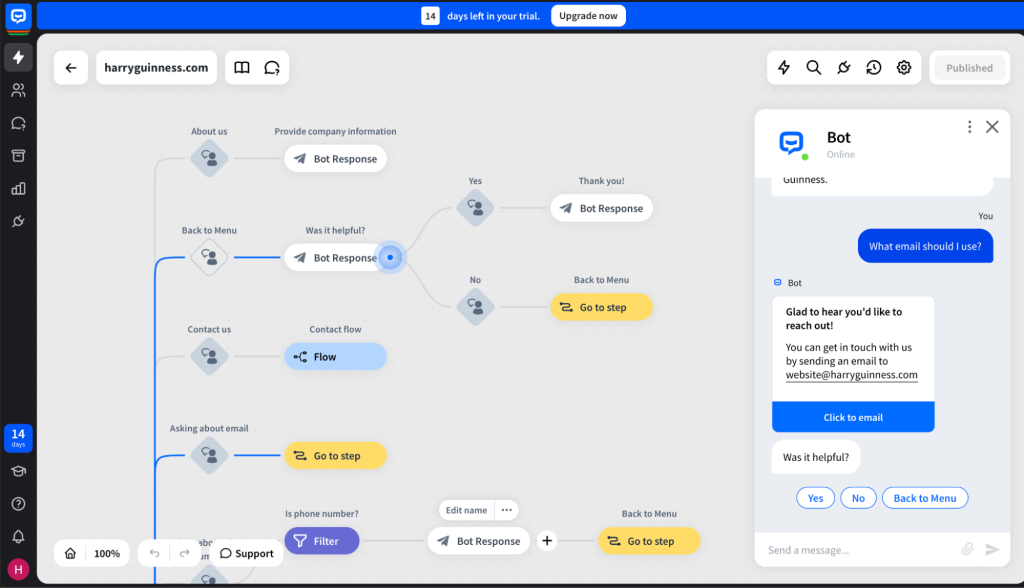
The seamless live agent transfer is handled well. When the bot reaches its limit, it passes the conversation to a human with full context, and the handoff is smooth enough that most visitors do not notice the switch. Conversation tagging makes it easier to categorize and filter transcripts for analysis.
The pricing is on the higher end relative to the feature set, and the starter plan only gives you 7 days of chat history. If you need longer data retention for compliance or quality review purposes, you need a higher-tier plan from day one.
Pros:
- Intuitive visual editor that displays the full conversation flow as a diagram
- Train the bot from knowledge base articles or text content directly
- Chat tags for categorizing and filtering conversations
- Analytics and reporting for tracking bot performance and conversions
- Messenger bot for 24/7 automated responses on Facebook
Cons:
- Starter plan limits chat history access to 7 days
- Pricing is higher relative to comparable tools
- Live chat requires a separate subscription on top of the chatbot plan
User Rating: 4.4/5 (G2)
Pricing: No free plan available. Free trial offered. Paid plans start at $50/month.
11. HubSpot — Best for CRM-Connected Live Chat for Sales Teams
HubSpot’s free live chat tool works because of what it connects to, not what it does in isolation. Every conversation is automatically saved in HubSpot’s CRM, which means your sales team sees the full visitor interaction history before following up. Lead qualification, meeting booking, and FAQ handling are all configurable through the chatbot builder without writing a single line of code.
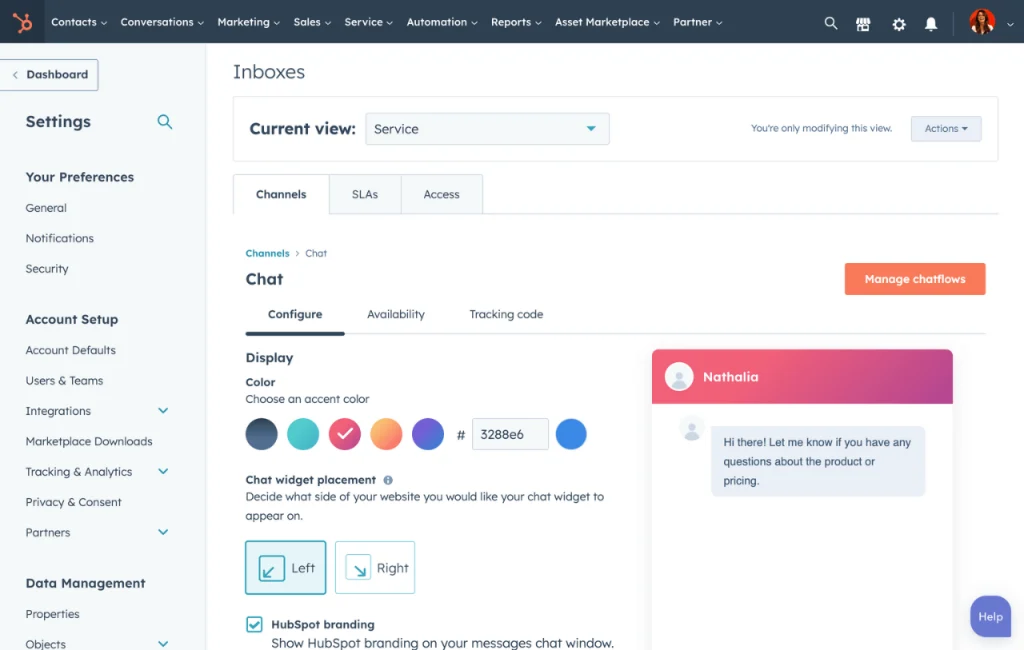
The chat widget customization is straightforward. Matching it to your brand takes minutes. For teams already using HubSpot for sales or marketing, the absence of integration friction is the main selling point. Everything you capture in chat flows directly into your existing workflows.
The A/B testing tools are not available on lower plans, and some users find the navigation between HubSpot’s many product areas confusing initially. If you are not already in the HubSpot ecosystem, evaluate whether the live chat capability alone justifies the broader platform cost.
Pros:
- All chat conversations automatically saved in HubSpot CRM for full customer context
- No-code chatbot builder for lead qualification, meeting booking, and FAQ handling
- Multilingual support for engaging visitors across different regions
- Chat transcripts available for review and agent follow-up
- Free plan with genuine functionality, no credit card required
Cons:
- A/B testing not available on lower-tier plans
- Navigation between HubSpot’s product areas can feel complex for new users
User Rating: 4.5/5 (G2)
Pricing: Offers a free plan with limited features and no credit card required. Paid plans start at $15/month.
12. Chatango — Best for Free Community Chat on Websites
Chatango is a niche tool for a specific use case: adding live group chat to a website where community discussion is the point. Think forums, fan sites, content communities, or educational platforms where visitors talking to each other is as valuable as visitors talking to your team.
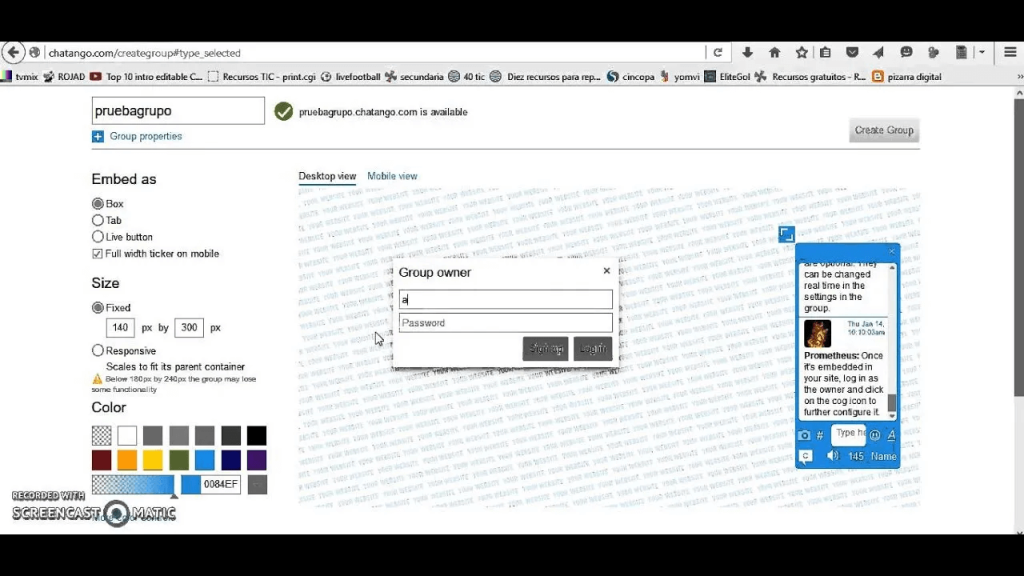
The setup is easy, the tool is completely free, and the anonymous chatting feature lowers the friction for new visitors who do not want to create an account before participating. Mobile compatibility means community conversations continue on any device.
The limitations are real and significant. Chatango is not a customer support tool. There is no AI, no lead capture, no CRM integration, and no way to route conversations or track performance in a meaningful way. If your goal is customer support, lead generation, or automated engagement, Chatango is not the right tool for that job.
Pros:
- Completely free with no usage limits or trial periods
- Anonymous chat lowers participation friction for new visitors
- Customizable chat rooms for building community discussions
- Mobile compatible for on-the-go conversations
- Simple, intuitive interface with minimal setup required
Cons:
- Limited emoticon and design customization options
- Blocked user management is not easily accessible in the interface
User Rating: 4.2/5 (G2)
Pricing: Free for all users with no paid tiers or usage limits.
How I Evaluated These Free AI Chat Widgets
Choosing the wrong chat tool is an expensive mistake. Not just in licensing costs, but in the time spent migrating and retraining. Here is exactly what I looked at when evaluating each platform.
- Verified User Reviews I pulled reviews from G2 and Capterra, focusing on recurring patterns: what teams praised after six months of real use, and what complaints appeared consistently across different company sizes and industries.
- Core AI and Chat Features I tested each tool hands-on, specifically looking at how well the AI handled questions outside its training data, how quickly the bot could be set up from scratch, and whether the human handoff experience was smooth or jarring.
- Ease of Setup The test was simple: could a non-technical team member get this running in a day without a call with the vendor’s sales team?
- Integration Depth I checked whether the tool connected natively with the CRMs and help desks most teams are already running. Salesforce, HubSpot, Zendesk, and Shopify in particular, and whether those integrations worked in practice or just on the feature list.
- Value for Money I compared pricing against actual feature depth. A free plan that does not include AI chatbot capability is not the same value as a free plan that does.
- Personal Experience I used each platform myself and cross-checked my impressions with peers who run similar support operations. What looks good in a demo often behaves differently under real traffic.
What Are My Top 3 Picks for the Best Free AI Chat Widget?
Still deciding? Here is where most teams should start.
1. ProProfs Chat
If you need an AI chat widget live today without a developer or a budget, ProProfs Chat is the cleanest starting point. The AI trains on your website in minutes, handles FAQs, captures leads, and escalates to a human when needed. The forever free plan includes everything: no trial clock, no credit card.
2. HubSpot
For teams already running HubSpot for sales or marketing, the free live chat widget is a no-brainer add-on. Every conversation saves automatically into your CRM, the no-code bot builder handles lead qualification and meeting booking, and setup takes under an hour. The ecosystem fit alone makes it worth it.
3. Tawk.to
If AI automation is not your priority and you just need a reliable, fully free live chat widget with zero strings attached, Tawk.to delivers. No trial limits, no forced upgrades, and the core chat experience is solid enough for small teams managing steady, predictable chat volume.
FREE. All Features. FOREVER!
Try our Forever FREE account with all premium features!
Level Up Your Support With the Right Free Chat Widget
Choosing the right free AI chat widget can be the difference between a visitor who converts and one who quietly disappears. The tools on this list cover every use case, from fully free community chat to AI-powered lead qualification.
A few tips before you decide: match the tool to your actual workflow, not a wishlist of features. Test the human handoff experience before going live. And measure what the bot resolves in the first two weeks. Those numbers tell you everything.
If you want a head start, ProProfs Chat gets you an AI chatbot, live chat, and lead capture on a free plan with no credit card required. Give it a try today.
Frequently Asked Questions
Can I use a free chat widget without any coding skills?
Yes. Most modern chat widgets offer no-code setup through a copy-paste code snippet or a Google Tag Manager integration. Many also include visual chatbot builders where you design conversation flows without writing a single line of code.
How long does it take to set up a free AI chat widget?
Most tools can be installed in under 10 minutes using a code snippet or Google Tag Manager. Training the AI chatbot on your website content typically takes less than a day, depending on how much content you want the bot to learn from.
Can a free chat widget handle multiple languages?
Yes, many can. The range varies significantly by tool, from a handful of common languages to 100 or more. If serving a multilingual audience is a priority, confirm the specific language list before choosing a platform, as free plans sometimes restrict multilingual features to paid tiers.
Are free chat widgets secure and GDPR compliant?
Reputable tools publish their GDPR compliance and data security documentation clearly. For any tool you are evaluating, check the vendor's privacy policy and data processing terms before deploying, especially if you handle EU customer data or operate in a regulated industry.
Can I customize the chat widget to match my brand?
Yes. Most tools allow you to customize the widget color, font, avatar, and button style. Some platforms go further with white-label options that remove all third-party branding entirely, which is useful for agencies managing multiple client websites or businesses that want a fully native look.
Will adding a chat widget slow down my website?
A well-built chat widget loads asynchronously and has minimal impact on page speed. If performance is a concern, check each vendor's documentation for their script weight and loading behavior before deploying. Most reputable tools are designed to avoid interfering with core web vitals.
Which free chat widget works best for WordPress websites?
Most leading chat widgets offer dedicated WordPress plugins that install in minutes without touching code. Look for a plugin with active maintenance, a high rating in the WordPress plugin directory, and compatibility with your current theme and page builder. AI functionality and CRM sync should work the same way through the plugin as they do through the standard code snippet.
Can a free chat widget help reduce cart abandonment for eCommerce stores?
Yes. Tools with proactive chat features can trigger automated messages when a visitor shows exit intent or has been idle on a product or checkout page. This re-engages shoppers before they leave and gives your team or the AI an opportunity to answer the question holding up the purchase.
FREE. All Features. FOREVER!
Try our Forever FREE account with all premium features!

 We'd love your feedback!
What did you like & how can we make it even better?

 Thanks for your feedback!
 Ask Your Question
Have a question? Get expert help to make your decision easier.