
“I can’t reply to every lead at 11 PM, and I can’t afford to hire more support.”
That one line sums up what most small business owners and founders feel. Trust me, I’ve been there.
Time is limited, the team is small, and the budget is tight. If this sounds familiar, it’s the perfect time to learn how to create a free chatbot for your website that can engage visitors, answer common questions, and capture leads 24/7.
I’ve done it myself using free tools that require zero coding. In this blog, I’m going to teach you exactly that, so stay tuned!
What Is a Free Chatbot and Why Does Your Website Need One?
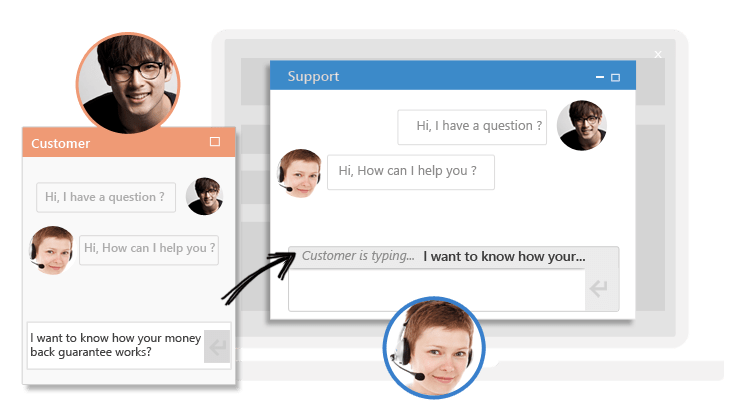
A free AI chatbot for a website is a virtual assistant that appears on your site to help visitors in real time. It can answer questions, capture leads, book meetings, and route conversations automatically, helping you respond faster without adding more workload.
It also helps solve common problems many websites face today like missed leads, slow responses, and visitors leaving without taking action. With a chatbot in place, you can engage users instantly, guide them to the right information, and offer support 24/7, even with a small team.
Modern chatbots are far more advanced than the basic bots from a few years ago. Today’s tools understand customer intent, support multiple languages, train on your existing content, and keep your data secure with features like SSL encryption and role-based access control.
What does “free” actually mean?
Well, this depends on the provider:
- Some offer limited-time free trials (14–30 days), after which you need to pay
- Some offer freemium plans with basic features and usage limits
- Others, like ProProfs Chat, offer a forever-free plan with all premium features included for one operator, which works well for small teams and solo founders
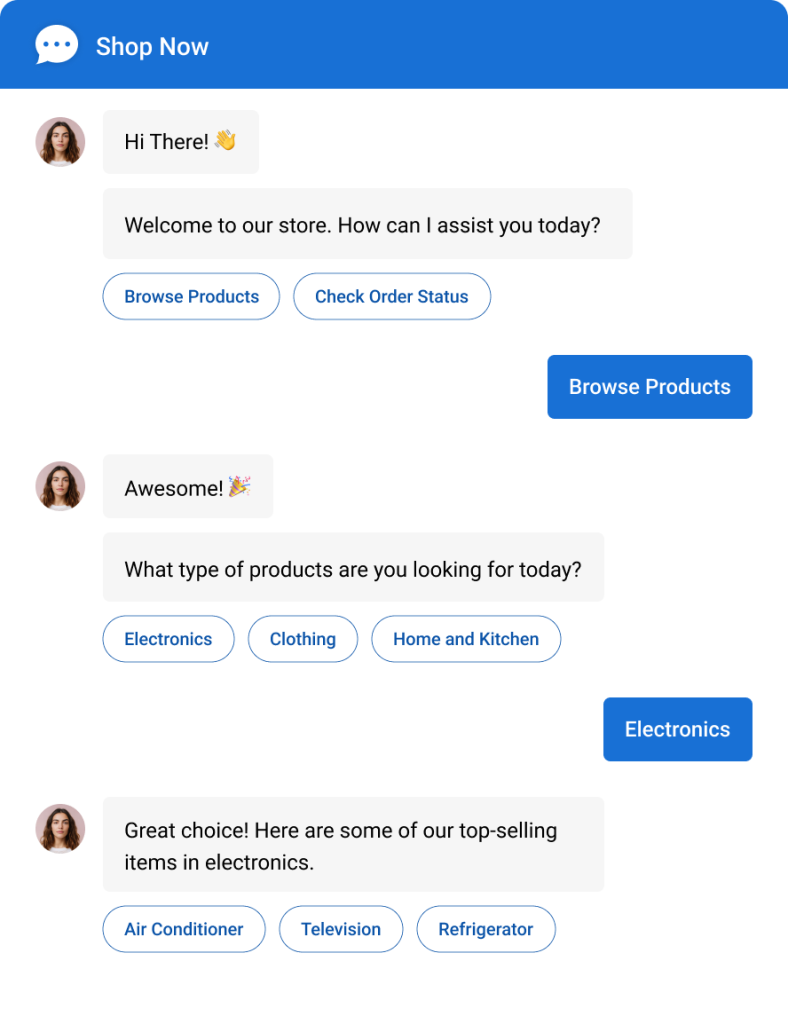
How to Create a Free AI Chatbot: A Step-by-Step Guide
Wondering if you can create your own chatbot for free without a big budget or coding skills? The answer is yes.
In this section, I’ll show you how to create your own AI chatbot for free, step by step, using ProProfs Chat.
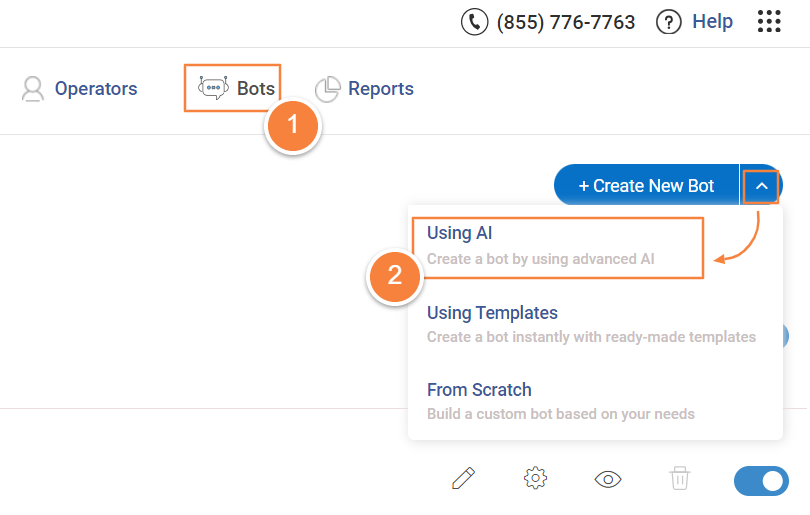
Step 1: After logging in, go to the “Bots” tab in the dashboard. Click “Create New Bot” and select the “Using AI” option.
Step 2: On this screen, you will see three to four options for uploading your data: website URL, uploaded files, plain text, or your Knowledge Base.
To demonstrate how it works, I will use this link as the training data source: [https://www.amazon.com/returnpolicy/]
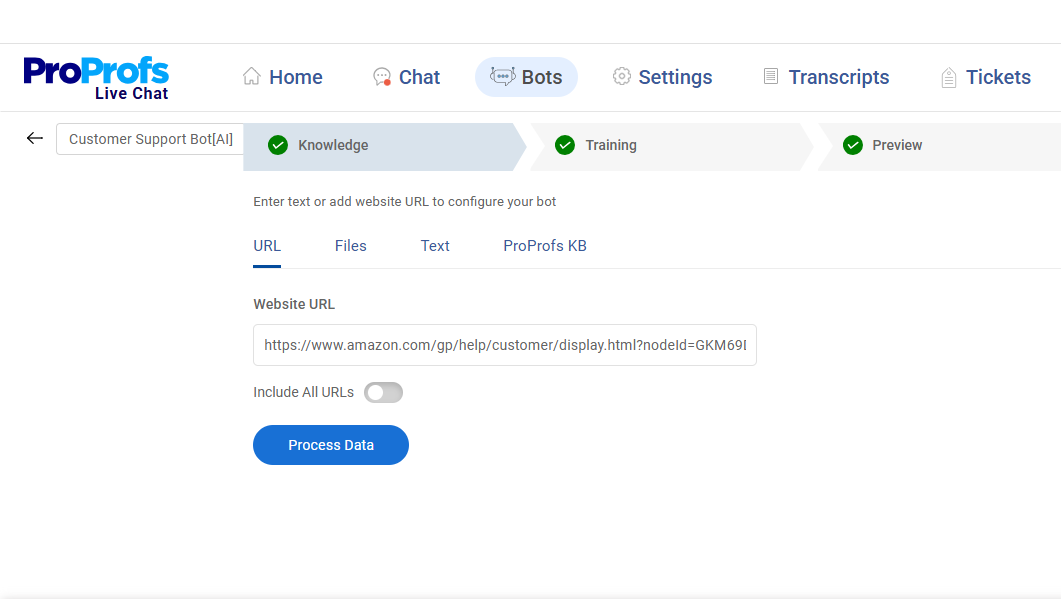
After adding your content, click “Process Data” to move ahead. Once the system finishes processing, your website content will appear like this:
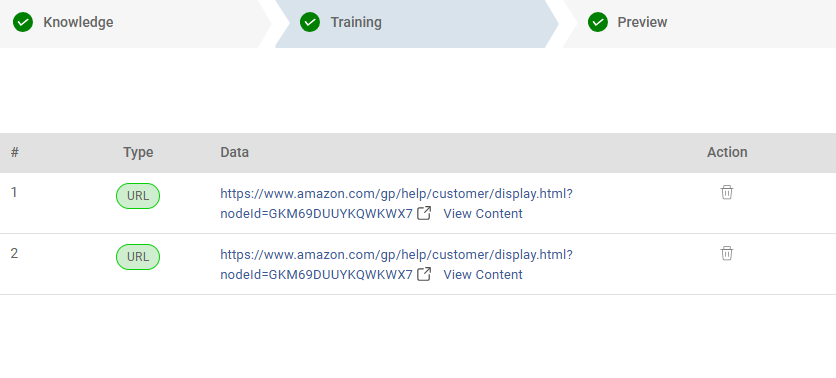
Step 3: Click “Preview” to test how your chatbot responds. Try asking a common customer question, such as, “Which items cannot be returned?”
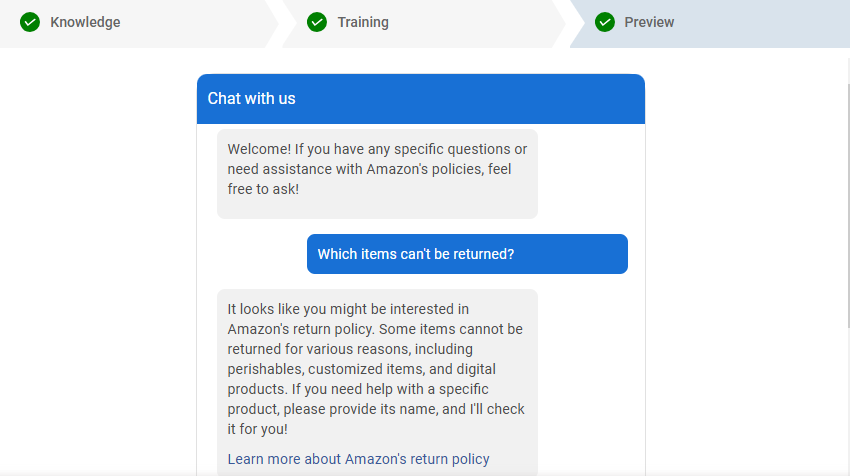
And there you have it! Your free AI chatbot is ready to provide instant, consistent support to your customers.
What Are the Top Free Chatbot Tools for Websites?
I’ve tested a bunch of free chatbot platforms, and these are my top 3 picks for automating conversations, capturing leads, and offering round-the-clock support, without stretching your budget.
Here’s a quick comparison of what you actually get with each chatbot:
| Feature | ProProfs Chat | Selzy | BotPenguin |
|---|---|---|---|
| Forever Free Plan | Yes | Yes (limited) | Yes (limited) |
| AI Chatbot | Full | Basic | Full |
| Live Chat Handoff | Yes | No | Yes |
| CRM Integrations | Salesforce, Zoho, HubSpot | Limited | Yes |
| Multilingual Support | Yes | No | Yes |
| White-Label Option | Yes | No | No |
| Omnichannel (WhatsApp, FB) | Yes | Yes | Yes |
| Pre-chat Lead Forms | Yes | Yes | Yes |
| Post-chat Surveys | Yes | No | No |
1. ProProfs Chat – Best for 24/7 Delightful Customer Support With AI Chatbots
ProProfs Chat is my go-to platform for building free chatbots that actually boost sales and deliver great customer service, no matter the size of the business. I can easily train my chatbot using my knowledge base or website data, so it answers FAQs and supports customers 24/7 without missing a beat.
Setting the AI chatbot up and running was quite simple. I was able to build out workflows, tweak responses, and align everything with our brand voice in no time.
And the best part? ProProfs Chat comes packed with powerful features like multilingual support, real-time visitor tracking, and smart chat routing that help me stay ahead in the game.
Pros:
- Chat transcripts to assess the performance of agents
- Automatic chat routing to offer a delightful support experience
- Pre-chat forms to enhance the chances of sales opportunities
- Post chat surveys to gather feedback and insightful data
Cons:
- Cloud-only – no offline access
- No dark theme
Pricing: A free plan is available for growing teams. Paid plan starts at $19.99/user/month.
2. Selzy – Best for Email Marketing Campaigns
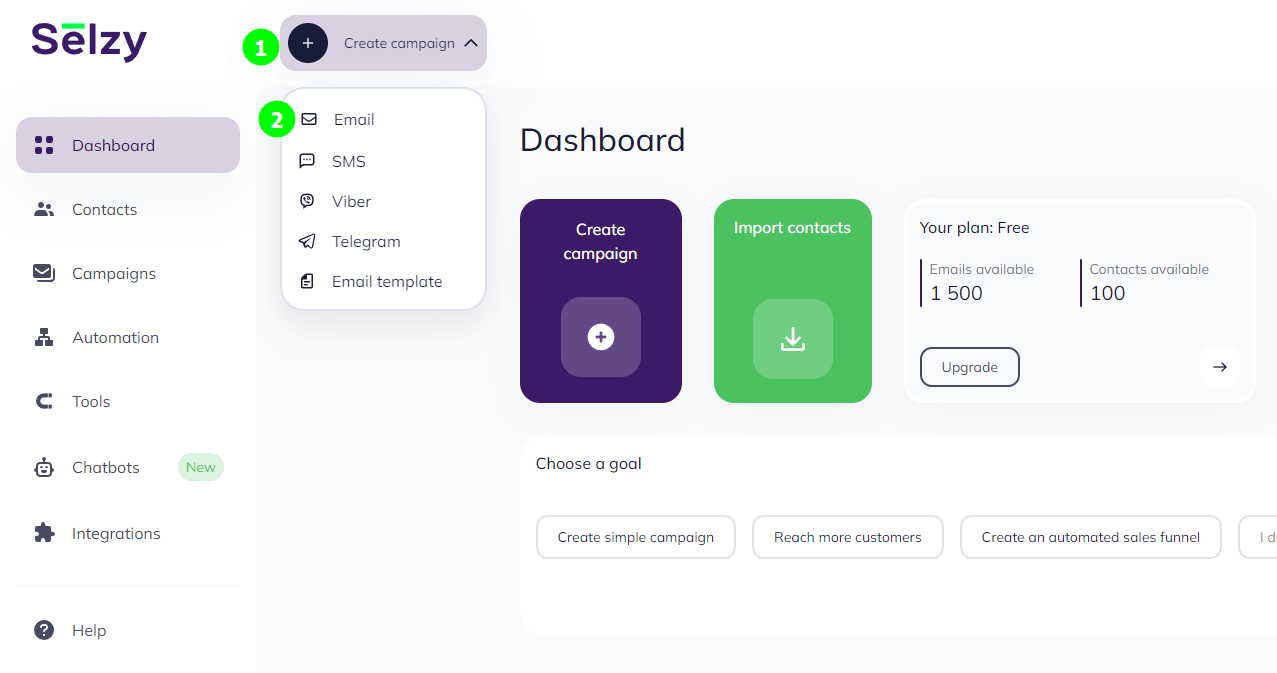
When I wanted a tool that could do more than just chat, I gave Selzy a try, and it didn’t disappoint. It lets me create free chatbots for my website and social media pages, like having a smart assistant always ready to answer FAQs or update customers.
I also use it to build eye-catching popups that help convert visitors into subscribers. But what really stands out is that Selzy isn’t just a chatbot tool; it’s a full-blown marketing platform.
I can create stunning emails with drag-and-drop ease, use templates, and segment my audience for personalized campaigns. It’s all about building stronger customer connections, even while I’m away.
Pros:
- Pop-up forms to boost conversion rates
- AI Email generator to form catchy headlines and strong CTAs
- AI image generator to give your brand a unique and instantly recognizable look
- Email builder to create professional emails instantly
Cons:
- Integration options are limited
- Some features can be difficult to find
Pricing: A free plan is available with limited features. Paid plans start at $5.25/month.
3. BotPenguin – Best for Lead-Generation
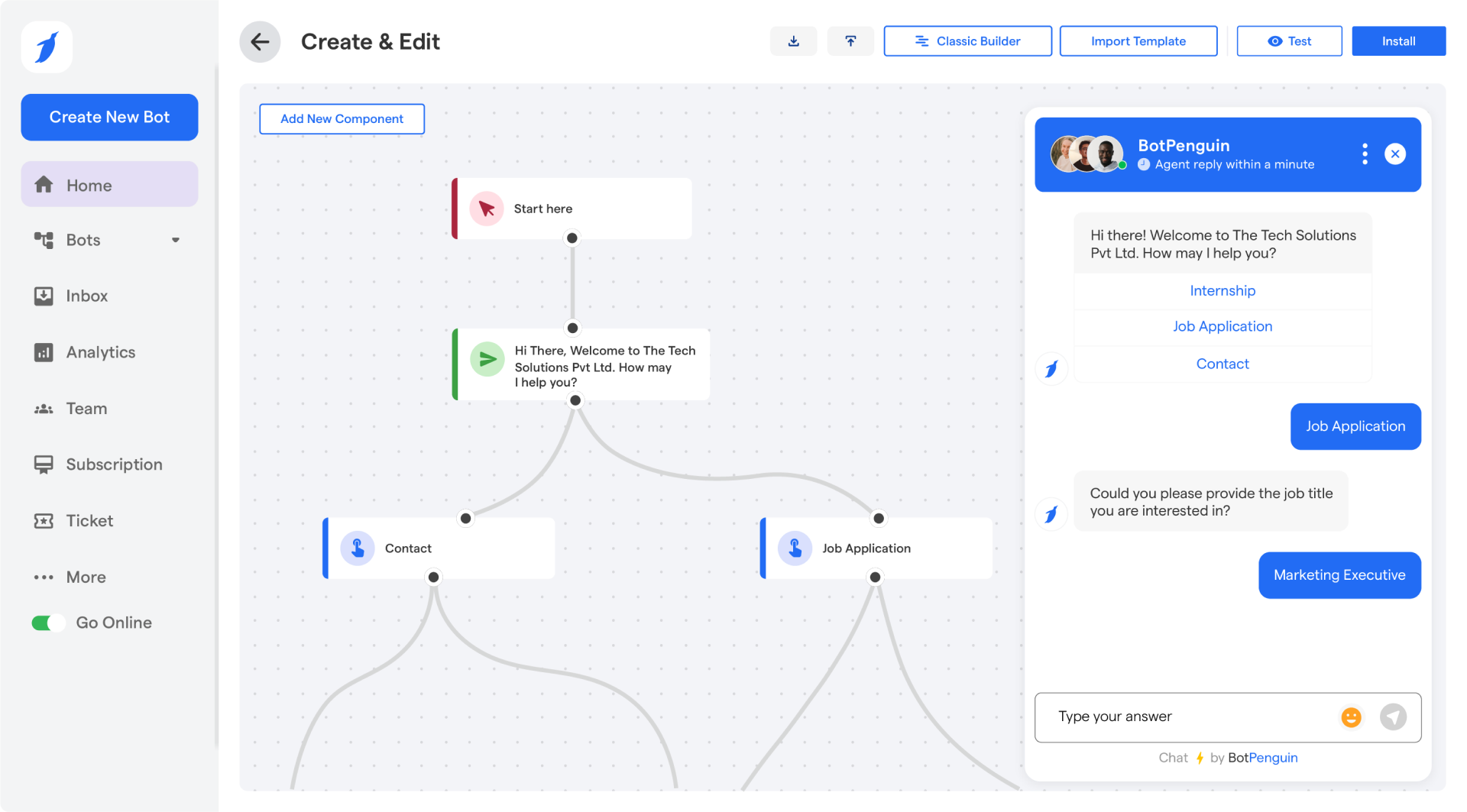
Image Source: BotPenguin
I found BotPenguin to be a powerful chatbot builder to create your own free chatbots for popular platforms like Facebook Messenger, WhatsApp, and your website. The best part is it doesn’t require coding – just point, click, and design your ideal conversation flow.
More interestingly, BotPenguin can manage multiple conversations at once, boosting your lead-generation capabilities. This simultaneous chat handling captures more opportunities and engages more customers efficiently.
Whether you’re a startup or a growing enterprise, BotPenguin offers a scalable solution to boost customer satisfaction and achieve your business objectives.
Pros:
- Bot-to-human transfer for complex inquiries needing personal assistance
- Multilingual support to assist customers worldwide
- Video calling to provide instant support for complex issues
- Powerful analytics to analyze chatbot performance
Cons:
- UI may require some improvements
- Some functionalities may need a technical understanding
Pricing: A free plan is available with limited features. Paid plans start at $15/month.
What Can a Free Chatbot Actually Do for Your Website?
The real value you get when you create an AI chatbot for free goes far beyond cost-cutting. It quietly takes care of important tasks in the background: saving time, enhancing UX, and boosting site performance. In fact, McKinsey’s 2025 State of AI report found that 71% of companies now use generative AI in at least one business function, up from 65% in early 2024.
1. Capture Leads Automatically
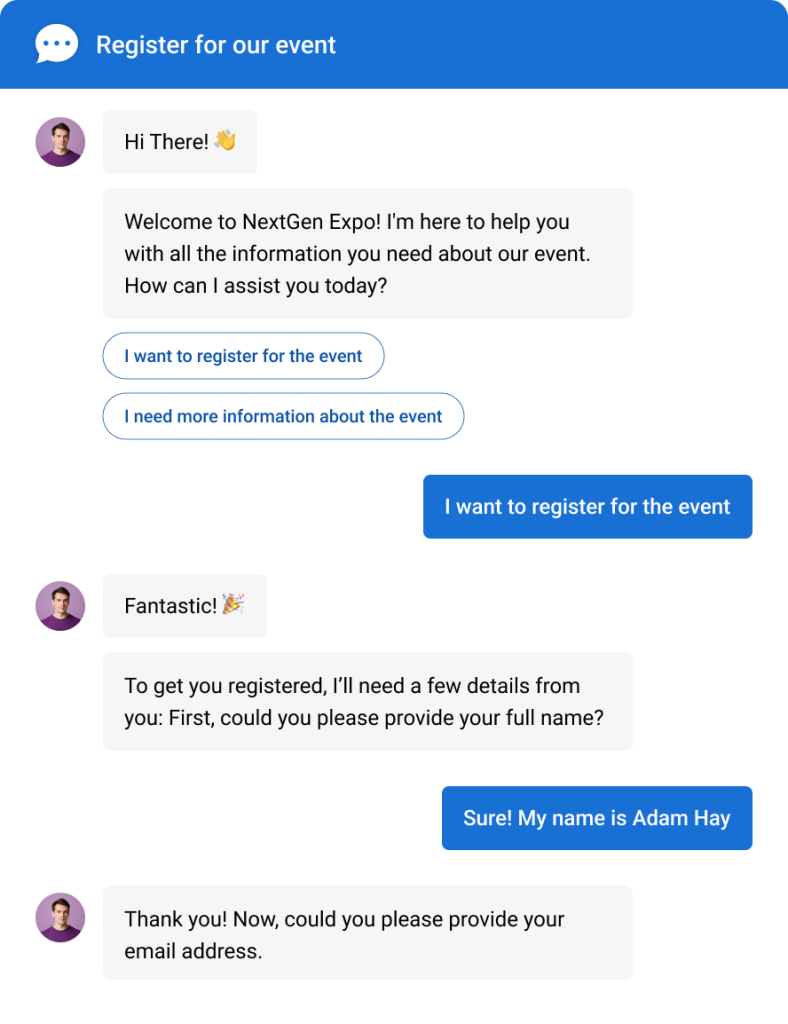
Instead of relying on forms that often get ignored, a free chatbot can actively engage visitors, ask the right questions, and collect lead details in real time. It helps you qualify prospects while they’re still interested, reducing missed opportunities and saving your sales team hours of manual follow-up.
2. Book Appointments Instantly
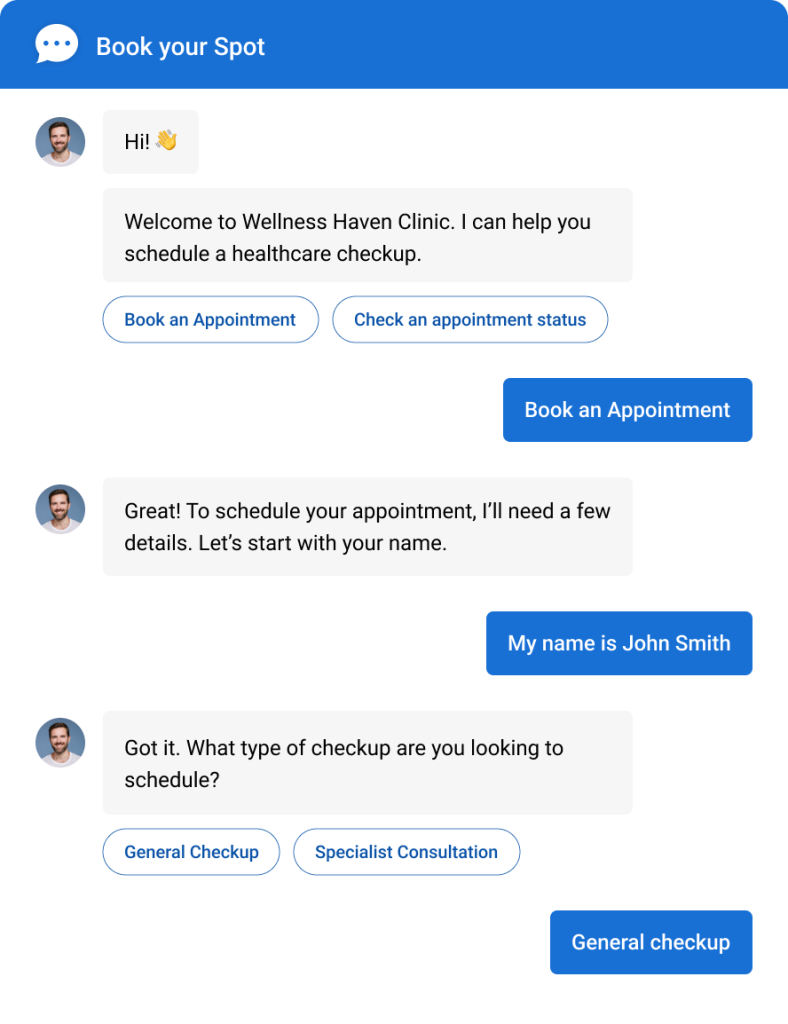
Your free chatbot can be synced with your calendar and allow visitors to book meetings or consultations directly. Whether you’re in real estate, healthcare, or the education sector, this eliminates the back-and-forth of emails and calls, making scheduling a smooth, hands-off experience for both you and your clients.
3. Support Visitors 24/7
When you create a chatbot for your website, it can automatically handle repetitive queries about pricing, availability, shipping, and more. Instead of your team answering the same questions again and again, the bot takes over, day or night. This leads to faster responses, better customer experiences, and lower support costs.
It’s also why adoption is growing fast. According to a study by Grand View Research in (2026). The global chatbot market is projected to reach USD 41,244.2 million by 2033, expanding at a CAGR of 19.6% from 2026 to 2033.
4. Integrate With Your Tools
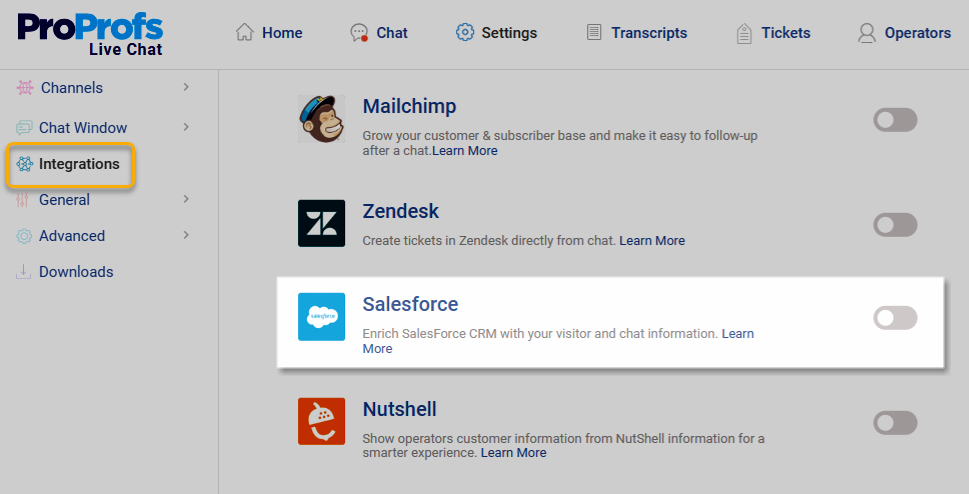
Many free chatbot platforms offer integrations with CRMs like Salesforce, ActiveCampaign, and others. That means leads captured by your chatbot go straight into your workflow, ready for nurturing or follow-up. Businesses that need deeper integrations or custom automation often work with an AI chatbot development service to build more advanced conversational workflows. It eliminates manual data entry and ensures you never lose track of a potential customer again.
5. Personalize the Experience
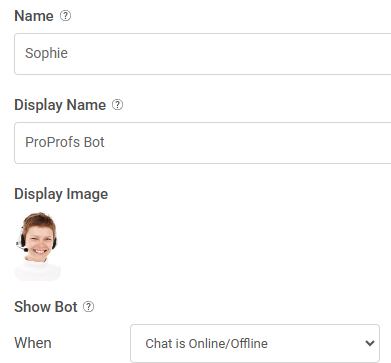
Your free chatbot doesn’t have to feel generic. You can shape it to match your brand perfectly. Give it a unique name, choose a welcoming avatar, and craft a tone that sounds just like you.
You can also choose from ready-to-use chatbot templates to speed things up, design personalized chat flows, control when it appears, and even support multiple languages to connect with a global audience.
FREE. All Features. FOREVER!
Try our Forever FREE account with all premium features!
How to Choose the Right Free Chatbot Platform
Not all free chatbots are built the same. Some lack integrations, while others limit customization. To help you choose a tool that truly supports your business without hidden tradeoffs, here are a few smart tips to guide your decision.
Here’s a handy selection checklist to help you make sure you’re covering all the essentials:
| Selection Criteria | Description |
|---|---|
| Free Plan Duration | Forever-free or limited-time trial |
| Limited vs. Unlimited Features | Any feature restrictions or paywalls |
| AI & Human Handoff | Enables smart handoff to human agents when needed. |
| Multilingual Capability | Offers multilingual support to serve global customers. |
| Customization & Branding | Gives full control over chatbot design and user flows. |
| Ease of Setup | Easy to deploy with little to no tech skills needed. |
| CRM Integration | Integrates with CRMs like Salesforce, HubSpot, or Zoho. |
| Security and Compliance | Ensures GDPR compliance, encryption, and secure integrations. |
| Analytics & Reporting | Tracks performance, engagement, and overall chatbot success. |
What Are the Most Common Free Chatbot Challenges (and How Do You Fix Them)?
Free chatbot tools can be a smart starting point to create your own chatbot for free, but they often come with hidden roadblocks. From setup troubles to poor replies and growth limits, here are the most common challenges and how ProProfs Chat solves them for good.
Challenge 1: It’s Hard to Integrate with Your Tools
Most free chatbot platforms make it tough to integrate with the tools you already use. You might struggle to sync data with your CRM, calendar, or help desk, which leads to wasted time and broken workflows.
How ProProfs Chat Fixes It:
ProProfs Chat comes with built-in integrations for popular platforms like Salesforce, Zoho CRM, Calendly, and more. You can set everything up in minutes, no technical headaches or coding required.
Challenge 2: The Bot Doesn’t Understand Visitors
Many free bots can’t handle natural conversations. They misread questions, get stuck in loops, or fall back on the same generic response which quickly frustrates your visitors.
How ProProfs Chat Fixes It:
ProProfs AI Chatbot can be trained using your own knowledge base or website content to deliver accurate, human-like responses. When a query needs personal attention, it automatically hands off the chat to a live agent for a smooth experience.
Watch this short video to see how AI and human agents work together to deliver better support expeirences:
Challenge 3: You Can’t Make It Match Your Brand
Free chatbot tools often limit how much you can personalize your customer service chatbot. You’re stuck with a generic look, fixed greetings, and no control over tone or language, making your bot feel out of place on your website.
How ProProfs Chat Fixes It:
With ProProfs Chat, you can customize your chatbot’s name, avatar, tone, greetings, and even chat flow. Want to go faster? Use ready-to-go templates. Need global support? Enable multilingual conversations, all without writing code.
Challenge 4: The Free Plan is Too Limited to Grow
Some “free” chatbot plans come with hidden limits, such as capped conversations, locked features, or forced branding that makes your site look less professional.
How ProProfs Chat Fixes It:
ProProfs Chat offers a forever-free plan designed for small teams. You get real-time visitor tracking, canned responses, knowledge base integration, and multi-channel support across popular social media platforms like Facebook, WhatsApp, and Instagram. You can even remove the “Powered by ProProfs” tag for a fully white-labeled, professional look.
Put Customer Conversations on Autopilot with a Free Chatbot
A well-configured free chatbot can help you boost user engagement, automate support, and upgrade your website’s overall user experience.
If you’re wondering how to create a chatbot for free, start by choosing one that integrates seamlessly with your tools, allows smooth handover to human agents, and matches your brand’s look and tone.
If you want all this without the hassle, ProProfs Chat is a great pick. It offers easy chatbot training, ready-made chatbot templates, seamless integrations, post-chat surveys, and detailed customization, and more, all in a forever-free plan.
Frequently Asked Questions

Can a free chatbot handle live chat handoff to a human agent?
Yes. Tools like ProProfs Chat offer a free plan including live chat handover. When the bot encounters a question it can't confidently answer, it routes the conversation to a live agent — keeping the experience smooth and professional for the visitor.
How do I track and analyze my chatbot's performance?
Chatbot tools provide in-depth reporting even on the free plan. You can track total chats, bot-handled conversations, handoffs to agents, visitor response time, and more. Use this data to identify gaps in your bot's knowledge and improve over time.
Can a free AI chatbot support multiple languages?
Yes. Several tools support multilingual conversations, which means your bot can interact with visitors in their preferred language — making it a practical tool for businesses serving global audiences.
Can I collect email addresses and phone numbers using a free chatbot?
Yes. Most free chatbot platforms let you add pre-chat forms that collect visitor details — name, email, phone number, company — before the conversation begins. This is one of the most effective ways to automate lead capture on a tight budget.
Can a free chatbot be used for appointment scheduling?
Yes. You can connect your chatbot with scheduling tools like Calendly to let visitors book meetings directly inside the chat window. This removes the back-and-forth of email scheduling entirely.
What happens when a free chatbot can't answer a question?
In a well-configured chatbot, the bot recognizes when it's out of its depth and routes the conversation to a human agent. This is called live chat handoff. ProProfs Chat supports this automatically — the bot flags the query, notifies an available agent, and transfers the chat seamlessly without the visitor having to start over.
How long does it take to set up a free chatbot?
You can go from zero to a working chatbot in under 10 minutes. Enter your website URL, process the data, preview the bot, and embed it on your site. Most of the setup is automated — you're just reviewing and tweaking, not building from scratch.
Can a free chatbot work across whatsapp, facebook, and my website at the same time?
Yes. Many free chatbot tools support omnichannel deployment — your chatbot can handle conversations across your website, Facebook, WhatsApp, and Instagram, all from one dashboard. This is available even on the free plan.
Is it safe to use a free chatbot? what about data privacy?
Reputable free chatbot platforms use SSL encryption, role-based access control, and GDPR-compliant data handling. ProProfs Chat includes these security features even on the free plan. Always check the provider's privacy policy and data handling practices before you go live, especially if you're collecting personal information from visitors
FREE. All Features. FOREVER!
Try our Forever FREE account with all premium features!

 We'd love your feedback!
What did you like & how can we make it even better?

 Thanks for your feedback!
 Ask Your Question
Have a question? Get expert help to make your decision easier.