
“Why does our chatbot exist if customers still ask for human support?”
I’ve heard this more times than I can count. Most teams invest in bots with high expectations, but without the right chatbot best practices, they end up creating more friction than value.
I’ve seen this firsthand. The difference between a bot that converts and one that gets ignored isn’t the tech. It’s how thoughtfully it’s designed, trained, and improved over time.
The reality is simple. Customers don’t care that you have a chatbot. They care if it actually helps them get what they need faster.
In this guide, I’ll walk you through 10 practical best practices I’ve seen work across teams. These aren’t theoretical ideas. They’re the ones that turn everyday conversations into real outcomes.
What Are the 10 Best Chatbot Practices That Actually Work?
Most chatbots fail quietly. Not with a dramatic error, but with a customer who gives up, closes the window, and never comes back. The difference between a bot that builds trust and one that frustrates users almost always comes down to execution, not technology.
These ten best practices in chatbot building cover exactly that.
1. Define a Clear Purpose and Scope
A chatbot without a defined purpose is a liability, not an asset. Before you write a single conversation flow, answer this: What specific problem is this bot solving?
The most effective chatbots do one thing extremely well. A bot built specifically to answer “Where is my order?” will always outperform a bot that vaguely handles orders, returns, billing, and general questions.
Start by pulling your top 10 most repeated support queries from email, chat, and tickets. That list is your chatbot’s first mandate.
How to define your chatbot’s scope:
- Identify high-volume, low-complexity queries
- Set clear boundaries for the bot
- Align with a clear business goal
- Get buy-in from your support team
A narrow scope means faster deployment, higher accuracy, and a better user experience. You can always expand later once the core use case is working well.
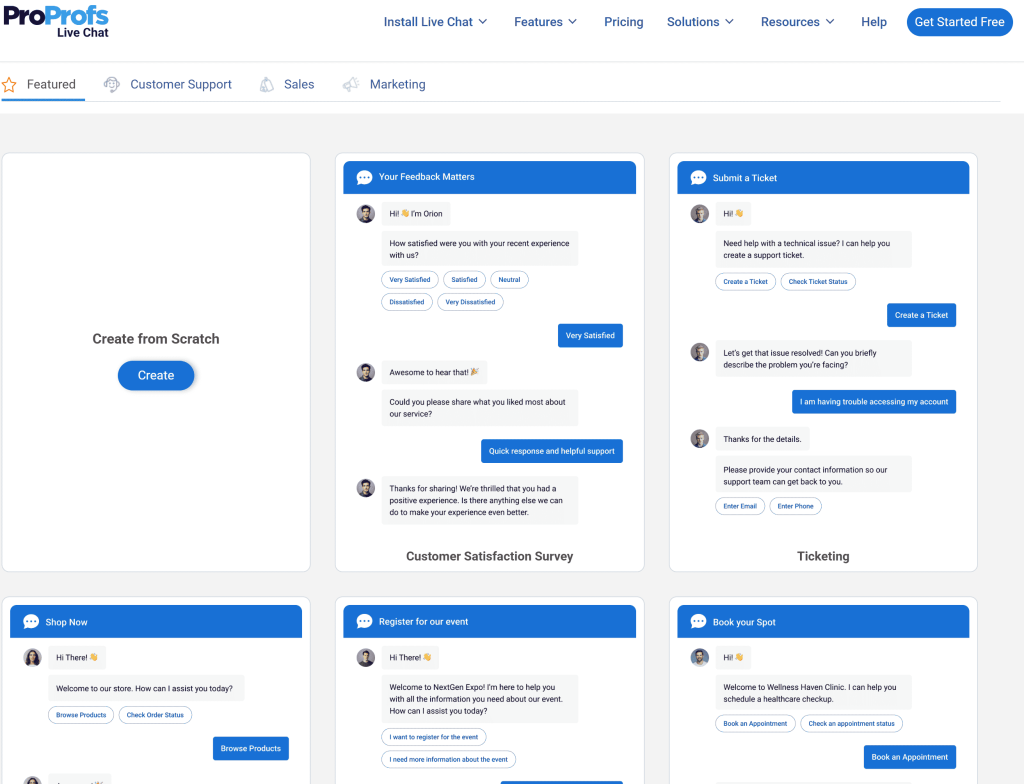
To make things easier, you can start with chatbot templates built for specific use cases, so you don’t have to start from scratch.
2. Train Your Chatbot on the Right Data
A chatbot is only as smart as the data it learns from. Training your chatbot on the right inputs is one of the most overlooked steps in the process, yet it directly determines how accurate, helpful, and trustworthy your bot will be. The foundation should always be real customer conversations, not theoretical FAQs built in a vacuum.
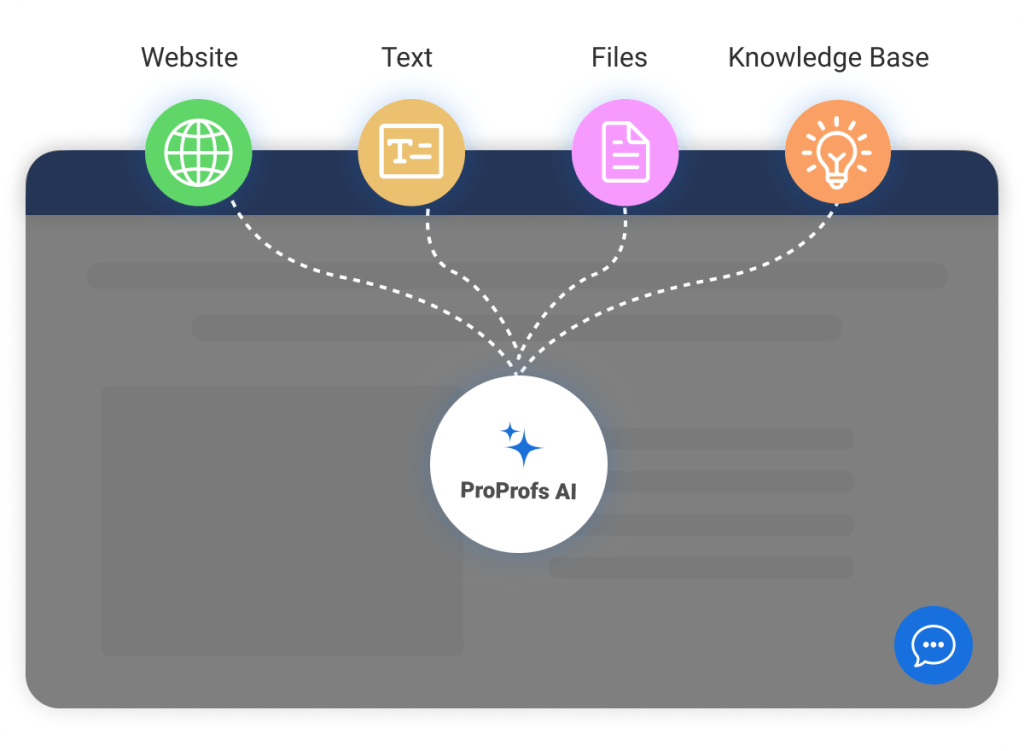
What to train your bot on:
- Historical chat transcripts — Real language your customers actually use
- Support ticket themes — Categorized by issue type and resolution
- Your knowledge base articles — Structured answers to known questions
- Product documentation and FAQs — Keep these updated regularly
- Sales call recordings or notes — Especially useful for lead qualification bots
What to avoid:
- Generic placeholder content that doesn’t reflect your actual customer language
- Outdated policies or product information
- Overly formal or corporate-speak that doesn’t match how your users talk
Most businesses underestimate how much the quality of training data shapes the bot’s day-one performance. A bot trained on the wrong inputs doesn’t just underperform; it actively erodes customer trust by giving confident answers to the wrong questions.
3. Design Conversation Flows That Feel Human
Nobody wants to talk to a bot that sounds like a legal disclaimer. The way your chatbot communicates, including its tone, pacing, and word choices, directly impacts whether users complete their interaction or abandon it.
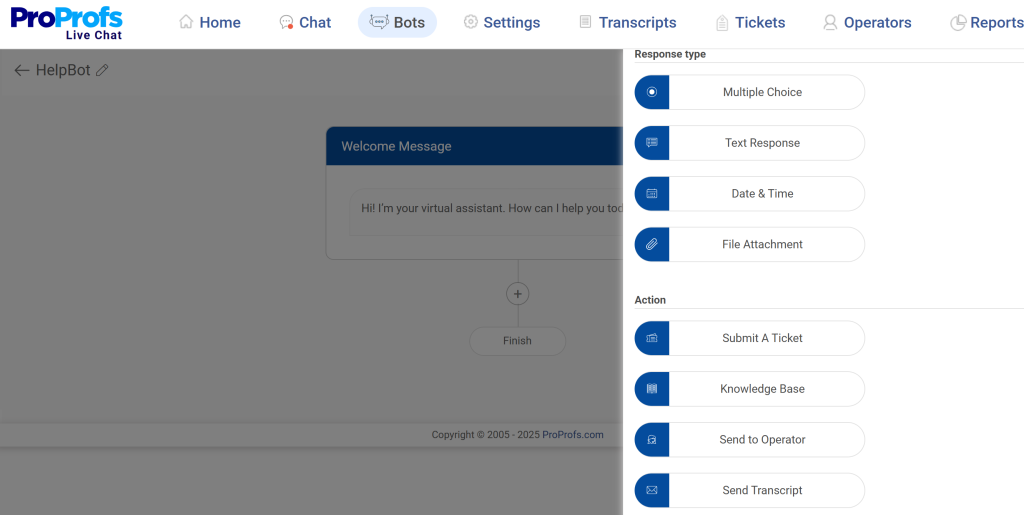
Among the best practices for chatbots, conversational design is the one most often underinvested in and the one customers notice most immediately.
How to make conversations feel natural:
- Use progressive disclosure — Ask one question at a time, not five at once
- Mirror your brand voice — Friendly brand? The bot should be friendly. Professional industry? Keep it clean and direct
- Acknowledge, then answer — A simple “Got it!” before a response feels more human
- Use buttons and quick replies — Reduce typing friction by offering pre-set options for common paths
- Build in typing delays — A slight pause before a response feels more natural than an instant wall of text
- Write like people talk — Short sentences, plain words, no jargon
A useful test: read your conversation flow out loud. If it sounds unnatural, rewrite it. If a new employee is confused by the instructions, a customer will be too.
4. Build a Seamless Human Handoff Strategy
This is the one that most chatbots get wrong. A poorly designed handoff where a customer gets transferred without context and has to repeat everything can undo all the goodwill your bot just built, while customer service AI agents can help make those escalations faster and more seamless.
Best chatbot practices treat human handoff not as a fallback, but as a feature.
What a seamless handoff looks like:
- Trigger criteria are defined — Escalation happens when: the bot can’t answer after two attempts, the user types “agent,” “human,” or “help,” or a sentiment threshold is crossed
- Full context transfers — The agent receives the complete conversation transcript, not just the last message
- No dead ends — If no agent is available, the bot captures the customer’s issue and contact details, then sets an expectation for response time
- Warm vs. cold handoffs — When possible, the bot introduces the agent before transferring
- After-hours routing — The bot clearly communicates when humans will be available and offers to follow up
Among chatbot building best practices, this one has the clearest impact on customer satisfaction scores. The handoff itself is often the most painful point in the customer journey and getting it right is what separates a forgettable bot experience from a trusted one.
5. Use Your Chatbot to Capture and Qualify Leads
Most businesses use their chatbots as support tools. The smarter ones use it as a 24/7 sales assistant.
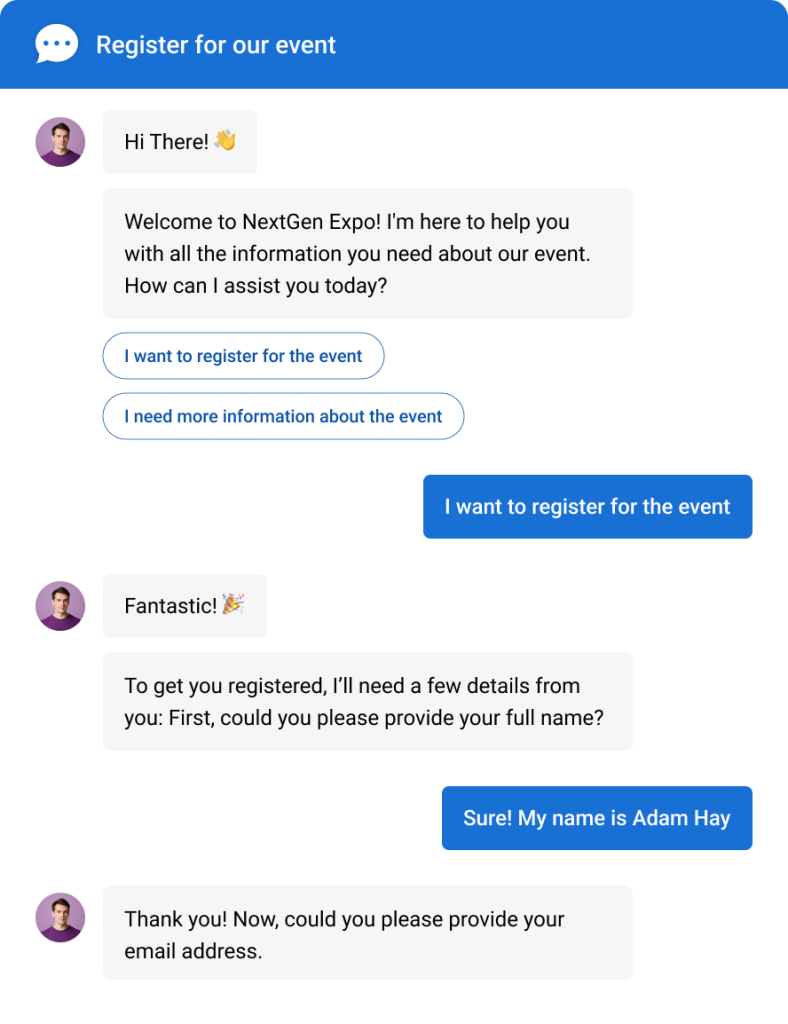
A well-configured lead generation chatbot can identify high-intent visitors, capture contact information, and route warm leads directly to your CRM all without a human being involved.
How to turn your chatbot into a lead engine:
- Trigger the bot on high-intent pages — Pricing pages, demo pages, and product comparison pages have the highest conversion intent
- Ask progressive qualification questions — Start with the problem they’re trying to solve, then layer in company size, timeline, and budget
- Offer value in exchange for contact info — A free trial, a demo, a resource download, or an instant answer to their question
- Route by score — Hot leads go to sales immediately; warm leads go to a nurture sequence
- Integrate with your CRM — Every captured lead syncs automatically to HubSpot, Salesforce, or Zoho
According to Grand View Research (2025), the global chatbot market reached USD 9,560.7 million in 2025, and lead generation and sales support are two of the fastest-growing use cases driving that number.
6. Deploy Chatbot Across the Right Channels
Your chatbot should be where your customers already are, not just where you think they are.
Many businesses default to a website widget and stop there. But if your customers primarily reach you via WhatsApp, Facebook Messenger, or Instagram DM, a website-only bot is leaving a significant chunk of interactions unaddressed.
How to identify the right deployment channels:
- Audit your inbound traffic sources — Where are conversations already starting?
- Check support ticket origins — Email, social, phone, or live chat?
- Survey your customers — Ask them directly where they prefer to communicate
- Map to your audience demographics — B2B customers tend to prefer web and email; B2C customers lean toward messaging apps
- Deploy in phases — Start with your highest-volume channel, stabilize, then expand
One of the most important best practices of chatbot building is omnichannel chatbot consistency, ensuring the bot behaves the same way and has access to the same information regardless of which channel the customer uses.
7. Integrate With Your CRM and Business Tools
A chatbot that doesn’t talk to your other tools is just an expensive FAQ page. The real value of a chatbot comes from what it does with the data it collects, and that only happens through integration.
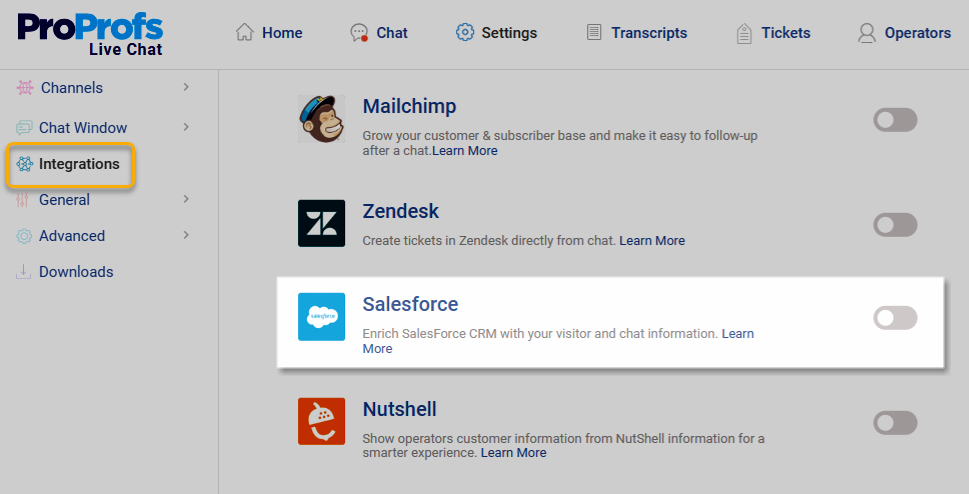
Key integrations that amplify chatbot value:
- CRM (Salesforce, HubSpot, Zoho) — Sync leads, contacts, and conversation history automatically
- Help desk (ProProfs Help Desk, Zendesk) — Convert unresolved bot conversations into support tickets without manual input
- E-commerce platforms (Shopify, WooCommerce) — Pull live order status, tracking info, and product data
- Scheduling tools (Calendly, Google Calendar) — Let the bot book demos, appointments, or callbacks
- Knowledge base — Feed your existing documentation to the bot so it can answer from a single source of truth
According to IDC’s FutureScape 2024 IT Industry Predictions, data silos remain a critical barrier — and by 2026, only 50% of large enterprises are expected to have significantly broken them down, even with modern data-as-a-product architectures in place.
When your chatbot data doesn’t connect to your business systems, you lose visibility into what’s actually happening. The integration step is also where most teams hit friction. Choosing a platform like ProProfs Chat, which offers pre-built integrations with the most common CRM and help desk tools, significantly reduces setup time.
8. Plan a Fallback Strategy for Every Dead End
Every chatbot hits a wall. The ones that keep customers happy are the ones that handle that wall gracefully.
A fallback strategy is your plan for what happens when the bot doesn’t understand a query, the user goes off-script, or the conversation reaches a point where automation simply isn’t enough.
What a strong fallback strategy includes:
- Friendly non-understanding messages — “I’m not sure I caught that — can you rephrase it?” beats “Error: input not recognized”
- Maximum retry limit — After two failed attempts to understand, escalate or offer a different path
- Clear escalation options — Always offer a “speak to a human” path, visible and accessible
- After-hours contact capture — If no agent is available, collect the issue and contact info with a clear SLA
- Redirect to resources — Link to relevant knowledge base articles or FAQ pages as an interim step
A well-designed fallback doesn’t break the conversation. It keeps it moving forward.
9. Personalize Conversations Based on User Context
A chatbot that greets a returning customer the same way it greets a first-time visitor is leaving a lot of value on the table.
Personalization in chatbots doesn’t require complex AI. It starts with using the data you already have — visit history, past purchases, CRM records, or even the page a user is currently on — to make the conversation feel relevant.
How to personalize chatbot conversations:
- Use the visitor’s name — If it’s in your CRM, surface it
- Reference past interactions — “Last time you asked about our enterprise plan…” builds instant rapport
- Trigger contextually — A visitor on your pricing page gets a different opening message than one reading your blog
- Segment by user type — New visitors, existing customers, and high-value accounts should each have tailored flows
- Adapt tone based on behavior signals — A user who’s been on the same page for 5 minutes may need proactive help
According to McKinsey (2025), AI-enabled customer service is the fastest way to deliver personalized, proactive support at scale — and personalized experiences consistently translate into higher conversion and retention rates.
10. Monitor Performance and Continuously Improve
Launching your chatbot is the beginning, not the finish line.
The businesses that get the most from their chatbots treat them like a product — with regular reviews, data-driven updates, and a process for identifying what’s breaking and what’s working.
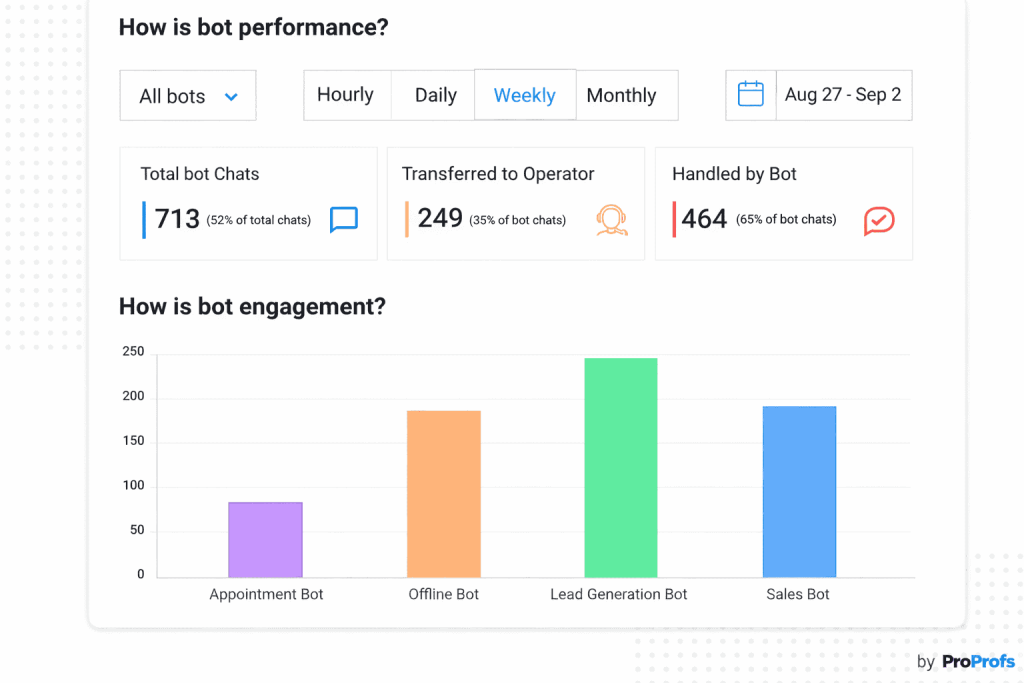
What to monitor and how often:
| Metric | Why It Matters | Review Frequency |
|---|---|---|
| Containment Rate | % of chats resolved without human help | Weekly |
| Fallback Rate | How often the bot fails to understand | Weekly |
| Lead Capture Rate | % of visitors who share contact info | Weekly |
| Handoff Rate | How often escalation to human occurs | Weekly |
| CSAT / Rating | Customer satisfaction with bot interactions | Monthly |
| Conversion Rate | Leads or sales influenced by bot | Monthly |
| Top Unresolved Queries | Gaps in bot training data | Monthly |
Continuous monitoring directly determines long-term ROI. Set a recurring monthly review. Bring your support lead, a sales rep, and whoever manages the tool. Walk through unresolved queries, drop-off points, and conversion trends. Make small, targeted updates. Then measure again.
Gartner (2025) projects that by 2029, agentic AI will autonomously resolve 80% of common customer service issues — but that future only arrives for organizations that are already in the habit of iterating on their current tools.
What Do Real Businesses Gain From Following Chatbot Best Practices?
When these practices are applied together, the results are consistent and measurable:
For support teams:
- Fewer repetitive tickets handled by humans
- Faster first response times; bots respond in seconds, not minutes
- Agents spend more time on complex, high-value issues
For sales and marketing:
- Leads captured 24/7, including nights, weekends, and holidays
- Faster lead qualification and routing to the right sales rep
- Higher conversion rates from proactive, well-timed engagement
For customers:
- Faster answers, regardless of time zone or business hours
- Consistent, accurate information every time
- An escalation path that actually works when they need a human
Businesses that build good habits now, from clean training data to thoughtful handoffs and tight integrations, will be significantly ahead as customer expectations for AI-powered service continue to rise.
What Are the Most Common Chatbot Mistakes (And How to Fix Them)?
Even with the best intentions, teams make the same mistakes. Here’s what to watch for:
Mistake 1: Building a Bot That Does Everything
Teams try to cover every possible use case at once. This leads to weak, surface-level responses across multiple topics instead of strong performance in one area. The bot becomes unreliable, users lose trust quickly, and support teams face more escalations than before, defeating the purpose of automation.
How to Fix it:
Start with one high-impact use case like FAQs or lead capture. Focus on accuracy and resolution first. Once performance is strong and consistent, gradually expand to new use cases based on real user demand and data.
Mistake 2: Skipping Training on Real Customer Data
Teams design chatbot flows based on assumptions instead of actual conversations. This creates a gap between how users ask questions and how the bot understands them. Even when answers exist, the bot fails to match intent, leading to poor resolution rates and frustration.
How to Fix it:
Analyze real conversations before building flows. Use past support tickets, chat logs, and emails to identify common phrases, intent patterns, and questions. Train the bot using actual language customers use, not internal assumptions.
Mistake 3: No Human Handoff Plan
Without a proper escalation system, customers get stuck when the bot fails. There’s no clear path to a human, no context transfer, and no continuity. Users must repeat their issues, creating friction and frustration that damages trust in both the bot and the brand.
How to Fix it:
Define when and how escalation happens. Set triggers for complex queries, ensure chat context is passed to agents, and provide clear messaging so users know when they’re being transferred or when to expect a response.
Mistake 4: Deploying Only on the Website
Many teams limit chatbot deployment to their website, ignoring channels where customers are already active. This creates a fragmented experience and misses high-intent conversations happening on social or messaging platforms, reducing the chatbot’s overall effectiveness and reach.
How to Fix it:
Identify where your customers interact most, such as WhatsApp, Instagram, or Messenger. Deploy the chatbot across these channels first to ensure consistent support and engagement wherever users prefer to communicate.
Mistake 5: Launching and Forgetting
After launch, teams stop monitoring performance. Over time, unanswered queries increase, language patterns change, and the bot becomes outdated. Performance declines gradually, but teams only notice when customer complaints rise and manual workload returns.
How to Fix it:
Schedule regular reviews of chatbot performance. Analyze unresolved queries, update responses, and refine training data. Treat the bot as a continuously evolving system, not a one-time setup.
Mistake 6: Training on Outdated Content
When chatbot knowledge isn’t updated, it starts sharing incorrect or irrelevant information. This can mislead customers, especially around pricing or policies, and damage credibility. In some industries, outdated responses can even create compliance risks.
How to Fix it:
Keep chatbot knowledge synced with your latest content. Connect it to a live knowledge base and review information regularly. Ensure updates in products, pricing, or policies are reflected immediately in chatbot responses.
Don’t Just Launch a Bot. Launch Results!
Getting a chatbot right isn’t about advanced tech. It’s about how thoughtfully you set it up, train it, and improve it over time.
The teams seeing real results follow the best practices in chatbot building from the start: they begin focused, use real data, build human handoff early, and keep refining post-launch. That’s what works.
As you move forward, solve one key problem first. Plan fallbacks before launch. Connect your CRM early. And treat the first 90 days as a learning phase, not the finish line.
If you want a simple way to bring this together, ProProfs Chat is worth exploring. It combines live chat, AI, omnichannel support, and integrations in one easy-to-manage platform.
Frequently Asked Questions

How often should I update my chatbot's content?
At a minimum, quarterly. More frequently if your pricing, policies, or products change often. A bot giving outdated information is worse than no bot at all. Incorrect answers erode customer trust faster than a slow response time ever would.
Is it okay for my chatbot to say it does not know something?
Absolutely, and it is better than guessing. A bot that says "I do not have that information, but let me connect you with someone who does" builds more trust than one that fabricates an answer. Transparency about limitations is one of the most underrated chatbot best practices.
Should my chatbot always identify itself as a bot?
Yes. Customers who discover they have been talking to a bot without disclosure consistently report lower satisfaction and trust. Most users today do not mind talking to a bot. They mind being deceived. A simple "Hi, I am [Bot Name], your virtual assistant" sets the right expectation from the start.
How long does it take to set up a chatbot?
For a focused, single-use-case chatbot, most businesses are live within a day or two. Enterprise deployments with CRM integrations and multiple conversation flows typically take three to six months. The most important factor is not speed. It is starting with a clear purpose and clean training data.
What industries benefit most from chatbots?
Retail, e-commerce, SaaS, healthcare, and financial services see the strongest returns. Any industry with high query volume, repetitive support questions, or a need for 24/7 availability is a strong candidate. B2C companies with large customer bases typically see the fastest ROI from chatbot deployment.
Can chatbots handle complaints effectively?
For straightforward complaints such as delayed orders, billing discrepancies, or basic product issues, yes. For emotionally charged or complex situations, the bot’s job is to acknowledge the issue, gather context, and hand off to a human agent quickly with full conversation history. Trying to resolve serious complaints entirely through automation is one of the fastest ways to lose a customer.
FREE. All Features. FOREVER!
Try our Forever FREE account with all premium features!

 We'd love your feedback!
What did you like & how can we make it even better?

 Thanks for your feedback!
 Ask Your Question
Have a question? Get expert help to make your decision easier.