
Selling online sounds exciting until your inbox turns into a never-ending to-do list.
While managing our Shopify store, I’ve felt the pressure of being “always on,” constantly responding to customer questions while trying to drive sales. It’s exhausting.
But here’s the good news: you don’t have to do it all manually.
With the best chatbot for a Shopify store, you can automate the busywork, respond instantly, and even guide shoppers toward checkout, day or night.
In this blog, I’ll share the 11 best AI chatbots for Shopify that can take your support to the next level and help grow your online business.
What Is a Shopify AI Chatbot?
Unlike basic live chat, an AI chatbot learns from your product catalog, help content, and past conversations. It gets smarter over time. And unlike a human support team, it works 24/7, handles multiple simultaneous chats, and never loses patience.
It seamlessly integrates with your CRM, social channels like Facebook and Instagram, and tools like WhatsApp, so your customer experience stays consistent everywhere a shopper might reach out.
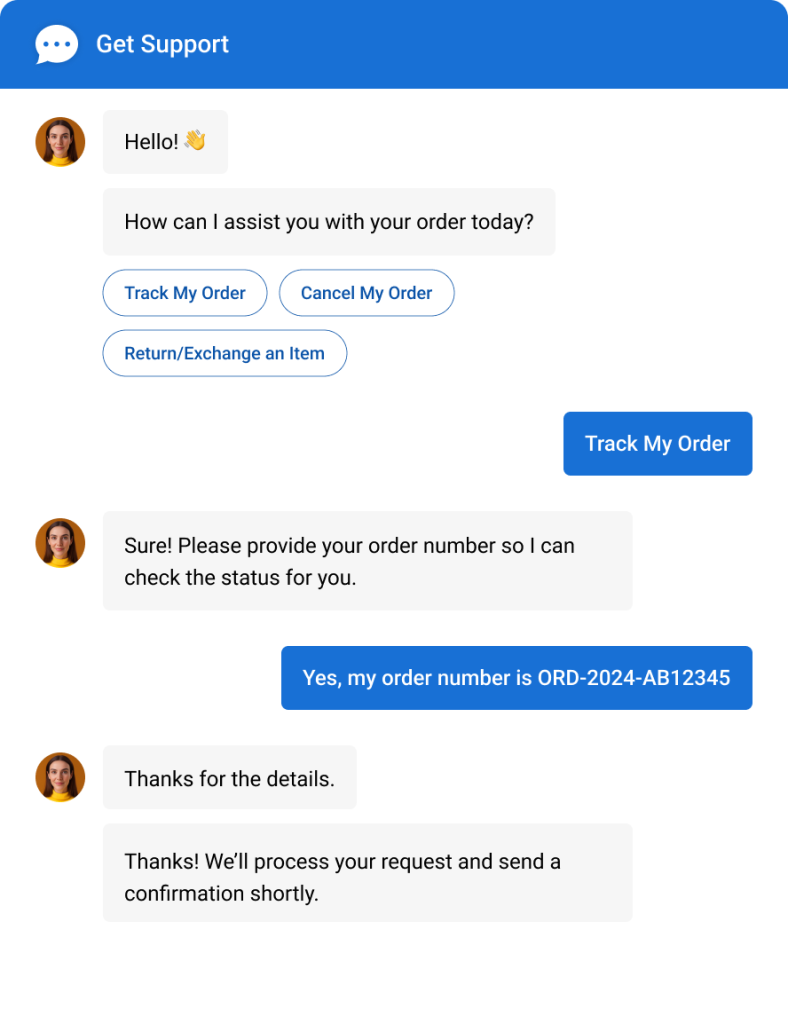
Here’s what a well-configured Shopify AI chatbot can do out of the box:
- Instantly answers FAQs and repetitive questions
- Tracks orders and handles product queries within Shopify
- Captures leads with pre-chat forms and custom flows
- Book appointments directly through the Shopify live chat app
- Integrates with WhatsApp, Facebook, and Instagram
- Tracks performance with real-time analytics and reporting
Why this matters now: According to McKinsey’s State of AI report in 2025, 71% of companies now use generative AI in at least one business function, up from 65% in early 2024.
What Are the 11 Best Chatbots for Shopify Stores?
I’ve tried out quite a few Shopify chatbots over the years, comparing pricing, features, and how smart their AI really is. If you’re searching for the best AI chatbot for Shopify store, these picks strike an outstanding balance between functionality and affordability.
Here’s a quick look at the top 11 AI chatbots for your Shopify store.
| Shopify Chatbots | Best For | Pricing | User Rating |
| ProProfs Chat | Easy Live Chat & AI Customer Service Agent for Instant, Automated Support | A free plan is available for growing teams. Paid plan starts at $19.99/user/month | 4.8 (Capterra) |
| Zowie | Self-Service | Contact the sales team | 4.2 (G2) |
| Intercom | Multi-Channel Communication | Starts at $29/seat/month | 4.5 (Capterra) |
| Zendesk | Helpdesk Functionality | Starts at $19/user/month. | 4.5 (G2) |
| YourGPT | Multi-Channel Support Automation | Starts at $39/user/month | 4.7/5 (G2) |
| Tidio | Ticketing Functionality | Starts at $29/month. | 4.7 (Capterra) |
| Jasper | Generating Engaging, AI-driven Conversations | Starts at $39/user/month. | 4.5 (G2) |
| HeyDay by HootSuite | Live Chat Handoff | Contact the sales team. | 4.0 (G2) |
| ChatBot | Lead Qualification | Starts at $52/month. | 4.6 (Capterra) |
| Re:amaze | Real-Time Visitor Data | Starts at $29/user/month. | 4.6 (G2) |
| Gorgias | Real-Time Customer Support & Automated Self-Service | Starts at $50/month. | 4.6 (G2) |
1. ProProfs Chat – Best for Easy Live Chat & AI Customer Service Agent for Instant, Automated Support
I’ve been using ProProfs Chatbot for my Shopify store for over a year now, and the results have been excellent. It’s an all-in-one customer support solution that delivers round-the-clock assistance, answers common questions, gathers feedback, and even helps with upselling seamlessly integrated with Shopify and tools like email marketing, CRM, and analytics.
Getting started was surprisingly easy. I simply entered my Shopify store URL, and it generated an AI customer support agent using my existing store content. You can try it out here:
As I added product guides, FAQs, and help articles, it continued learning and became better at answering shopper questions without extra setup. Advanced AI agent training trains the chatbot on your website, help center, and FAQs, so AI-generated answers always pull from your actual data with the source cited. Once live, action-based AI agents complete tasks like updating orders and scheduling meetings directly from chat.
Sentiment analysis detects emotions in real time and feeds into risk prediction, which assigns churn scores so your team knows who needs attention. Resolution overviews and AI agent performance reports, then continuously track satisfaction.
I also like that it integrates seamlessly with ProProfs Knowledge Base and ProProfs Help Desk, making it easy to combine self-service resources, AI conversations, and live support as customer needs become more complex. Thanks to ProProfs Chat, I’ve seen higher sales, lower support expenses, and more loyal customers. It’s a powerful, scalable solution, ideal for Shopify stores of any size, whether you’re running a small shop or managing a large-scale ecommerce operation.
Pros:
- Action-based AI support agents that update orders, schedule meetings, and trigger notifications
- Sentiment analysis and risk prediction to flag frustrated or at-risk customers early
- Resolution overviews and AI performance reports to track and improve chatbot quality continuously
- Real-time visitor tracking to understand customer behavior and provide instant assistance
Cons:
- Cloud-only – no offline access
- No dark theme
User Rating: 4.8 (Capterra)
Pricing: A free plan is available for growing teams. Paid plan starts at $19.99/user/month.
See how Horse Saddle Shop transformed customer experience using ProProfs Live Chat, delivering 24/7 support, increasing sales, and impressing global buyers with real-time translation.

2. Zowie – Best for Self-Service
If you’re looking for a way to provide fast, efficient support on your Shopify store, Zowie is a great choice. Best known for its self-service capabilities, this AI chatbot streamlines customer service by automating responses to common questions and issues. It helps provide quick solutions, freeing up your team to focus on more complex tasks.

I love how easy it is to set up on Shopify—Zowie integrates smoothly and starts working right away. Whether it’s handling order tracking, answering product questions, or managing FAQs, Zowie’s AI ensures your customers get immediate responses. Over time, it gets smarter, improving its ability to tackle more detailed inquiries.
It’s a solid pick, especially for growing or high-traffic stores looking to scale support without adding extra staff.
Pros:
- Automated responses to Instantly address common customer questions
- Customizable workflow to tailor the chatbot’s behavior to fit your business needs
- Analytics dashboard to monitor performance and customer interactions in real-time
- Customer intent recognition to identify customer needs
Cons:
- Pricing not transparent upfront
- Limited customization for conversation flows
Pricing: Contact the sales team.
User Rating: 4.2 (G2)
3. Intercom – Best for Multi-Channel Communication
Intercom is an AI chatbot that excels at engaging with customers across multiple platforms, making it perfect for Shopify users looking to connect with visitors through various channels.
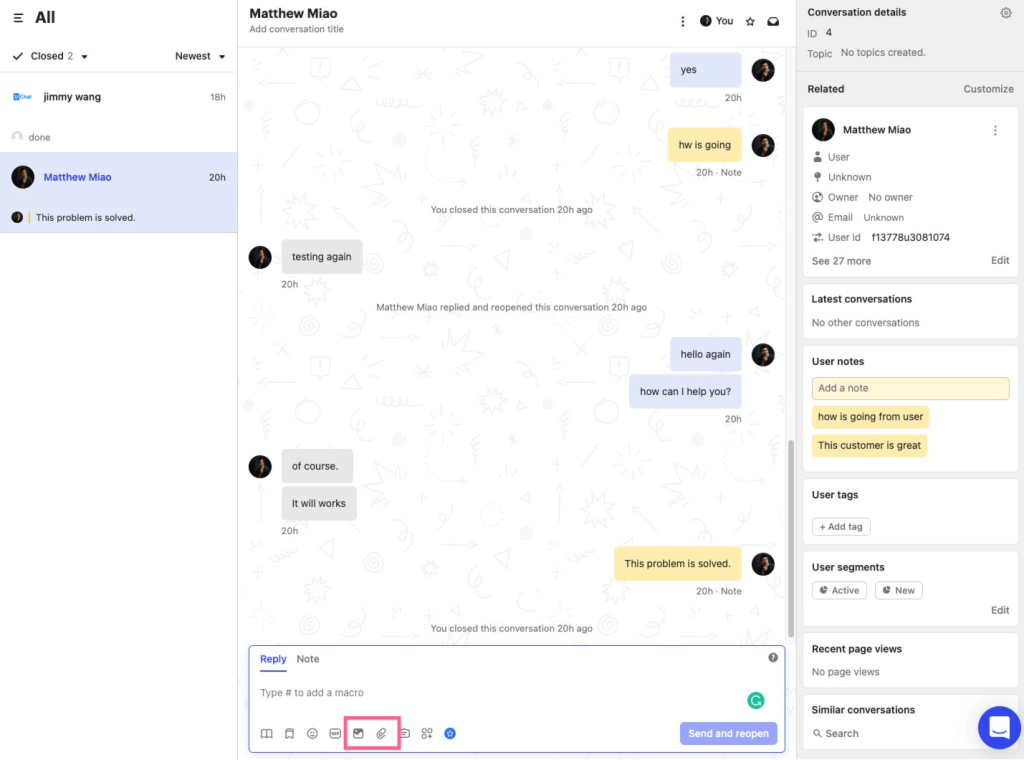
From live chat to email, and even social media, Intercom allows you to manage all interactions in one place. This streamlined communication means you can keep conversations consistent, no matter where your customers are.
I’ve found it especially handy for personalizing customer support. Intercom’s automation features help you quickly answer common questions, while its live chat option ensures you’re there for more complex queries. Whether it’s support or personalized marketing, Intercom integrates seamlessly with Shopify, ideal for medium to large stores handling high customer volumes.
Pros:
- Multi-channel support to engage with customers via email, social media, and live chat
- Personalized messaging to tailor interactions based on customer data
- Real-time analytics to monitor customer engagement and chatbot performance instantly
- Help center integration to provide instant self-service answers
Cons:
- Gets expensive fast at scale
- Setup takes time for beginners
User Rating: 4.5 (Capterra)
Pricing: Starts at $29/seat/month.
4. Zendesk – Best for Helpdesk Functionality
Zendesk is a solid AI chatbot tool that integrates seamlessly with your Shopify store, helping you provide excellent customer service.
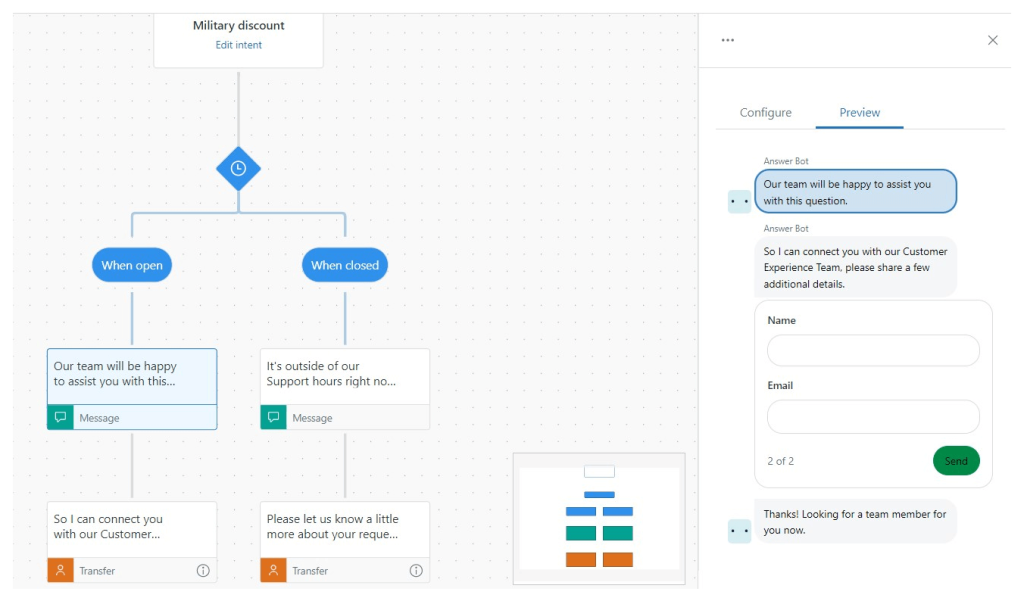
Best for helpdesk functionality, it ensures that you can quickly respond to customer inquiries, whether they’re about products, shipping, or returns. I personally love how easy it is to set up, and it works well for businesses of all sizes.
With Zendesk, you can automate responses, collect data, and even use AI to predict customer needs. It also helps manage conversations across multiple channels, so you never miss an inquiry. What’s more, it’s easy to track performance through detailed reports, which is a big win for managing customer support efficiently.
It’s especially great for medium to large Shopify stores looking for a robust support system without getting overwhelmed.
Pros:
- Advanced ticketing system to organize and prioritize customer inquiries
- AI-powered responses to provide instant, relevant answers to common questions
- Knowledge base integration to empower customers with self-service options
- Unified inbox to manage chat, email, and social messages in one place
Cons:
- Can feel complex for small stores
- AI features need significant initial training
User Rating: 4.5 (G2)
Pricing: Starts at $19/user/month.
5.YourGPT – Best for Multi-Channel Support Automation
YourGPT handles customer support across email, WhatsApp, Instagram, Slack, and your website, from one dashboard. Unlike single-channel solutions, it deploys one AI agent across 100+ platforms simultaneously. The platform automatically resolves customer queries with up to 80% resolution rate, freeing your team from repetitive work. It improves over time through self-learning, so accuracy increases as conversations happen.
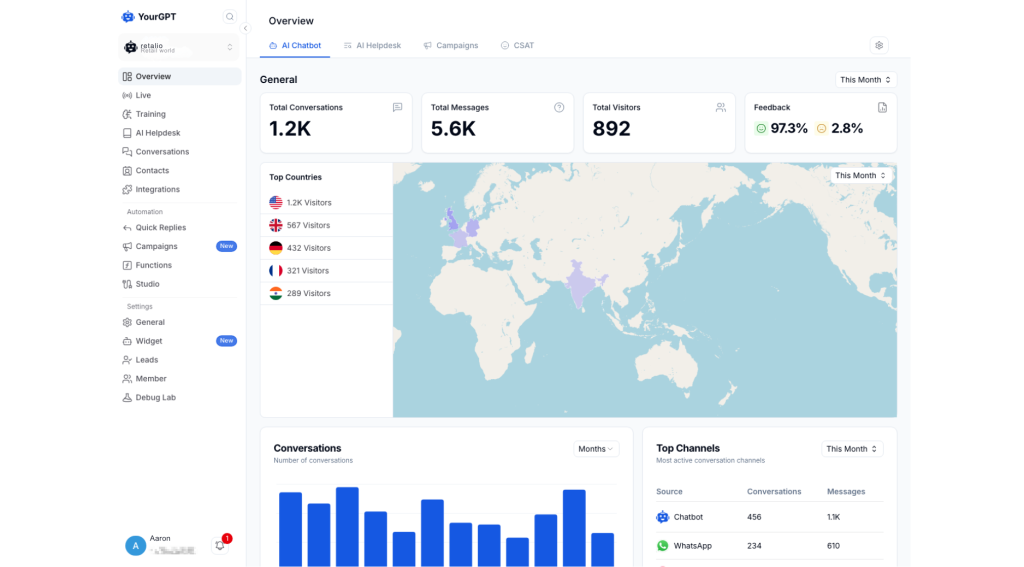
YourGPT integrates directly with platforms like Shopify and automatically answers common product, order, and shipping questions. Set it up by uploading your product documentation, linking your FAQ, or manually typing answers. The AI learns from these sources and responds conversationally. When a question is too complex, it routes to your team with full context. You can customize workflows, set escalation rules, and track performance in real-time.
What makes it stand out: Easy to set up, and the visual builder is straightforward enough for non-technical team members. Updates to your knowledge base take minutes. And since it works across all your channels, customers get consistent support whether they contact you on WhatsApp, email, or your website.
Pros:
- One agent across 100+ channels (WhatsApp, Instagram, Slack, Discord, Telegram, email, web) with instant synchronization
- Visual, no-code builder that non-technical teams can configure in 15-30 minutes without hiring developers
- Self-learning AI that improves automatically from conversation feedback and unresolved queries
- Integrates natively with Shopify, Stripe, Zendesk, Airtable, and Zapier without requiring third-party tools
Cons:
- Manual knowledge base updates required when product information changes. Platform does not auto-sync with your website or documentation.
- Advanced features like custom branding and API access locked behind higher pricing tiers ($129+/month)
Pricing: $39/month (Essential). $129/month (Professional). $499/month (Advanced). 7-day free trial included.
User Rating: 4.7/5 (G2)
6. Tidio – Live Chat with Ticketing Functionality
Tidio is a fantastic Shopify chatbot that brings both simplicity and efficiency to your store’s customer service. It combines live chat and ticketing functionality, making it easy to manage customer inquiries. As a Shopify store owner, I found Tidio’s seamless integration with my store invaluable. It offers quick support to customers and boosts engagement.
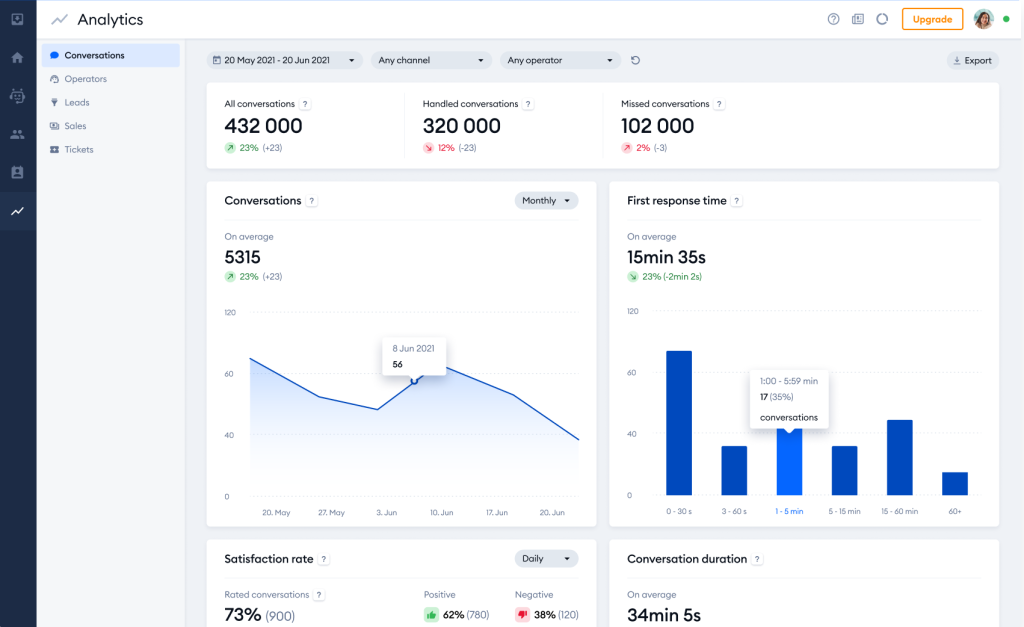
The best part about Tidio is that it offers real-time customer interaction, which is key for enhancing customer experience. I’ve found that it works smoothly across different devices, so you can stay in touch with customers anytime, anywhere. It works perfectly for businesses that need an efficient solution without complicating things.
If you’re running a small to medium-sized Shopify store and want something powerful without the overwhelm, Tidio’s a solid choice.
Pros:
- Integrated ticketing system to Keep track of customer issues systematically
- User-friendly interface for easy navigation
- Multi-channel support to manage customer queries from various platforms
- Customizable chatbot templates to automate FAQs, lead capture, and support
Cons:
- Free plan has limited bot conversations
- AI accuracy drops on complex queries
User Rating: 4.7 (Capterra)
Pricing: Starts at $29/month.
7. Jasper – Best for Generating Engaging, AI-driven Conversations
Jasper offers a robust AI-powered chatbot for Shopify designed to make conversations feel more natural. It stands out as a great tool for automating customer interactions while still keeping things personal. What I love about it is its ability to craft tailored responses that feel natural and human-like, which really helps enhance the customer experience.

As a Shopify chatbot, Jasper integrates smoothly, helping you manage inquiries efficiently and boost sales. You’ll appreciate how it can automatically answer product-related questions, process orders, and even recommend products based on customer behavior. It’s definitely built with ease of use in mind, so you won’t have to worry about complex setups.
All in all, Jasper feels like a perfect fit for small to mid-sized Shopify stores looking to scale support without losing that personal touch.
Pros:
- Easy-to-use interface to set up and manage the chatbot
- Automated order processing to handle customer orders quickly, reducing manual work
- Product recommendations to suggest relevant products based on customer interests
- Self-service returns & refunds to reduce support workload
Cons:
- Primarily a content tool, not dedicated chatbot
- Limited native Shopify-specific support features
User Rating: 4.5(G2)
Pricing: Starts at $39/user/month.
8. Heyday by HootSuite – Best for Live Chat Handoff
Heyday by Hootsuite is an excellent choice for Shopify store owners looking to elevate their customer support. It seamlessly integrates with your store, offering real-time customer support while providing a personalized experience. As an AI chatbot, it can answer FAQs, recommend products, and automate customer service tasks with ease.

What I appreciate about Heyday is its flexibility. It allows human agents to jump in when needed, creating a perfect balance between automation and personal touch. It works effortlessly with Shopify, making it a handy tool for managing sales inquiries, order updates, and customer feedback.
It’s user-friendly, and the integration is quick and straightforward, which makes it a solid option for growing e-commerce businesses. Overall, it’s a great fit for small and mid-sized stores looking to scale their support without scaling their stress.
Pros:
- AI-powered product recommendations for personalized shopping
- Real-time updates and order tracking to keep customers in the loop
- Flexible handoff to live agents for complex queries
- Real-time order tracking to provide instant shipment updates
Cons:
- Pricing not publicly listed anywhere
- Limited integrations outside Hootsuite ecosystem
User Rating: 4.0 (G2)
Pricing: Contact the sales team.
9. ChatBot – Best for Lead Qualification
As an AI chatbot for Shopify, ChatBot offers a seamless integration that helps you automate customer interactions. It’s perfect for qualifying leads, which means it can handle initial queries, gather details, and pass on valuable information to your team.
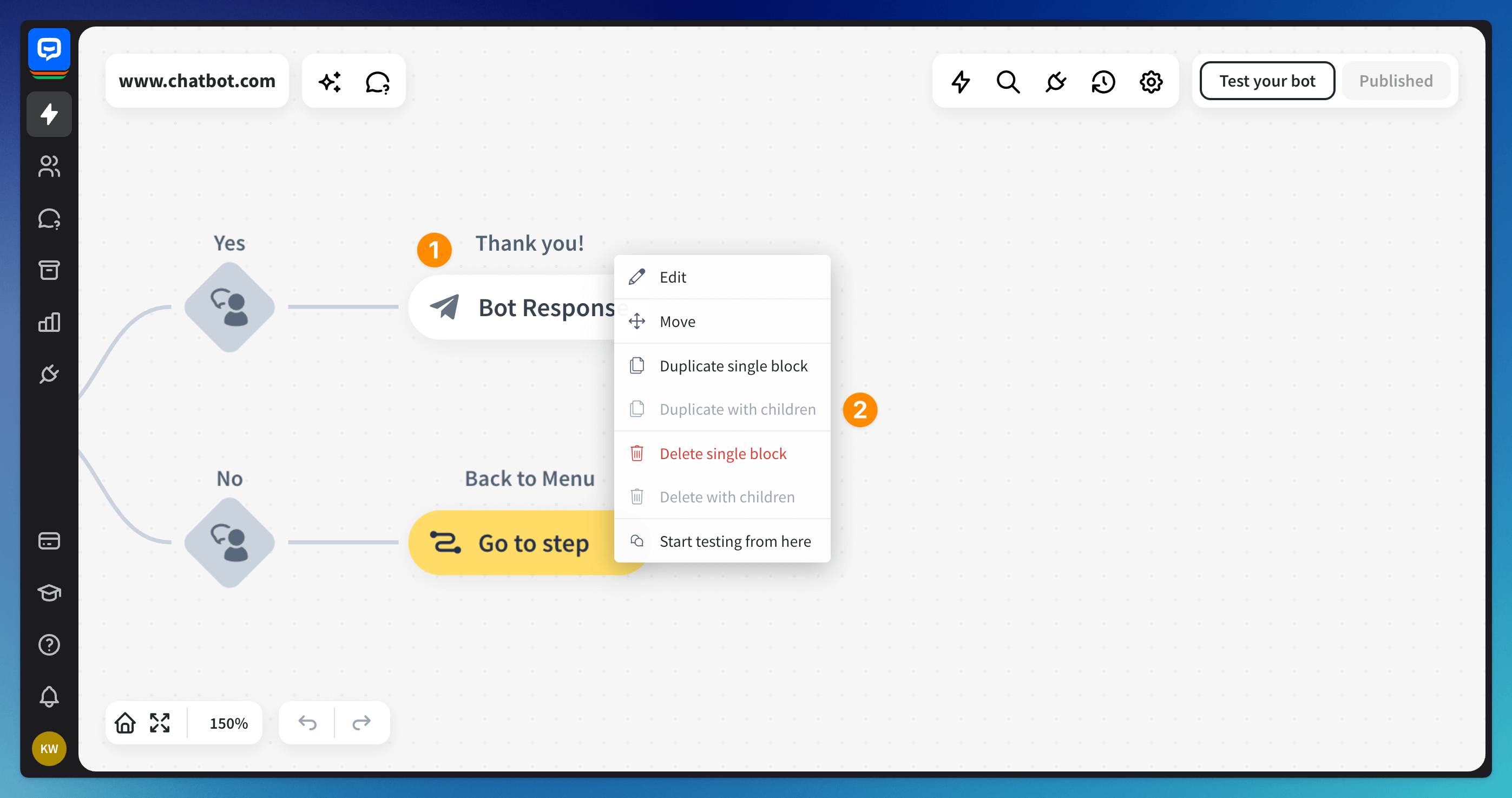
I’ve found it to be a time-saver when it comes to filtering prospects and ensuring that only the most promising ones get your full attention.
It’s also customizable and easy to set up. The drag-and-drop builder is a easy to use, even if you’re not tech-savvy. With features like automated follow-ups, chatbot analytics, and multi-channel support, it’s a great tool to upgrade your Shopify store’s customer experience.
It’s a great fit if you’re running a small to mid-sized Shopify store and want to scale your support without overwhelming your team.
Pros:
- Drag-and-drop builder for easy setup of automated workflows
- Multi-language support to expand your global reach
- Visitor tracking to monitor and track website visitors
- Chatbot analytics & insights to track chatbot performance and improve customer interactions
Cons:
- No built-in live chat on base plan
- Analytics dashboard can feel overwhelming
User Rating: 4.6 (Capterra)
Pricing: Starts at $52/month.
10. Re:amaze – Best for Real-Time Visitor Data
Re:amaze is a versatile AI chatbot designed to boost your Shopify store’s customer engagement. It’s particularly known for providing real-time visitor data. With Re:amaze, you can consolidate all your support channels, email, live chat, social media, and more into one seamless helpdesk, making customer communication more efficient.

What sets Re:amaze apart is its ability to automate tasks using machine learning, helping you respond faster and more accurately. You can create custom chatbots to handle common inquiries, freeing up your time for more complex issues. Plus, its integration with Shopify means you can view order histories and customer data right within your chats, providing personalized support effortlessly.
If you’re running a small to mid-sized Shopify store, Re:amaze is a solid choice for offering fast, personal support without getting overwhelmed.
Pros:
- Unified inbox to manage all customer communications from various channels in one place.
- Real-time monitoring to observe live customer activities on your site for timely engagement.
- Customizable FAQs to provide self-service support with a branded FAQ section
- Canned responses to quickly respond to common questions
Cons:
- Bot builder is less intuitive to configure
- Mobile app experience needs improvement
User Rating: 4.6 (G2)
Pricing: Starts at $29/user/month.
11. Gorgias – Best for Real-Time Customer Support & Automated Self-Service
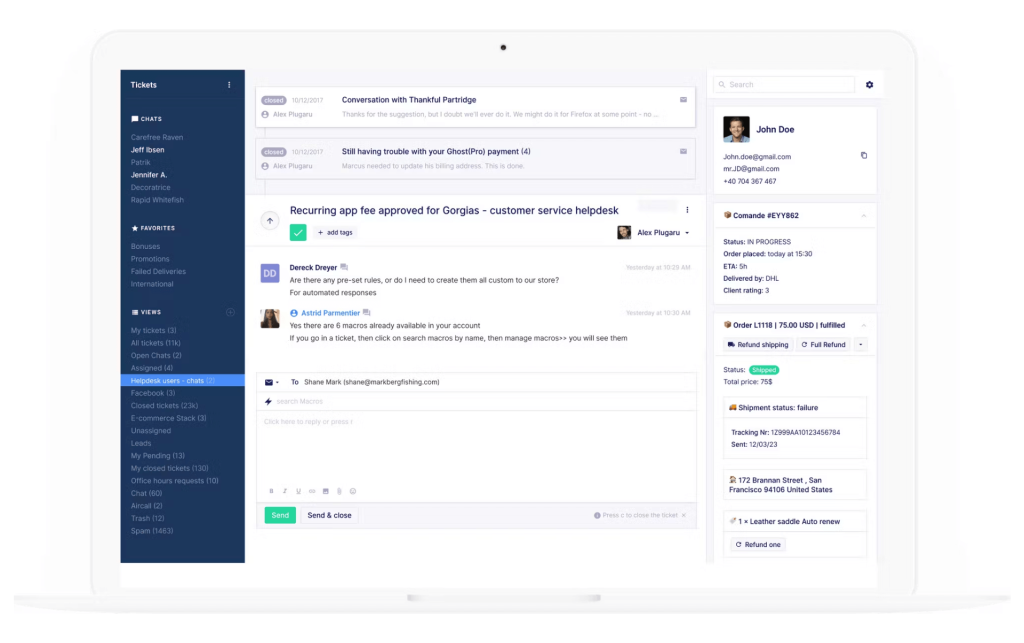
Image Source: GetApp
A colleague recommended Gorgias to me, and I’ve found it to be an amazing tool for eCommerce. It seamlessly integrates with Shopify, allowing you to manage customer interactions efficiently. With Gorgias, you can centralize all your customer communications—be it email, social media, or live chat—into one unified platform, making it easier to stay on top of inquiries.
What sets Gorgias apart is its AI Agent, which automates tasks like order cancellations, refunds, and subscription management directly within Shopify. This means routine queries are handled swiftly, freeing up your time for more personalized customer interactions. Plus, its ability to provide instant product recommendations can boost sales and the shopping experience.
While smaller shops can definitely benefit, Gorgias really shines when your support needs grow. It’s a great match for medium to large Shopify stores that want to stay responsive as volume increases.
Pros:
- Centralized inbox to manage all chats, emails, and social messages in one place
- Product recommendations to boost sales with instant suggestions
- Real-time order management to edit orders and apply discounts
- Revenue tracking to measure chatbot-driven sales and conversions in Shopify
Cons:
- Pricing scales steeply with ticket volume
- Onboarding requires dedicated time investment
User Rating: 4.6 (G2)
Pricing: Starts at $50/month.
What Are the Top 3 Picks for Shopify Chatbots?
Can’t decide? These are the three worth a closer look.
1. ProProfs Chat
ProProfs Chatbot is a robust solution for Shopify stores, providing 24/7 support, upselling, multilingual features, and CRM integration. It uses existing content for training, offers performance analytics, and enables smooth handoffs to human agents, helping boost sales, cut support costs, and improve customer retentio.n
2. Zendesk
Zendesk is a robust AI chatbot tool that offers helpdesk functionality, automated responses, and multi-channel support. It predicts customer needs, collects data, and provides detailed performance reports, making it easy for businesses of all sizes to manage customer service efficiently.
3. Tidio
Tidio combines live chat, ticketing, and real-time customer interaction to streamline support and boost engagement. Its seamless integration, multi-device compatibility, and easy-to-use design make it perfect for businesses seeking efficient, hassle-free customer service.
How to Add ProProfs AI Chatbot to Your Shopify Website
I remember setting up the ProProfs AI Chatbot on my Shopify site — it was quick, easy, and seamless. Let me show you how to set it up in no time!
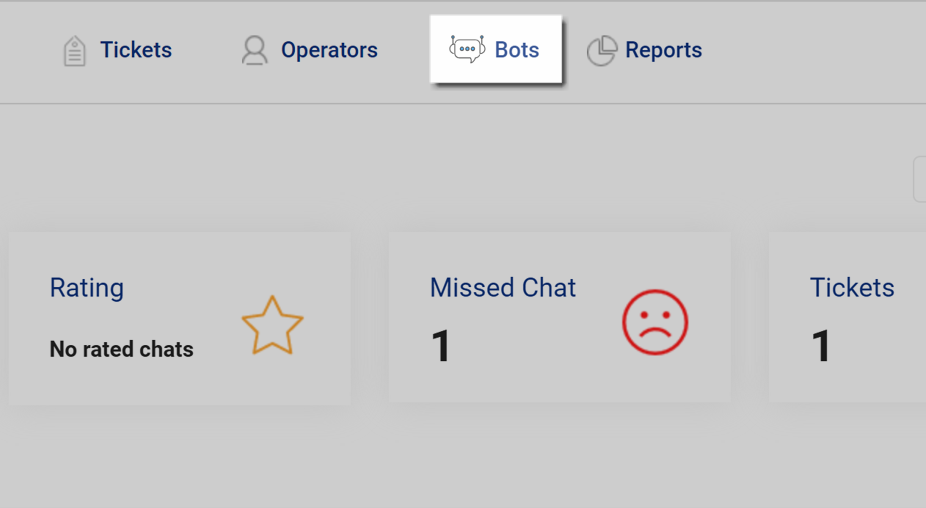
Step 1: Go to your ProProfs Chat account and select the Bots option.
Step 2: On the My Bots page, you’ll see your existing bots. If there aren’t any, use the Create New Bot button to add one.
Here, we’ll be making changes to an existing bot.

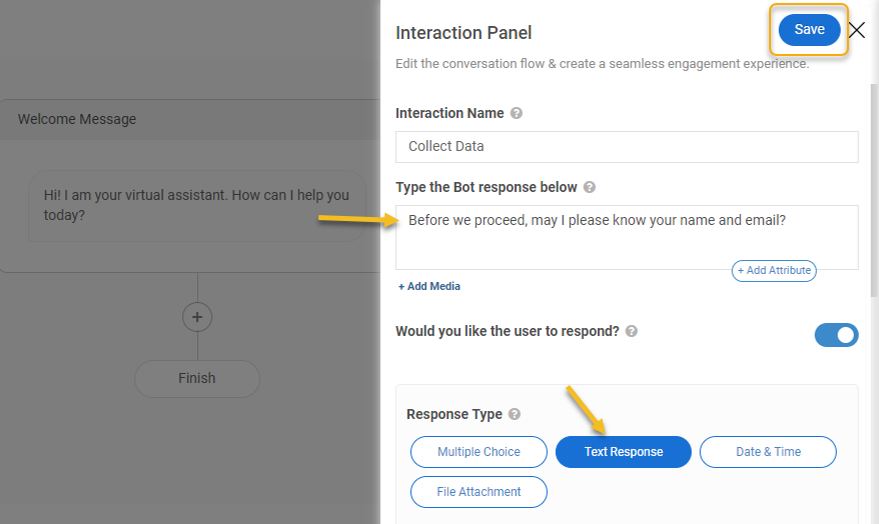
Step 3: Click the + icon to insert an interaction panel after the welcome message. Then, choose Order Status from the interaction panel options.

Step 4: Now, personalize the interaction panel by setting a name and defining the bot’s response, then click save.
Step 5: Once you’ve created the interaction flow, head to Bot Settings to activate your bot where you need it. Just click the gear icon on the My Bots page.

Step 6: To configure the Show Bot section, head to Settings, turn it on for selected or all pages, provide the URL, and save your changes.

Your bot is up and running!

Customers can now seamlessly interact with it for all their order-related queries and more!
Step 7: To integrate, open ProProfs Chat Settings and choose “Integrations.”

Step 8: Click to turn on Shopify, then connect your store in the window that appears.

Step 9: Now, click New Store.

Step 10: You’ll need to enter your store name, which is located in your Shopify account.

Once you’ve entered the info, click “Connect to Shopify.”
Step 11: Log in to your Shopify account, and then install the ProProfs Chat app by clicking “Install App“.

FREE. All Features. FOREVER!
Try our Forever FREE account with all premium features!
Why Are Business Owners Turning to AI Shopify Chatbots?
AI chatbots simplify customer support and boost sales, making them a powerful addition to any Shopify store. Here’s what they can do for your business:
1. Be There 24/7, Even When You’re Not
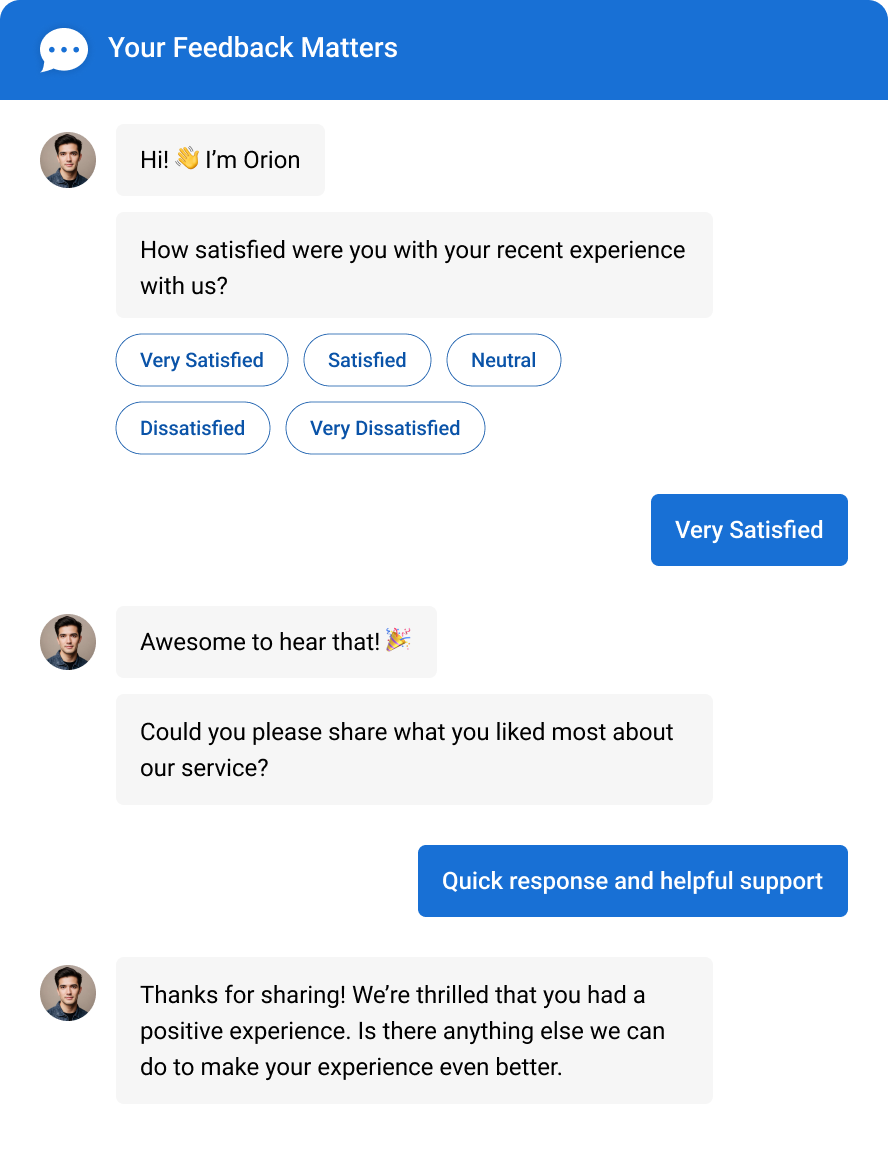
Your customers shop at all hours and expect answers instantly. With AI chatbots for Shopify, your store can support visitors 24/7, whether it’s midnight in New York or morning in Tokyo.
From order tracking to product availability, bots respond immediately, with no wait times and no staffing headaches. And with multilingual support, your international customers feel just as valued.
What’s more, they automatically collect post-chat feedback (as shown above), helping you enhance the customer experience.
Here’s what you gain with 24/7 chatbot support:
- No more missed inquiries
- No more timezone troubles
2. Hand Off Chats to Agents Instantly
Best Shopify chatbots handle FAQs, greetings, and order questions. The moment a conversation gets complex, it escalates to a live agent automatically, with the full chat history attached. No repeated explanations, no frustrated customers waiting in a loop.
Here’s what a clean handoff sets up for your team:
- Trigger-based escalation on keywords or unresolved queries
- Full chat transcript delivered to the agent before they type a word
- Zero wait time gaps during the transition
- Customers stay in the same chat window throughout
See how smart automation meets human touch in this short video:
3. Train Your Bot on Your Store
A chatbot is only as useful as what you teach it. Add your website URL, upload your return policy, or connect your help center, and it learns your store in seconds.
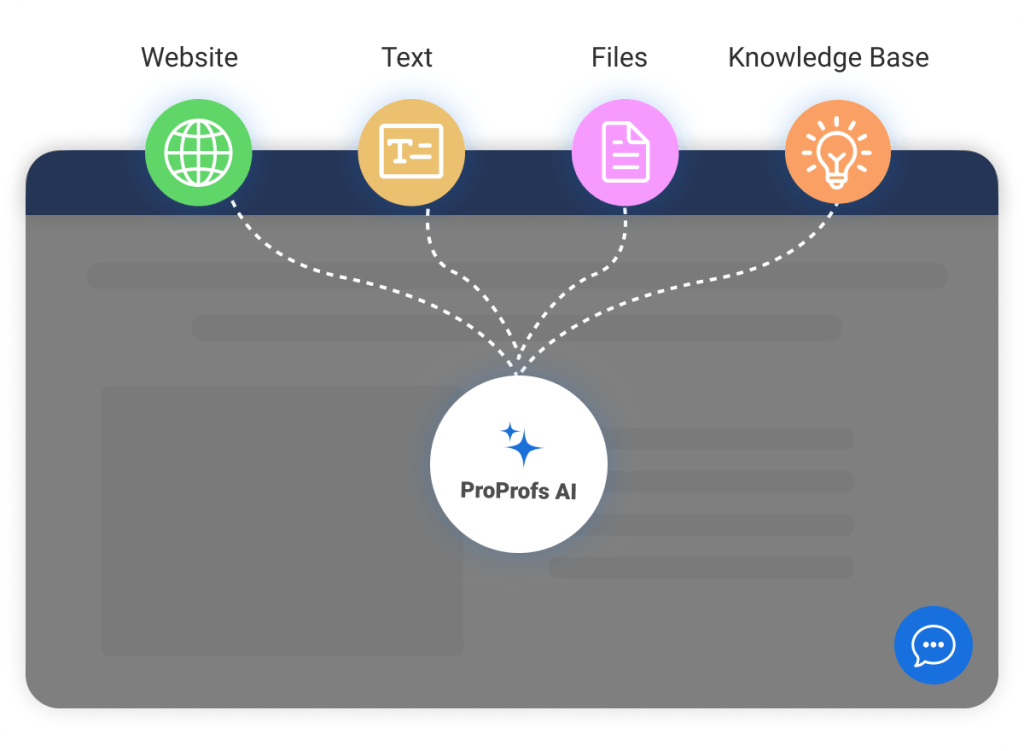
No scripting, no decision trees. Your bot picks up exactly what your customers need to know:
- Product details, variants, and availability
- Shipping timelines and return policies
- Pricing, payment options, and order status
- Store-specific tone and brand language
4. Seamless Integration
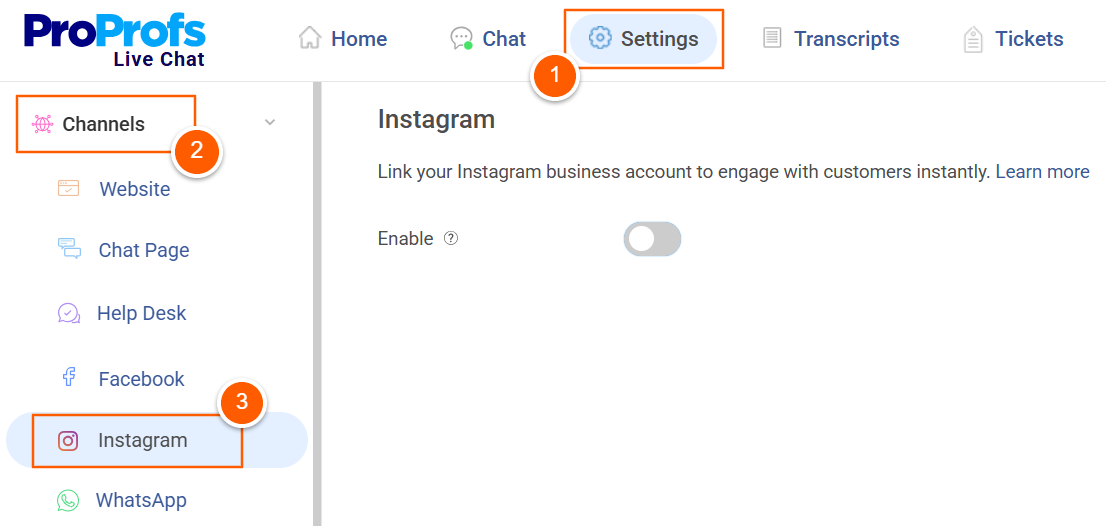
Worried about setup? Don’t be. Most AI chatbots offer plug-and-play integration with Shopify, no coding needed. They pull product details, track orders, and connect with your marketing tools with just a few clicks.
Even better, you can plug into WhatsApp, Facebook, and Instagram, so your bot meets customers where they are.
Why this matters:
- One chatbot, multiple channels
- Zero workflow disruption
5. Stay Informed with Real-Time Analytics
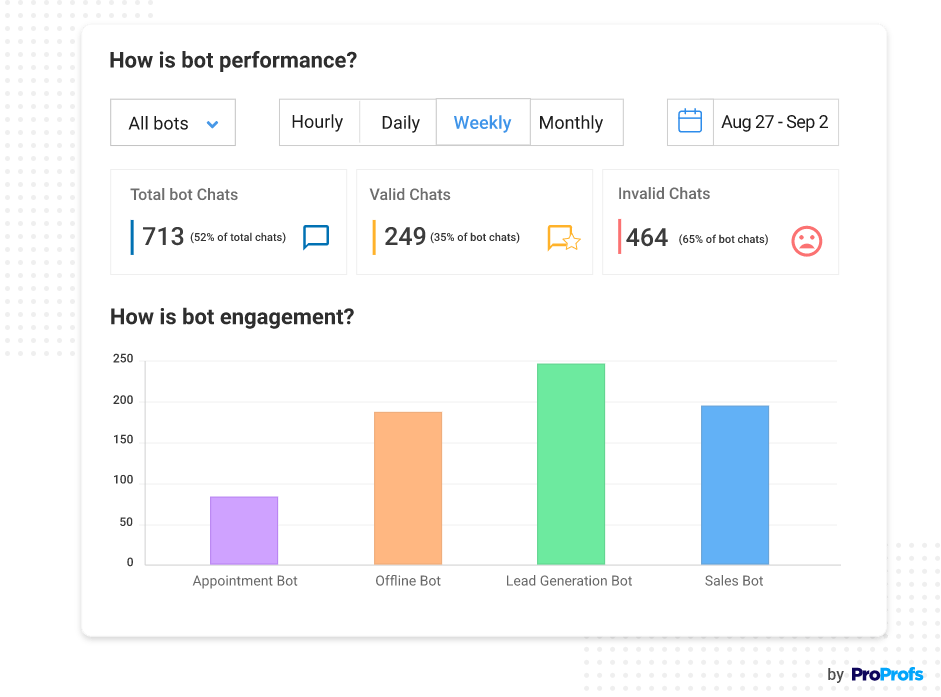
Guessing what works? Not anymore. With built-in analytics and performance tracking, you’ll see what questions are being asked, where leads drop off, and how your chatbot is performing.
Whether you’re managing multiple stores or running your own brand, this data helps you fine-tune for better results.
Here’s what you’ll be able to do with actionable insights:
- Make data-driven decisions
- Track leads, conversions, and support efficiency
Evaluation Criteria for AI Shopify Chatbots
Most store owners shortlist chatbots by feature count. I’d rather shortlist by failure points. The tools that look impressive in a trial often break down on the details that matter most: handoff logic, integration depth, and how they handle a customer who doesn’t speak English.
Use this checklist before you sign up for anything.
| Selection Criteria | What I Look For |
|---|---|
| AI and Human Handoff | Does it escalate to a live agent based on keywords or customer intent, and does the agent receive full chat context automatically? |
| Multilingual Capability | Can it detect a visitor's language and respond natively, without making international customers feel like an afterthought? |
| Customization and Branding | Can I control the chat window design, conversation flow, and tone to match my store without touching a line of code? |
| Ease of Setup | Can a non-technical store owner have it running in under an hour, trained on real store content? |
| CRM Integration | Does it push leads and chat data directly into Salesforce, HubSpot, or Zoho, not just contacts but qualified leads? |
| Security and Compliance | Is it GDPR compliant, SSL encrypted, and built on infrastructure I can actually trust with customer data? |
| Analytics and Reporting | Does it show me what questions are being asked, where conversations drop off, and what the chatbot is actually contributing to revenue? |
Grow Your Shopify Store Faster With a Powerful AI Chatbot!
Best Shopify AI chatbots boost support with instant replies and real-time engagement. An AI chatbot takes it further by automating queries, driving sales, and saving time. Together, they streamline your customer experience and fuel growth.
To make the most of your chatbot, choose one that fits your business needs, integrates seamlessly with Shopify, and provides valuable insights through analytics. Regularly train and update the bot to improve its performance.
ProProfs Chat is a fantastic option, offering AI-powered support, easy Shopify integration, and multilingual capabilities, all designed to help you grow your business.
Even better? You can try it out for FREE and see the impact for yourself. Sign up today and watch your store thrive.
Frequently Asked Questions

Can a Shopify chatbot help with cart abandonment?
Yes, and this is one of the highest-ROI use cases. By detecting hesitation signals, such as inactivity on checkout pages, exit intent behavior, or extended time on the cart page, a proactive chatbot can send a timely message that addresses the customer's concern before they leave.
How do I train a chatbot for my Shopify store?
Most modern tools let you train your chatbot by importing your website URL, uploading FAQ documents, or syncing with your help center. ProProfs Chat scans your website content automatically and organizes it into a knowledge base the bot uses to answer questions. After setup, review the bot's performance analytics regularly and update its training content whenever your products or policies change.
What is the difference between a Shopify chatbot and live chat?
Live chat connects a customer directly to a human agent in real time. A chatbot automates the conversation using AI, without requiring a human to be online. Most modern tools offer both. The bot handles routine queries, and a live agent steps in for complex issues. This combination gives you 24/7 coverage without requiring a 24/7 team.
Can I use a chatbot to collect leads on my Shopify store?
Yes. Most chatbot platforms let you add a pre-chat form that captures the visitor's name, email, and phone number before the conversation begins. You can also build lead qualification flows that ask targeted questions and push the collected data directly into your CRM, such as HubSpot or Salesforce, in real time.
What happens when a chatbot cannot answer a customer's question?
A properly configured chatbot escalates the conversation to a live agent when it hits the limits of its training. The best tools preserve the full chat history during the handoff so the customer never has to repeat themselves. If no agent is available, the bot can collect the customer's contact details and create a support ticket for follow-up.
Can I use a chatbot to collect leads on my Shopify store?
Yes. Most chatbot platforms let you add a pre-chat form that captures the visitor's name, email, and phone number before the conversation begins. You can also build lead qualification flows that ask targeted questions and push the collected data directly into your CRM, such as HubSpot or Salesforce, in real time.
FREE. All Features. FOREVER!
Try our Forever FREE account with all premium features!

 We'd love your feedback!
What did you like & how can we make it even better?

 Thanks for your feedback!
 Ask Your Question
Have a question? Get expert help to make your decision easier.