I have spent years in and around healthcare support, talking to practice managers, patient experience leads, and health system IT teams, and one gap keeps coming up more than any other: what happens to a patient who needs help after hours. A healthcare chatbot would answer, triage, and schedule right then.
I have tested dozens of these tools myself, and most buyers judge them on the wrong things. What actually separates a good one from a liability is HIPAA posture, human handoff quality, EHR integration depth, and how fast your team can get it live without a developer.
Here are the ten I would actually trust with a patient conversation, plus a scoring framework and answers to the questions your compliance team will ask before you sign anything.
What Is a Healthcare Chatbot?

Here’s how the right AI chatbot for healthcare, or AI healthcare chatbot, depending on how you search for it, actually helps your team:
- Answers patient FAQs and provides health information 24/7, even outside office hours
- Schedules, reschedules, and sends reminders for appointments without staff involvement
- Escalates high-risk or complex queries to a live clinical staff member with full conversation context
- Supports multiple languages to serve diverse patient populations
- Maintains security and compliance standards appropriate for healthcare data
10 Best Healthcare Chatbots to Transform Patient Care
To build this list, I tested each tool firsthand and cross-referenced peer recommendations with verified reviews on G2, Capterra, and Gartner. Here’s the quick summary of the top 10 chatbot solutions for the healthcare industry.
| Healthcare Chatbot | Best For | Pricing | User Rating |
| ProProfs Chat | Easy Live Chat & AI Customer Service Agent for Instant, Automated Support | Free plan available. Paid from $19.99/operator/month | 4.8/5 (G2) |
| Ada Health | Intelligent Symptom Assessment | Custom Quote | 3/5 (G2) |
| Kore.ai | Appointment Management at Multi-Location Practices | Custom Quote | 4.6/5 (G2) |
| Hyro.ai | Real-Time Conversational Insights Across Call Centers and Web | Custom Quote | 4.9/5 (G2) |
| Kommunicate | Seamless Bot-to-Human Handoff for Clinical Support Teams | Starts at $40/month | 4.8/5 (G2) |
| QliqSOFT (Quincy) | HIPAA-Compliant Digital Intake and Post-Discharge Outreach | Custom Quote | 4.7/5 (G2) |
| Infermedica | AI-Powered Triage and Symptom Checking at Scale | Custom Quote | 4.5/5 (G2) |
| Orbita | Voice and Chat Automation Across Hospital Systems | Custom Quote | 4.2/5 (G2) |
| Sensely | Virtual Nurse Assistants in Chronic Care Management | Custom Quote | 4.5/5 (G2) |
| Aisera | AI Service Desk Automation Across Healthcare IT and HR | Custom Quote | 4.4/5 (G2) |
1. ProProfs Chat – Best for Easy Live Chat & AI Customer Service Agent for Instant, Automated Support
When I tested ProProfs Chat for a healthcare support use case, I wanted to see how well it could handle patients outside business hours without putting anyone on call. The setup was faster than I expected. AI Agent Training lets you point the bot at your website, upload clinical FAQs, or connect your knowledge base, and it goes live the same day with every answer citing its source.
The AI layer is where the platform really earns its keep: AI Agents schedule appointments, send confirmations, and trigger Slack alerts without staff involvement.
I like how AI Article Recommendations surface relevant help content mid-chat to cut escalations; and Sentiment Analysis, Risk Prediction, and the Resolution Overview work together to tell you exactly how patients are feeling, which conversations are at risk, and how every chat ended.
Curious how a healthcare chatbot works? Try it out now!
Beyond the AI, Proactive Chat Invitations pull hesitant patients into a conversation before they leave, and Intelligent Chat Routing sends complex queries to the right department automatically.
With 100+ integrations including Salesforce, HubSpot, and Zoho, everything your team captures feeds directly into the systems you already use. It also integrates seamlessly with ProProfs Knowledge Base and ProProfs Help Desk, giving healthcare teams a connected AI, self-service, and live support experience.
Pros:
- Train the AI chatbot on your website URL, uploaded clinical documents, or knowledge base without any coding
- Sentiment analysis and risk prediction surface at-risk patient conversations before they escalate
- Proactive chat invitations based on visitor behavior engage patients who show hesitation or exit intent
- AI bot performance analytics and Resolution Overview drive continuous improvement from real patient data
- Customer Delight Suite bundles live chat, help desk, knowledge base, and survey tools in one platform
Cons:
- Cloud-only; no offline or self-hosted deployment for on-premise healthcare IT environments
- No dark theme for the chat interface
User Rating: 4.8/5 (G2)
Pricing: A free plan is available for small teams with all premium features included. Paid plan starts at $19.99/operator/month.
Here is how MilitaryCruiseDeals boosted customer communication with ProProfs Live Chat, offering seamless follow-ups and easy access to chat history.

2. Ada Health – Best for Intelligent Symptom Assessment
Ada surprised me when I tested it, reasoning through symptom combinations, not just matching keywords, before it ever pointed a patient toward the right level of care.
Digging into how the engine works, I found it asks structured clinical questions, weighs severity alongside risk factors, and works through combinations the way a triage nurse might, rather than pattern matching a single symptom. What impressed me most was the clinical depth sitting underneath a friendly conversational interface.
The assessments came out credible enough that I could see a clinician comfortably reviewing them before any next step. I also liked that CBT modules handle mental health conversations right inside the same bot, patient calendars take care of reminders automatically, and the white label option lets the whole experience feel like it belongs inside a health system’s own patient portal.
Pros:
- Clinical symptom assessment engine reasons through symptom combinations and patient risk factors
- CBT modules support mental health conversations within the same chatbot interface
- Patient calendars automate medication reminders and appointment confirmations
- Feedback surveys measure patient satisfaction at the close of each interaction
- White-label deployment embeds the experience directly into your patient portal
Cons:
- Assessment output is not a diagnosis; patients expecting certainty may find the framing ambiguous
- Deeper enterprise configuration requires a sales conversation rather than self-serve setup
User Rating: 3/5 (G2)
Pricing: Custom Quote
3. Kore.ai – Best for Appointment Management at Multi-Location Practices
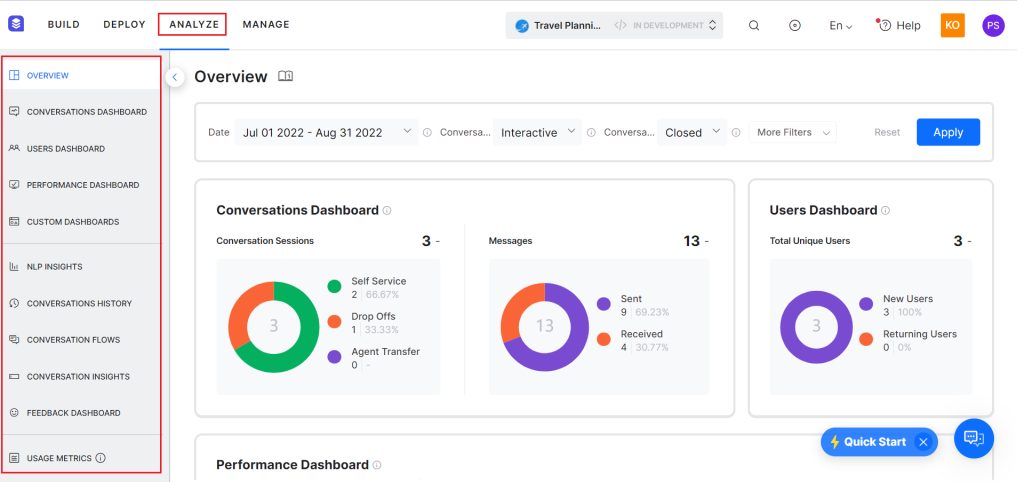
Scheduling coordination across multiple locations is where I put Kore.ai through its paces, and it held up well from the start. I got hands-on with the no-code XO Platform, which lets you design, train, and deploy virtual assistants without a developer, across web, SMS, and voice channels.
The appointment management piece is where it earned its place on my list. During testing, the bot handled rescheduling requests and reminder dispatch without manual intervention, and patients could check availability, book a slot, and get a confirmation in a single conversation.
For multi-location systems where scheduling coordination is a genuine operational bottleneck, I found this the platform’s clearest win. Enterprise-grade security and compliance controls come built in, which matters a lot once a healthcare IT team gets involved in the review.
Pros:
- No-code bot builder designs, trains, and deploys healthcare virtual assistants without developer involvement
- Appointment management handles scheduling, rescheduling, and reminder dispatch automatically
- Omnichannel support covers web, SMS, and voice from one platform
- Robust analytics and insights identify conversation breakdowns and guide retraining decisions
- Enterprise-grade security and compliance controls built in for healthcare IT requirements
Cons:
- Learning curve for non-technical teams building complex, multi-step conversation flows
- Pre-built healthcare templates are available but not as comprehensive as the appointment use case suggests
User Rating: 4.6/5 (G2)
Pricing: Custom Quote
4. Hyro.ai – Best for Real-Time Conversational Insights Across Call Centers and Web
Channel coverage is what stood out to me the moment I put Hyro up against a large health system’s call volume; it was the first platform whose reach genuinely matched that scale. What won me over was how it connects directly to existing data sources, website content, staff directories, and EHR documentation, and generates conversational responses automatically.
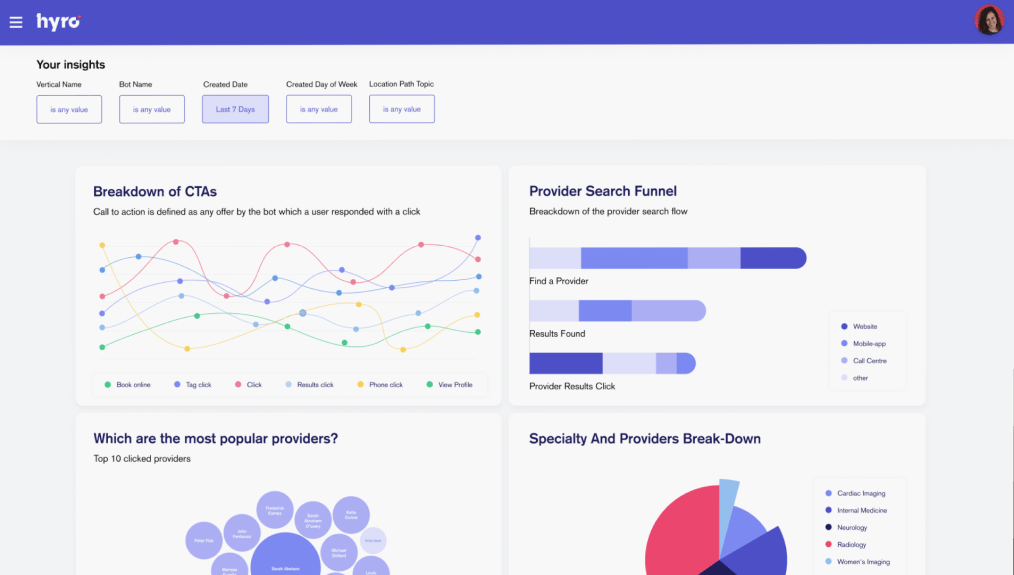
When content changes, the bot updates without anyone rebuilding a flow by hand. For a system running both a call center and web chat, the channel breadth mattered: Hyro handles calls and messages across phone, website, mobile, and SMS from a single deployment.
Real-time conversational insights showed me what patients call about most, where they abandon a conversation, and what they simply cannot find. Smart routing then transfers the complicated cases to the right department with full context intact.
Pros:
- Adaptive AI connects to existing data sources and updates automatically when content changes
- Covers phone, web, mobile, and SMS from a single deployment without separate builds per channel
- Real-time conversational insights identify patient inquiry patterns and friction points at scale
- Smart routing transfers complex cases to the right department with full conversation context preserved
- Prescription refill and pharmaceutical information queries handled natively
Cons:
- Sized for hospital networks; individual practices or small clinics may find the scale mismatched to their needs
- Deployment requires working closely with Hyro’s implementation team rather than a self-serve rollout
User Rating: 4.9/5 (G2)
Pricing: Custom Quote
5. Kommunicate – Best for Seamless Bot-to-Human Handoff for Clinical Support Teams
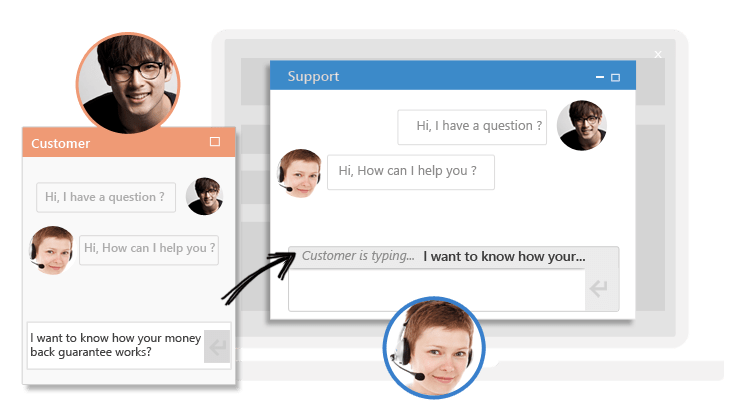
What sold me on Kommunicate, watching it in action, was seeing a handoff happen live. The agent got the full context, and the patient never had to repeat a word.
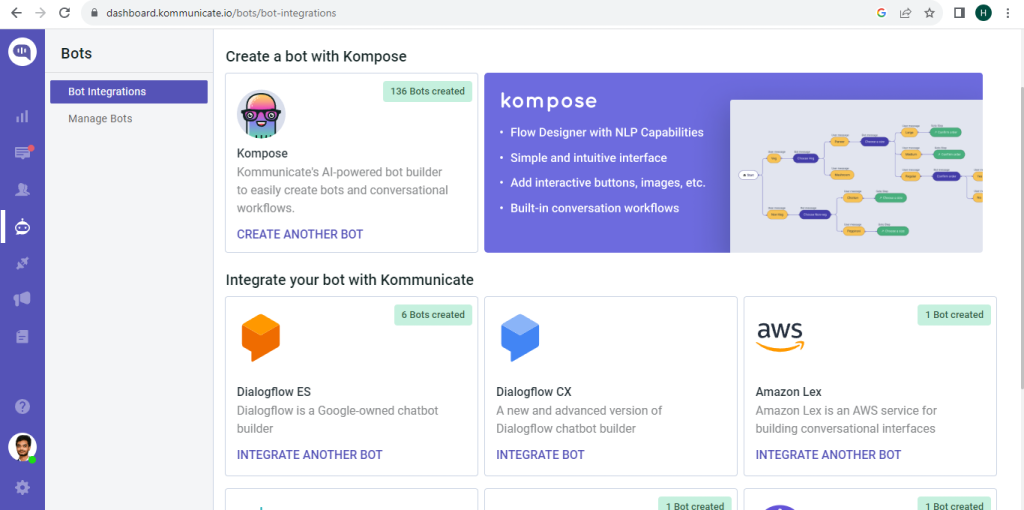
For an organization where an unanswered question carries real risk, that bot-to-human handoff felt like the core value, not a secondary feature. I also appreciated the Kompose builder, which lets non-technical staff create and train bots on clinical content without touching code.
When an escalation triggers, the receiving agent sees the patient’s information, the events that led to the handoff, and the full conversation history, so nobody has to start over. Analytics cover both bot and human performance, giving real visibility into containment rates and patient satisfaction. I would still test response times and widget stability closely before a full rollout.
Pros:
- Bot-to-human handoff preserves full conversation context so agents never start a conversation blind
- Kompose builder lets non-technical teams create and train bots on clinical content without coding
- Mobile SDK integrates the chatbot into Android and iOS patient-facing applications
- Analytics dashboard covers both bot and human agent performance in one unified view
- Smart routing escalates to the right agent or department based on patient intent
Cons:
- Customer support response times have been flagged as inconsistent in user reviews
- Chat widget has reported stability issues under certain deployment configurations
User Rating: 4.8/5 (G2)
Pricing: Starts at $40/month.
6. QliqSOFT (Quincy) – Best for HIPAA-Compliant Digital Intake and Post-Discharge Outreach
Replacing paper intake forms with a conversational flow is exactly what I found when I put Quincy to the test for a pre-visit intake scenario. QliqSOFT built the Quincy chatbot with HIPAA compliance as a core requirement rather than an afterthought, and that showed up throughout my review.
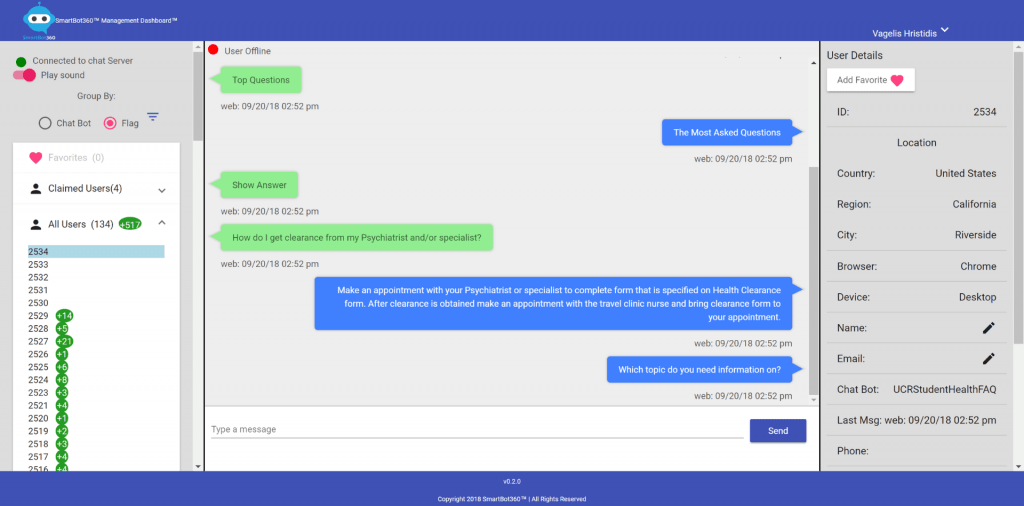
The digital intake capability is its clearest differentiator: patients complete pre-visit forms, e-sign documentation, and answer screening questions conversationally, with everything syncing back to Epic or Cerner.
Post-discharge, Quincy handles follow-up check-ins and care plan reminders automatically, which would free care navigators from manual outreach calls. One reference case I looked at, First Choice Neurology, reported saving real time per visit alongside a strong jump in digital intake adoption after rolling Quincy out.
Pros:
- HIPAA-compliant architecture is built in, not bolted on, for secure patient data handling
- Digital intake and e-signature forms replace pre-visit paperwork with a conversational flow
- Pre-built Epic and Cerner integration syncs intake data directly to the patient record
- Post-discharge and chronic care follow-up messaging runs without added staff workload
- No-code bot studio lets clinical teams launch new intake flows without developer support
Cons:
- Best suited to organizations already running Epic or Cerner; less turnkey outside those EHRs
- Review volume on public platforms is thinner than that of larger general-purpose competitors, so ask for direct references
User Rating: 4.7/5 (G2)
Pricing: Custom Quote
7. Infermedica – Best for AI-Powered Triage and Symptom Checking at Scale
High-volume telehealth is where Infermedica’s probabilistic triage proved its worth to me, handling edge cases that lighter symptom checkers kept missing.
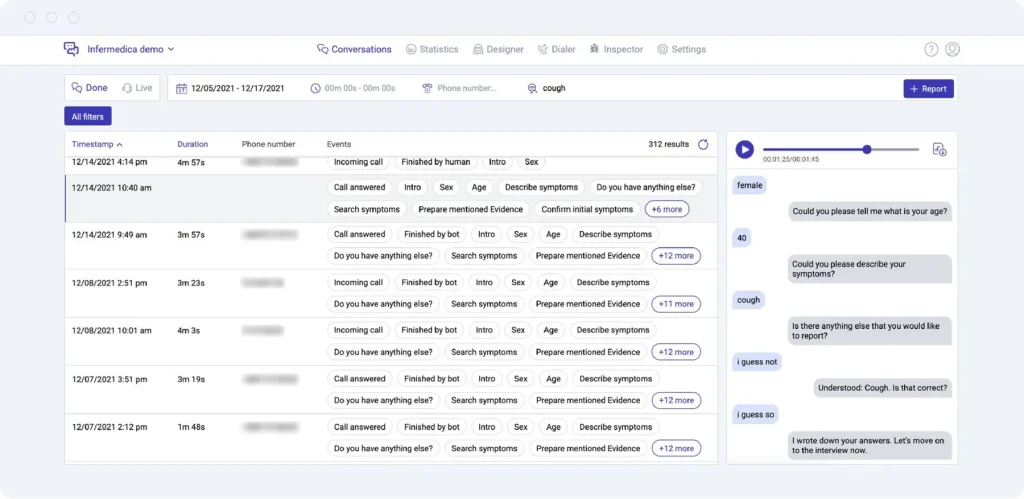
Once it was wired in, I saw why: the triage engine uses probabilistic reasoning across thousands of conditions in adult, pediatric, and specialist categories, weighing symptom combinations and patient-reported history to recommend self-care, primary care, urgent care, or emergency, each with a confidence level appropriate for clinical decision support.
The API-first architecture lets you embed the engine into existing patient portal and call center tools rather than replacing them. For high patient volumes, output quality on complex symptom presentations was noticeably higher than that of the lighter checkers I compared it against.
Pros:
- Probabilistic clinical reasoning engine evaluates complex symptom combinations with high accuracy
- API-first architecture embeds the triage engine into existing portals, apps, and call center tools
- Medical knowledge base covers thousands of conditions across adult, pediatric, and specialist domains
- Generates triage recommendations with confidence levels appropriate for clinical decision support
- White-label deployment allows health systems to embed the experience under their own brand
Cons:
- Technical implementation requires developer resources; not a plug-and-play option for small teams
- Public review volume is limited, so independent evaluation benefits from direct vendor references
User Rating: 4.5/5 (G2)
Pricing: Custom Quote
8. Orbita – Best for Voice and Chat Automation Across Hospital Systems
Watching Orbita sync with Epic and Cerner made the case for it immediately during my evaluation: care teams no longer need three separate systems just to hold one patient conversation.
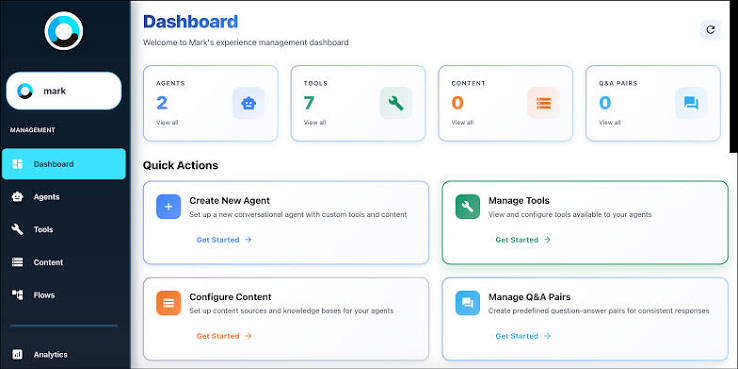
What Orbita handles well is the operational complexity specific to hospital systems: multiple departments, patient portals, call centers, and care team workflows that need to work together instead of in silos. The platform covers both voice and chat, which matters where a meaningful share of patient communication still happens over the phone.
Native EHR integration connects chatbot interactions directly to clinical records, and virtual assistants handle appointment scheduling, post-discharge follow-up, prescription refill requests, and care plan reminders, with everything logged through that integration. The no-code builder lets a clinical informatics team configure workflows without waiting on a development cycle.
Pros:
- Native voice and chat support covers both web-based and phone-based patient communication
- EHR integration with Epic and Cerner connects chatbot interactions directly to clinical records
- Handles appointment scheduling, post-discharge follow-up, and care plan reminders in one platform
- No-code builder lets clinical informatics teams configure workflows without development resources
- Multi-department deployment manages patient interactions across different service lines simultaneously
Cons:
- Implementation timeline runs longer and is better suited to hospital systems than small or single-location practices
- EHR integration depth varies by system configuration and requires coordination with IT teams
User Rating: 4.2/5 (G2)
Pricing: Custom Quote
9. Sensely – Best for Virtual Nurse Assistants in Chronic Care Management
Older patients responded to Sensely’s avatar, Molly, in ways a plain-text bot never came close to achieving, which stood out to me most during testing in a chronic care scenario. Sensely deploys that avatar-based virtual nurse instead of a standard chat widget, and the visual, conversational format produces a noticeably different engagement outcome for chronic care programs where adherence is the whole battle.
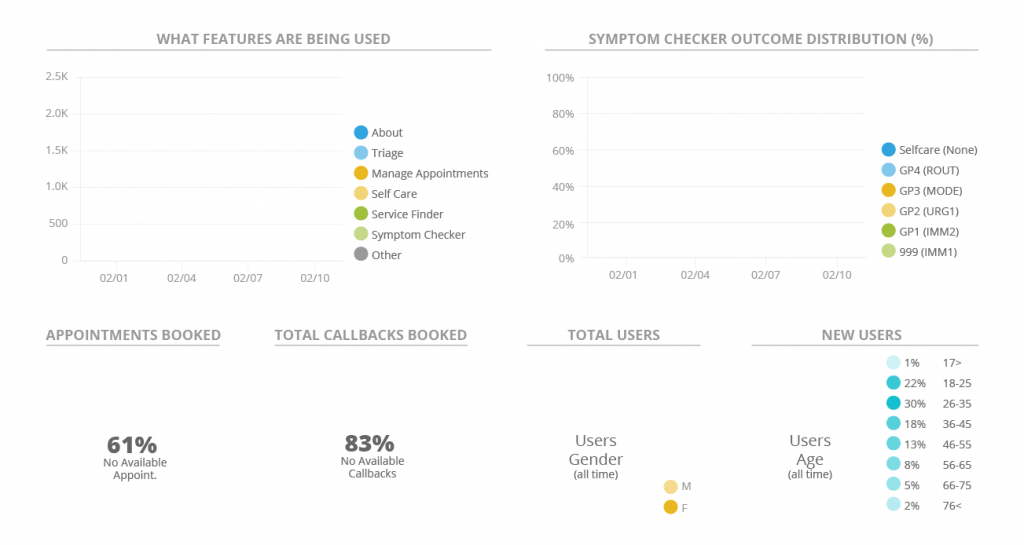
The platform is built around structured clinical workflows: symptom-monitoring check-ins, medication-adherence tracking, chronic-disease protocols, and post-visit follow-up sequences.
Integration with EHR systems and remote monitoring devices keeps conversations contextually accurate instead of generic. For diabetes and heart failure cohorts specifically, health systems using Sensely have reported real improvement in adherence and fewer avoidable readmissions.
Pros:
- Avatar-based virtual nurse format improves engagement for chronic care and older patient populations
- Structured clinical workflows cover symptom monitoring, medication adherence, and post-visit follow-up
- EHR and remote monitoring device integration make patient conversations contextually accurate
- Designed specifically for chronic disease management programs, including diabetes and heart failure
- Multilingual support enables deployment across diverse patient populations
Cons:
- Designed specifically for structured chronic care programs; not suited as a general-purpose patient support bot
- Public review volume on G2 and Capterra is limited, so ask for direct health system references before committing
User Rating: 4.5/5 (G2)
Pricing: Custom Quote
10. Aisera – Best for AI Service Desk Automation Across Healthcare IT and HR
Auto-resolving the repetitive password and access requests that pile up during an EHR rollout is exactly what I wanted to see from Aisera, and it delivered. What Aisera automates is the internal side of a healthcare organization: IT helpdesk requests, HR inquiries, facilities management, and the administrative workflows that eat up staff time when handled manually.
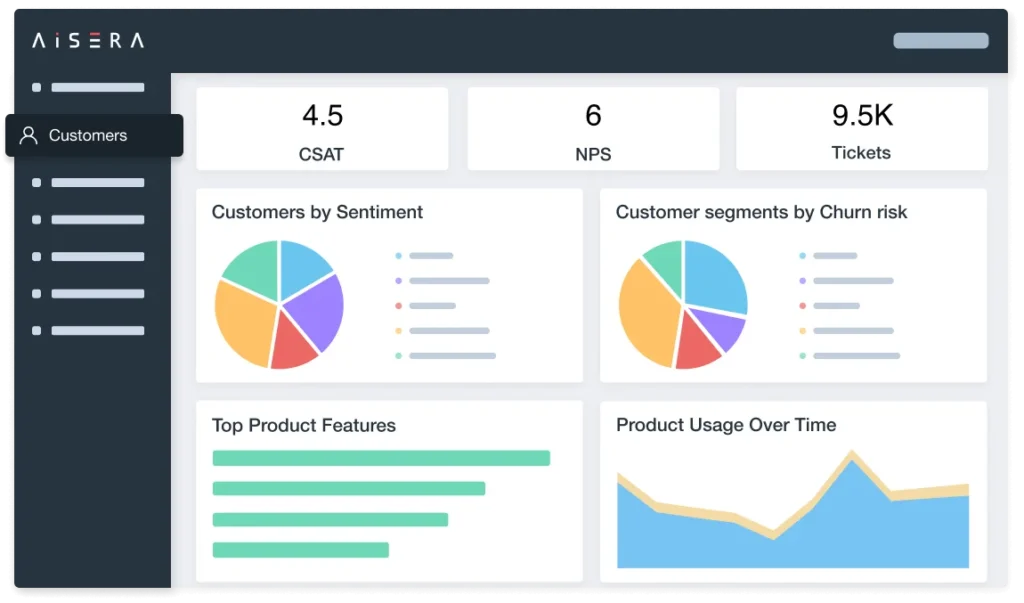
For a health system where clinical and administrative staff generate a steady stream of repetitive internal requests, password resets, benefits questions, and equipment requests, Aisera resolved a meaningful share of them automatically.
It integrates natively with ServiceNow, Jira, and Workday, so it slots right into an existing healthcare IT environment. The generative AI layer drafts responses, auto-resolves tickets, and escalates the complicated ones with full context. Worth knowing upfront: Aisera is not a patient-facing chatbot. It works best alongside a tool like ProProfs Chat if you need both sides covered.
Pros:
- AI service management automates IT, HR, and administrative requests across large healthcare workforces
- Integrates natively with ServiceNow, Jira, Workday, and major healthcare enterprise tools
- Generative AI drafts responses, auto-resolves tickets, and escalates with full context preserved
- Reduces IT and HR ticket volume, freeing clinical support staff for higher-value work
- Omnichannel deployment covers web, Slack, Teams, and email in one unified platform
Cons:
- Not designed for patient-facing support; requires a separate chatbot for clinical patient communication
- Implementation scope is built for larger organizations rather than smaller healthcare teams
User Rating: 4.4/5 (G2)
Pricing: Custom Quote
How I Evaluated These Healthcare Chatbot Tools
Choosing the wrong chatbot in a healthcare context does not just cost time. Chatbots in healthcare erode patient trust quickly when they fail and create compliance risks that are hard to walk back. Here is exactly how I approached the evaluation:
- User Reviews and Ratings: I pulled verified feedback from G2, Capterra, and Gartner, filtering specifically for reviews from healthcare buyers. Recency mattered because several platforms on this list have made significant product changes in the past 18 months.
- Clinical Use Case Fit: I evaluated each tool against the healthcare workflows that matter most: patient intake, appointment scheduling, symptom triage, post-visit follow-up, and care team escalation. A tool that works well for e-commerce support does not automatically translate to clinical contexts.
- HIPAA and Compliance Posture: I looked at whether compliance was a built-in architectural feature or an add-on. For healthcare buyers, this distinction matters significantly during procurement and IT review.
- Human Handoff Quality: In healthcare, the moment a bot cannot handle a query is a moment of patient vulnerability. I paid close attention to how each platform handles escalation: does the human agent receive full context, or does the patient start over?
- Integration Depth: I evaluated whether native integrations with EHR systems, CRMs, and help desk tools worked reliably in practice, not just in the feature list.
- Ease of Deployment for Non-Technical Teams: Clinical and administrative staff should be able to configure and improve the bot without waiting on IT. The benchmark was whether a non-developer could get the bot trained and running without outside help.
- Value for Money: I compared actual feature depth against the operational problems each tool solves. A platform that replaces three manual workflows earns its keep. One that handles a single narrow use case does not, regardless of tier.
Top 3 Picks for Healthcare Chatbots
Still narrowing it down? Here is where I would point most healthcare teams:
1. ProProfs Chat
For clinics and mid-sized healthcare organizations that need an AI agent running fast without a developer, ProProfs Chat delivers. It handles patient FAQs, appointment scheduling, and intake qualification, then pushes data into existing CRMs. Sentiment Analysis, Risk Prediction, and Resolution Overview give you a data-driven improvement loop from day one.
2. Ada Health
For providers whose primary need is reducing avoidable ER visits, Ada’s clinical assessment engine is the strongest tool on this list for that problem. It reasons through complex symptom combinations and keeps the experience inside your patient portal via white-label deployment. Best fit when symptom queries dominate your support volume.
3. Kore.ai
For multi-location practices where scheduling coordination is the biggest operational bottleneck, Kore.ai delivers. The no-code builder, omnichannel deployment, and automated appointment management handle rescheduling, reminders, and confirmations at a depth that simpler platforms cannot match. Best fit when a missed appointment carries real clinical and financial consequences.
FREE. All Features. FOREVER!
Try our Forever FREE account with all premium features!
Find the Healthcare Chatbot That Fits Your Patient Needs
The right chatbot for healthcare does not just answer questions. It closes the gap between when patients need help and when your staff is available, without burning out your team or breaking your budget.
Picking the right chatbot for healthcare starts with matching the category to your actual patient contact volume, not the flashiest demo in a sales call.
Before you commit to any platform, map your top 10 patient pain points first. Match the tool to the problem, not the other way around. Test human handoff on a real escalation scenario before going live. And verify HIPAA posture in writing, not just in a sales deck.
For clinics and mid-sized practices that need something fast, reliable, and genuinely easy to manage, ProProfs Chat is where I would start. It covers the essentials with AI Agent Training, Sentiment Analysis, and Risk Prediction, right out of the box.
Try it free and see how quickly it changes your after-hours patient experience.
Frequently Asked Questions
Is a healthcare chatbot HIPAA compliant by default?
No. HIPAA compliance depends on the vendor signing a Business Associate Agreement (BAA), encrypting data in transit and at rest, maintaining audit logs, and following the minimum necessary standard for any PHI collected. Always ask a vendor for BAA documentation before a demo, not after you have already invested evaluation time.
What is the difference between a clinical and an administrative healthcare chatbot?
Clinical chatbots handle symptom assessment, medical Q&A, and patient triage, and some fall under FDA oversight as Software as a Medical Device in certain regions. Administrative chatbots handle scheduling, billing, insurance FAQs, and patient service operations, and do not require FDA clearance. Most support teams evaluating a chatbot for day-to-day patient contacts need an administrative tool, not a clinical one.
How long does it typically take to deploy a healthcare chatbot?
Administrative chatbots with pre-built help desk integrations and no EHR scheduling requirements can go live in as little as two to four weeks. Tools requiring custom EHR integration or complex, multi-step conversation flows typically take 60 to 90 days.
Do patients actually trust chatbots for healthcare questions?
Trust is mixed and worth planning around rather than assuming. Research on health system chatbots found only about 35% of patients felt completely understood by the bot, while 61% felt it did not fully understand them. That gap is exactly why human handoff quality, not just AI sophistication, should weigh heavily in your vendor evaluation.
FREE. All Features. FOREVER!
Try our Forever FREE account with all premium features!

 We'd love your feedback!
What did you like & how can we make it even better?

 Thanks for your feedback!
 Ask Your Question
Have a question? Get expert help to make your decision easier.