

“What happens when your best support agent logs off at 6 PM?”
For most businesses, tickets pile up, chats go unanswered, and customers bounce. I’ve been there. When we started scaling, it became clear that hiring more agents wasn’t the only answer. What we really needed was an AI chatbot for customer service that could handle repetitive questions, qualify leads, and keep conversations moving even when the team was offline.
According to Gartner, by 2027, chatbots will become the primary customer service channel for about 25 percent of organizations. The transition is already underway as more teams look for scalable, always-on support.
But here’s what I’ve learned. Not all chatbots are created equal. Some feel robotic. Some fail at handoffs. And some create more confusion than clarity. In this guide, I’ll share the top tools, trends, and setup steps that actually work
A sneak peek at what’s ahead:
- 24/7 automated support with seamless human handoff
- Integrates with CRM, ecommerce, and help desk tools
- AI and human hybrid support drives the highest satisfaction
- Training on your data improves bot accuracy
- Omnichannel support and reporting are now standard
What Is an AI Customer Service Chatbot & Why Do You Need One?
Customer service chatbots are AI-powered virtual assistants that handle customer queries across websites, apps, and messaging platforms. They automate repetitive support tasks, integrate with CRM systems, and transfer complex issues to live agents when needed.
Where they deliver measurable value:
- Deflects tier-1 tickets without human involvement (24/7)
- Reduces first-response time to near-zero for common queries
- Captures and qualifies leads outside business hours
- Centralizes omnichannel conversations — web, WhatsApp, social — in one dashboard
- Frees agents to focus on escalations, complex issues, and high-value customers
AI Customer Service Chatbot vs Traditional Live Chat: What’s the Difference?
Both AI chatbots and traditional live chat tools aim to improve customer support, but the ways they handle conversations, scale operations, and reduce workload differ significantly.
Here’s how AI customer support chatbots compare with traditional live chat.
| Feature | AI Customer Service Chatbot | Traditional Live Chat |
|---|---|---|
| Availability | Operates 24/7 without breaks | Available only during agent working hours |
| Scalability | Handles multiple conversations simultaneously | Limited by number of available agents |
| Automation | Automates FAQs, lead qualification, and routing | Fully manual responses |
| Human Support | Transfers complex issues to live agents with context | Already human-led, no automation layer |
| Cost Efficiency | Reduces ticket volume and staffing pressure | Requires hiring more agents to scale |
| Integrations | Connects with CRM, help desk, ecommerce, and social channels | Limited automation and integration capabilities |
| Response Speed | Instant replies for common queries | Depends on agent workload and queue size |
| Failure Mode | Poor training → wrong answers at scale | Poor staffing → long wait times |
What Are the Top 11 AI Customer Service Chatbots for Your Business?
I’ve explored and evaluated many of the tools on this list, including what many consider the best chatbots for customer service, and I’ve also reviewed insights from industry experts and leading review platforms. Instead of jumping straight into the details, let me first give you a quick overview so you can see how they compare at a glance.
| AI Customer Service Chatbot Software | Best For | Pricing | User Rating |
|---|---|---|---|
| ProProfs Chat | Easy Live Chat & AI Customer Service Agent for Instant, Automated Support | Free plan available, paid plan starts at $19.99/user/month | 4.8/5 (Capterra) |
| HubSpot | Growing sales and engaging customers with live chat | Starts at $800/month | 4.4/5 (G2) |
| Kommunicate | Omnichannel integrations | Starts at $83.33/month | 4.6/5 (Capterra) |
| Tidio | Live chat with ticketing functionality | Starts at $29/month, free plan available | 4.7/5 (Capterra) |
| Intercom | Omnichannel platform with messenger and app | Starts at $39/month | 4.5/5 (G2) |
| Freshchat | Freshworks suite users | Starts at $17.87/month, free plan available | 4.4/5 (G2) |
| Chatfuel | Social media platforms | Starts at $10.13/month | 4.4/5 (Capterra) |
| Botsify | Conversational forms | Starts at $49/month | 4.3/5 (G2) |
| Zendesk | Zendesk users | Starts at $55/agent/month | 4.3/5 (G2) |
| Ada | Multilingual support | Custom pricing | 4.6/5 (G2) |
| Comm100 AI Agent | Regulated Industries | Custom pricing | 4.4/5 (G2) |
1. ProProfs Chat – Best for Easy Live Chat & AI Customer Service Agent for Instant, Automated Support
I have been using ProProfs Chat for close to two years now, and am very impressed with the customer service chatbot that I deployed on our website. The bot offers seamless, real-time assistance to customers and helps us reduce ticket volume by up to 40%.
One thing I especially liked was how quickly I could get started. By simply entering my website URL, I had an AI customer support agent ready to answer questions using my existing website content.

Advanced AI agent training trains the chatbot on your website, help center, and FAQs, so AI-generated answers always pull from your actual data with the source cited. Once live, AI customer service agents can complete tasks like updating orders and scheduling meetings directly from chat.
Sentiment analysis detects emotions in real time and feeds into risk prediction, which assigns churn scores so your team knows who needs attention. Resolution overviews and AI agent performance reports, then continuously track satisfaction.
Another advantage is how well it fits into the rest of the ProProfs ecosystem. It integrates seamlessly with ProProfs Knowledge Base and ProProfs Help Desk, making it easy to combine AI support, self-service, and human assistance in a single workflow.
With ProProfs’s customer service chatbot, I’ve seen remarkable improvements in both sales and customer satisfaction. I highly recommend it to anyone who wants to streamline customer service and grow their business.
Pros:
- Action-based AI agents that update orders, schedule meetings, and trigger notifications
- AI customer support agent can be launched in minutes from your website and further trained using your help center, FAQs, and uploaded files.
- Sentiment analysis and risk prediction to flag frustrated or at-risk customers early
- Resolution overviews and AI performance reports to track and improve chatbot quality continuously
- Real-time visitor tracking to monitor customer behavior and preferences
Cons:
- Cloud-only – no offline access
- No dark theme
User Rating: 4.8/5 (Capterra)
Pricing: A free plan is available for growing teams. Paid plan starts at $19.99/user/month.
See how ProProfs Live Chat helped MilitaryCruiseDeals improve follow-ups and streamline customer support.

2. HubSpot – Best for Growing Sales and Engaging Customers with Live Chat
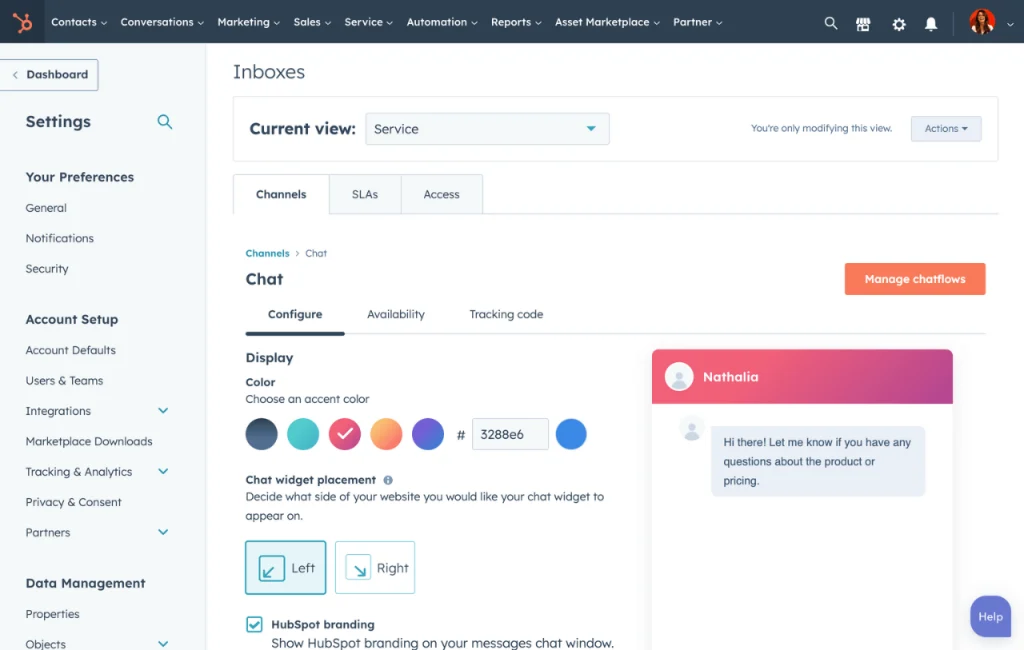
I used HubSpot‘s customer service chatbot for my website and was amazed by its ease and effectiveness. The chatbot builder helped me create a bot to schedule meetings, qualify leads, or answer common customer service questions.
I could build my bot or choose from one of their predefined templates, all from a visual editor that didn’t require coding knowledge. I also liked how the chatbot integrated with HubSpot’s CRM so I could personalize messages with the information in my database.
More importantly, its free live chat feature proved to be a valuable asset for our business. We experienced a noticeable increase in lead generation and customer engagement due to the ability to provide real-time support and answer queries promptly.
Pros:
- Digital engagement to reach customers on their preferred channels, such as web, in-app, SMS, WhatsApp, and more
- Einstein Bots to automate personalized, intelligent service with AI-powered chatbots
- Multilingual bots to deploy conversational AI across languages and channels
- Workflows to embed business processes and help customers self-serve
Cons:
- Paid plans become expensive quickly when scaling features or seats
- HubSpot branding remains visible on free live chat widget
User Rating: 4.4/5 (G2)
Pricing: Starts at $800/month.
3. Kommunicate – Best for Omnichannel Integrations
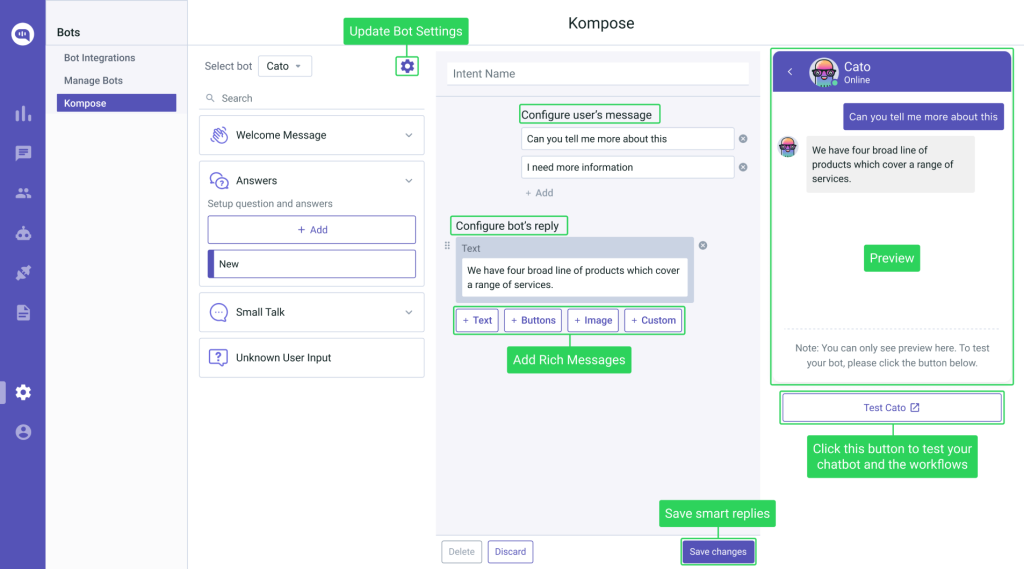
I used Kommunicate for my e-commerce business and was impressed with its features. It’s easy to use chatbot builder helped me launch an AI chatbot onto multiple channels without any coding experience.
I used it to handle customer inquiries across multiple channels, including Instagram Business Chat, Facebook Messenger, and Line. I really liked its bot-to-human handover feature, which automatically transferred complex support queries to my agents.
It’s another notable feature is its ability to remember context. This allowed my customers to have longer conversations with the chatbot, resulting in higher satisfaction with the responses.
For anyone seeking a versatile and efficient chatbot solution, I highly recommend Kommunicate.
Pros:
- Live dashboard to track all the conversations.
- No-Code chatbot builder Kompose
- Training AI chatbots with your website content and documents
- No-Code integrations across all popular channels
Cons:
- Pricing increases with higher conversation volumes or add-ons
- Occasional bugs or performance issues during high traffic
User Rating: 4.6/5 (Capterra)
Pricing: Starts at $83.33/month.
4. Tidio – Best for Live Chat With Ticketing Functionality
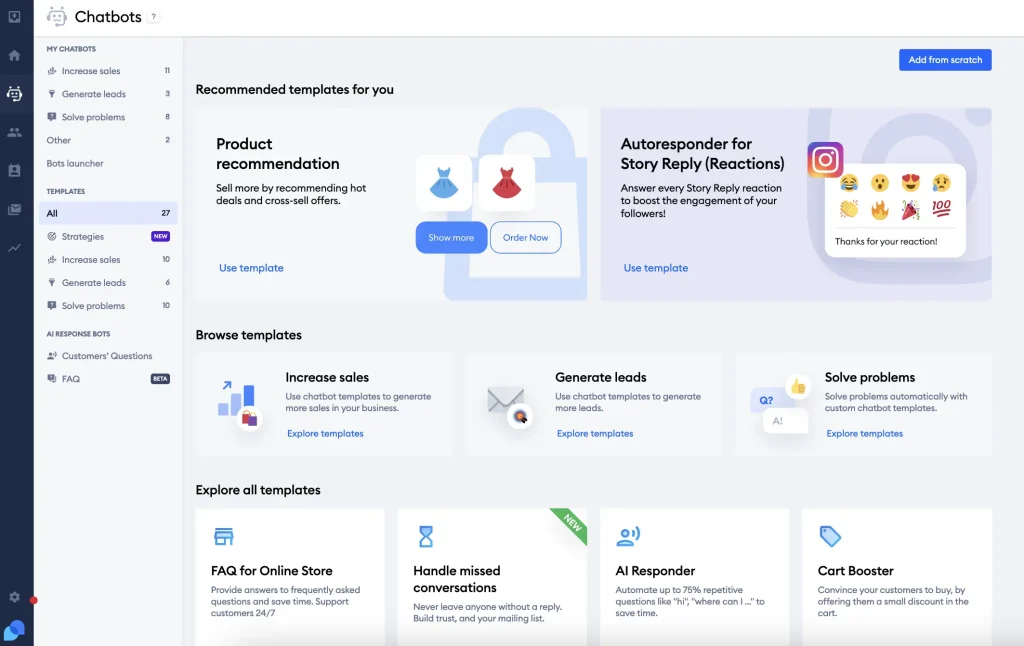
I used Tidio’s chatbot for an online store, and was amazed by its features and performance. Tidio is a platform that combines AI and human support to provide excellent customer service and increase sales. It has ready-to-use chatbot templates for various scenarios, such as greeting visitors, collecting leads, recommending products, and answering FAQs.
What I loved the most about Tidio was its real-time visitor tracking, which helped me proactively assist customers based on their behavior. Tidio’s multi-channel support ensured I could connect with visitors through chat, email, and even Facebook Messenger, all from a single dashboard.
Plus, Tidio’s live chat proved to be a valuable tool in my customer support operations. The ability to create tickets for complex inquiries ensured seamless follow-ups and improved overall customer satisfaction. If you want to boost your online presence and drive conversions, Tidio is a top choice.
Pros:
- Offline messages to receive email notifications for messages outside of business hours
- Integrations with popular tools like Shopify, WordPress, Mailchimp, and more
- Live typing to see what customers are typing before they send a message
- Visitor list to view and filter active, idle, and new visitors
Cons:
- Conversation limits on lower plans restrict heavy usage
- Some users experience delays in notifications or mobile sync
User Rating: 4.7/5 (Capterra)
Pricing: Plan starts at $29/month (A free plan is available with limited features)
5. Intercom – Best for Omnichannel Platform with Messenger and App
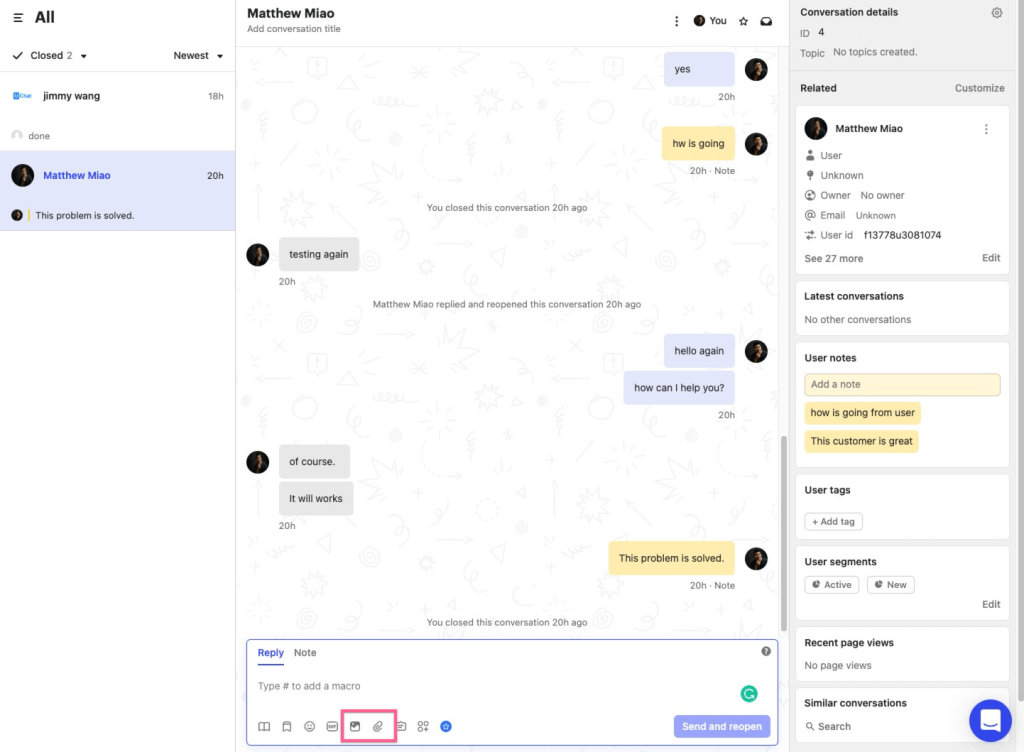
I used Intercom for six months in my previous company. The chatbot handled most of the common questions from my customers, such as shipping details, refund policy, and product features. The best feature of the chatbot was its AI-powered capabilities, which helped it understand complex queries and provide accurate and natural answers.
Intercom’s messenger and app features helped us connect with customers on multiple platforms such as WhatsApp, Instagram, and email, improving communication and making them happier overall. Plus, its chatbot also learned from my help center articles and other sources, so I didn’t have to train or configure it. It was like having a 24/7 support agent that never got tired or bored.
To sum it up, Intercom’s customer service chatbot saved me time, money, and hassle and improved customer satisfaction and loyalty.
Pros:
- Task Bot to automate repetitive tasks like booking meetings and collecting feedback
- Resolution Bot to resolve common customer queries instantly and accurately
- Custom Bot to qualify and route leads to the right sales reps
- Customer segmentation for targeted communication
Cons:
- The basic plan lacks multilingual support
- There can be delays in getting assistance from customer support
User Rating: 4.5/5 (G2)
Pricing: Starts at $39/month.
6. Freshchat – Best for Freshworks Suite Users
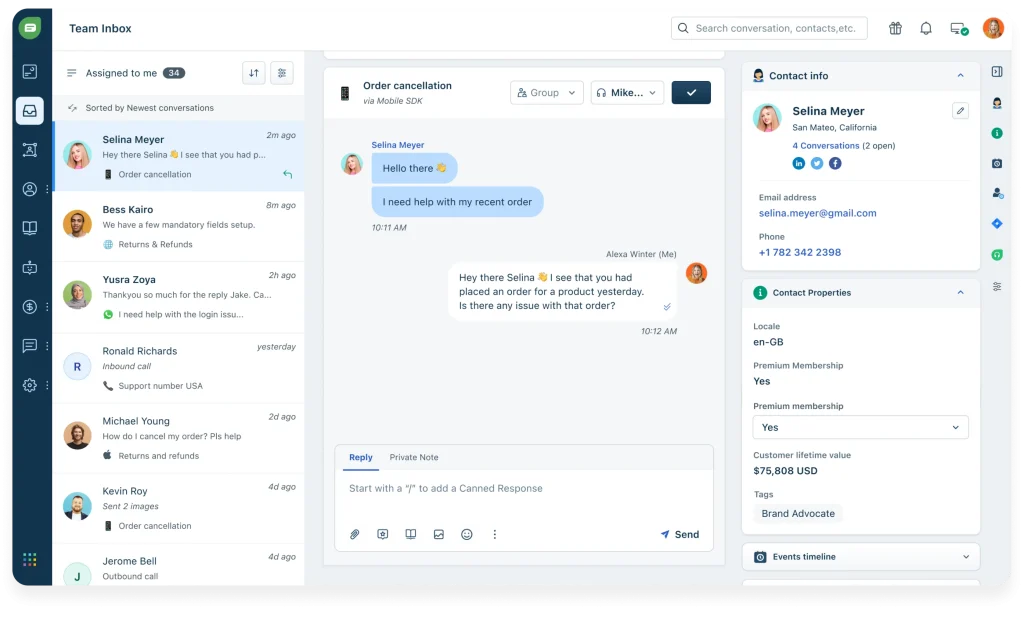
If you’re looking to improve customer service and engagement, Freshchat is a great option. It comes with intelligent chatbot software that automates resolutions, scales support, and personalizes interactions, making it easier to manage customer queries. Its user-friendly interface makes implementation smooth and straightforward.
Freshchat enables you to create and deploy AI-driven bot experiences across websites, apps, and messaging channels, providing consistent engagement across platforms. I’m really impressed by its unified agent workspace feature, which gives agents access to all necessary customer information, like past purchases and open issues, for more personalized support.
Plus, Freshchat integrates seamlessly with the Freshworks suite, offering a unified customer support experience that enhances efficiency and allows for deeper customer insights. This integration ensures smooth collaboration between tools, improving overall productivity for your support team.
Pros:
- Freddy AI to build and train chatbots with natural language processing
- SmartPlugs to fetch and display information from external sources like CRM
- Co-browsing to collaborate with customers and guide them through complex issues
- Campaigns to send targeted and personalized messages to customers based on their behavior and attributes
Cons:
- Long learning curve due to extensive and hidden features
- Heavy reliance on Freshworks ecosystem reduces flexibility
User Rating: 4.4/5 (G2)
Pricing: Starts at $17.87/month (A free plan is available with limited features)
7. Chatfuel – Best for Social Media Platforms
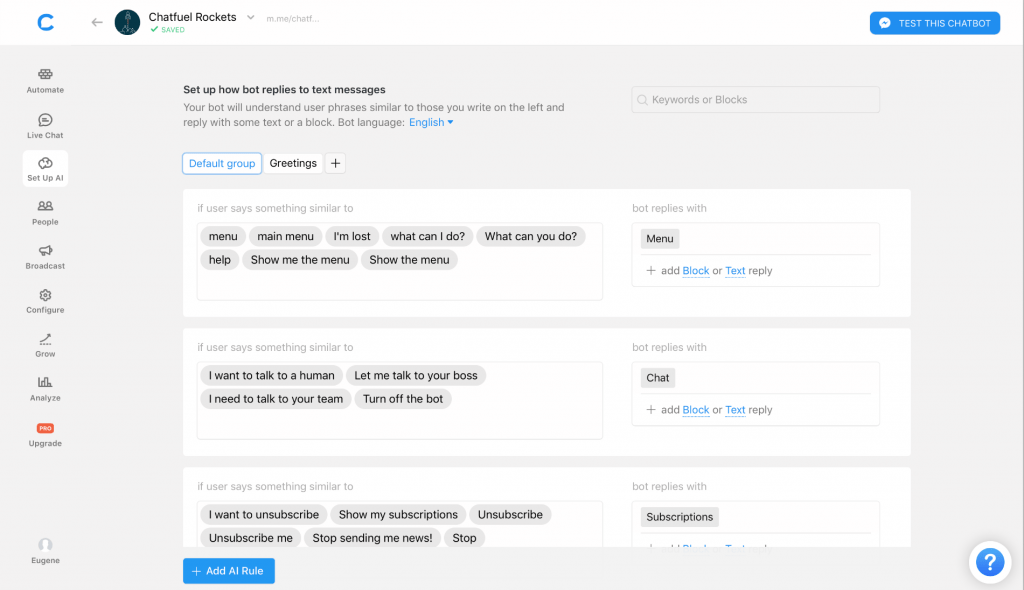
I used Chatfuel to create a customer service chatbot for an e-commerce store on Facebook Messenger. It was a great experience, as Chatfuel made it easy and fast to build and deploy a custom chatbot that could handle most of the common inquiries from my customers.
One of the best features of Chatfuel was the ability to segment and analyze my customers based on their behavior and feedback. I could use this data to improve my products, services, and chatbot marketing strategies. Chatfuel also offered a variety of templates, guides, and resources to help me create a chatbot that suited my needs and goals.
Chatfuel is a robust and reliable tool for boosting customer support and engagement through chatbots. I would recommend it to anyone who wants to grow their eCommerce business on WhatsApp and Facebook Messenger.
Pros:
- Built-in stats to assess the performance of each block in your chatbot
- Keyword rules to have your bot send specific responses for certain keywords
- Integration with the knowledge base to reduce support volume and resolution times
- Plugins to add functionality and features to chatbots, such as payments, forms, galleries, and more
Cons:
- Cannot duplicate flows easily across different channels
- Multilingual chatbot creation proves difficult and restricted
User Rating: 4.4/5 (Capterra)
Pricing: Starts at $10.13/month
8. Botsify – Best for Conversational Forms
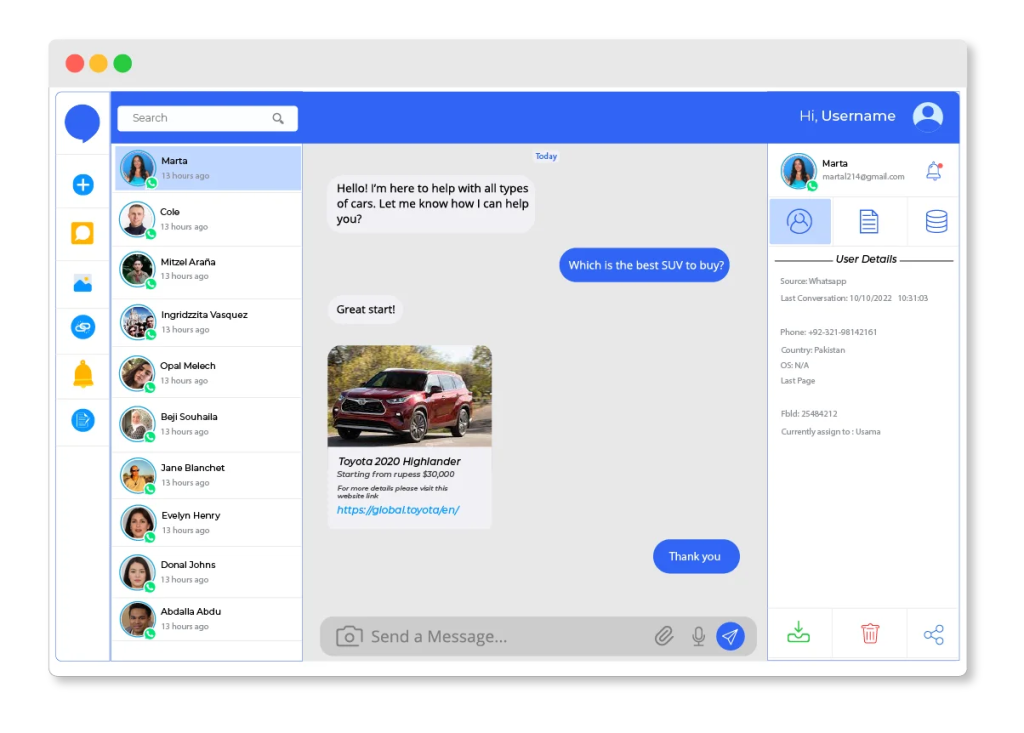
I briefly used Botsify and felt it could be a reliable tool for creating chatbots for customer service teams. It was easier to set up and customize without any coding required. I could choose from the templates and integrate them with my Shopify store and Facebook page.
The chatbot helped me handle customer inquiries 24/7 across multiple channels. It also collected user data and sent email follow-ups to reduce cart abandonment. One of the best features of Botsify was the conversational forms, which allowed me to create interactive and engaging chat flows with call-to-action buttons.
Botsify improved my customer service quality and increased my sales and conversions. If you’re looking to automate your customer service with a smart and effective chatbot, Botsify is the right choice.
Pros:
- Ready-made chatbot templates for various industries
- Story Tree to create and visualize chatbot flows with branching logic
- Sentiment analysis to detect user emotions and respond accordingly
- Human takeover to switch from chatbot to live agent seamlessly
Cons:
- Limited integrations outside core channels
- Support quality varies and can be slow
User Rating: 4.3/5 (G2)
Pricing: Starts at $49/month.
9. Zendesk – Best for Zendesk Users
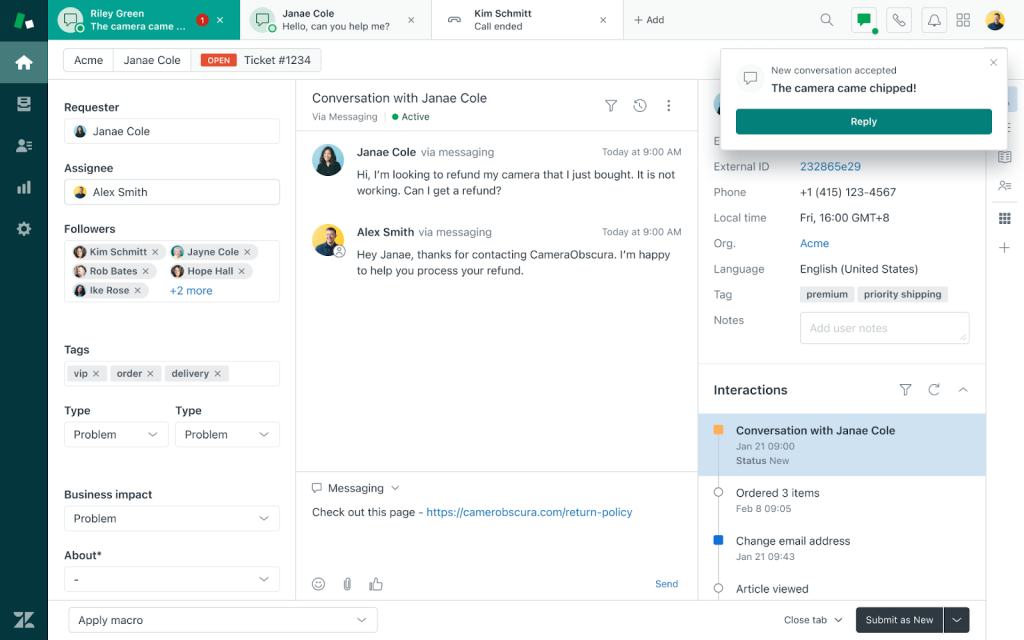
Zendesk offers a comprehensive suite of features that empowers businesses to provide exceptional service, setting a new standard for customer care. Its AI-powered chatbot serves as a valuable virtual assistant, efficiently handling a wide range of customer queries and offering self-service options.
I was particularly impressed with the Flow Builder, which allowed me to create customized conversational flows tailored to specific scenarios and customer intents. Another remarkable aspect is the chatbot’s ability to learn from customer feedback and interactions, continuously improving its accuracy and performance over time.
This tool is perfect for current Zendesk users as it seamlessly connects with your existing tools and data, making support easier and more efficient. If you’re looking for a customer support solution that combines powerful features, ease of use, and AI-driven intelligence, Zendesk could be the ideal fit.
Pros:
- AI tool to detect customer intent for better service
- Answer Bot to provide instant answers from the knowledge base
- Social messaging to connect popular platforms like Facebook, Twitter, and WhatsApp
- Sunshine Conversations to build rich and interactive chatbot experiences across channels
Cons:
- Advanced AI and multilingual features need higher tiers
- Occasional steep learning curve for Flow Builder tools
User Rating: 4.3/5 (G2)
Pricing: Starts at $55/agent/month.
10. Ada – Best for Multilingual Support
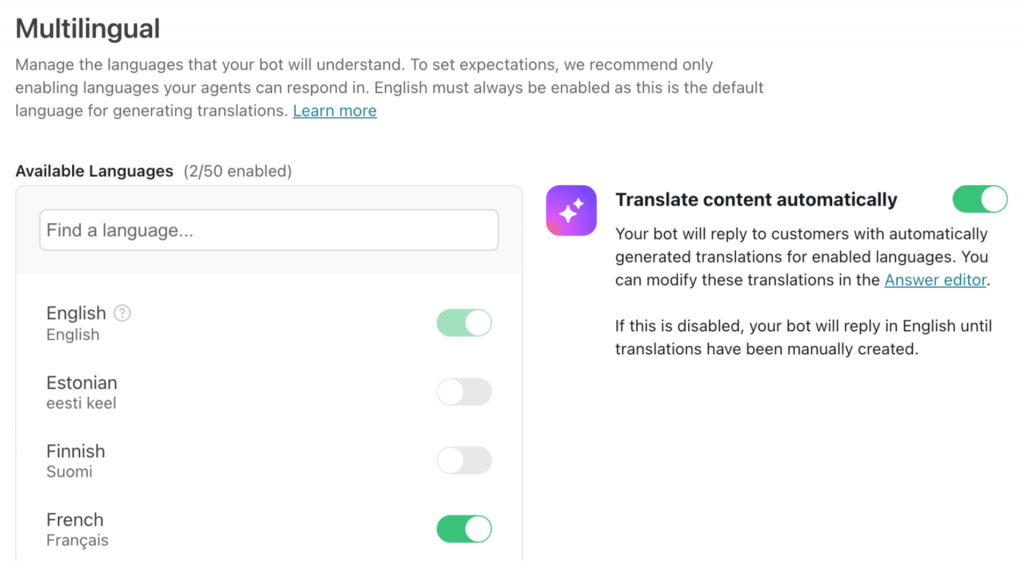
Ada’s chatbot proved to be a valuable tool in streamlining our customer support processes. It efficiently addressed common inquiries like order status, refunds, and product details, enabling us to provide prompt assistance. Plus, the chatbot’s personalization capabilities enhanced customer satisfaction by tailoring responses to individual preferences.
Ada’s 24/7 availability across various channels and languages enabled us to expand our customer reach and minimize response times significantly. The AI analytics offered key insights, enabling us to monitor and optimize chatbot performance for consistently excellent customer service.
Ada’s multilingual capabilities proved invaluable in expanding our customer support reach. By providing support in various languages, we ensured a positive experience for our global clientele, fostering inclusivity and engagement.
Pros:
- Ada Glass to hand off conversations from chatbot to live agent with full context
- Automation to streamline workflows and processes with chatbot actions
- Ada Translate to support customers in multiple languages
- Engage feature to proactively reach out to customers with personalized messages
Cons:
- Mixed accuracy on nuanced or edge-case queries
- Some integration challenges and ongoing maintenance needs
User Rating: 4.6/5 (G2)
Pricing: Custom pricing.
11. Comm100 AI Agent- Best for Regulated Industries
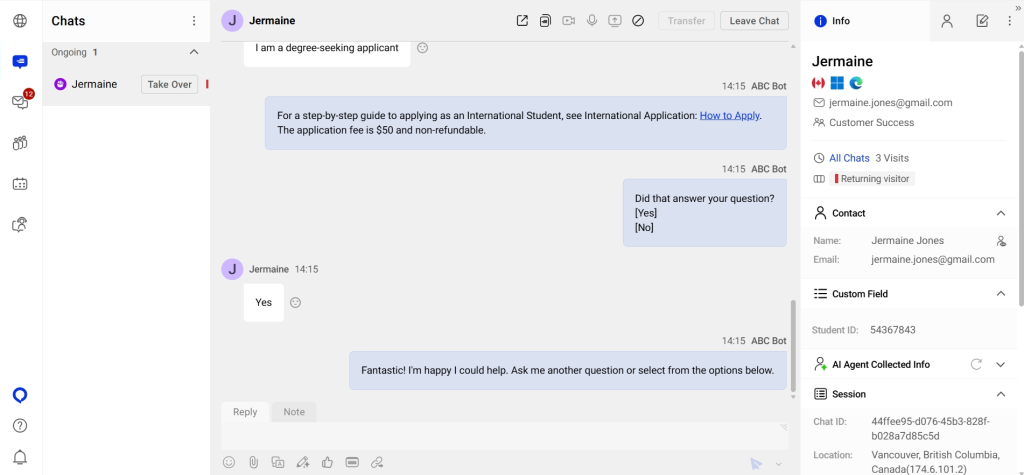
The Comm100 AI Agent is a popular choice in regulated industries like iGaming, higher education, banking, finance, and government. I like how smoothly it fits into their broader AI suite and helps deliver context-aware, human-like responses across channels like live chat, email, SMS, ticketing, and social messaging.
What I really like is how it balances strong AI automation with enterprise-level compliance without making things complicated. Getting started is quick, too. The AI can learn from your website, knowledge base, and uploaded files, so you’re not building everything from scratch. The visual workflow builder makes it easy to automate tasks such as bookings, order lookups, and ticket creation with simple commands.
It also goes beyond just being a chatbot. You get a full omnichannel setup with live chat, ticketing, AI Copilot for agent support, and AI Insights for performance tracking, all managed from one unified dashboard.
Pros:
- Omnichannel AI deployment across live chat, email, SMS, social media, and messaging apps
- Enterprise-grade security with SOC 2, PCI DSS, HIPAA, and ISO 27001 certifications built in
- Visual workflow builder with natural-language commands to automate tasks like bookings, lookups, and ticket creation without coding
- Built-in analytics to track CSAT, resolution rates, and lead conversions
Cons:
- Limited customization options in the dashboard
- Not suitable for smaller support operations
User rating: 4.4/5 (G2)
Pricing: Custom pricing
AI Chatbot for Customer Service: My Top 3 Picks
Still unsure which one to pick? Here are my top three recommendations to make your decision easier!
1. ProProfs Chat
ProProfs Chat can be a strong choice for businesses seeking a comprehensive chatbot solution with easy customization, chatbot training, and ready-made chatbot templates. You can create multiple AI-powered chatbots for your website, help center pages, etc., and automate your support process.
2. Chatfuel
If you want to engage customers on social media platforms like Facebook and WhatsApp, Chatfuel can be your ideal tool. This customer service chatbot can help you segment your visitors based on their behavior and preferences.
3. Ada
Ada is an easy-to-use chatbot solution that can help you cater to global audiences with its multilingual support functionality. This is a reliable customer service chatbot when it comes to automating routine inquiries with its round-the-clock support.
FREE. All Features. FOREVER!
Try our Forever FREE account with all premium features!
How to Build a Customer Service Chatbot in Minutes!
As someone who’s seen firsthand the impact of efficient customer support, I’m excited to walk you through the process of creating your very own customer service chatbot.
I’ve used ProProfs Chat as an example, as I believe it’s the most user-friendly tool out there. By following these steps, you’ll be able to create a support chatbot that’s up and running in no time and ready to assist your customers efficiently.
Step 1: Start the chatbot creation process
Go to the “Bots” section on your dashboard.
Click on the “+Create New Bot” button and choose “Using AI” from the dropdown list.
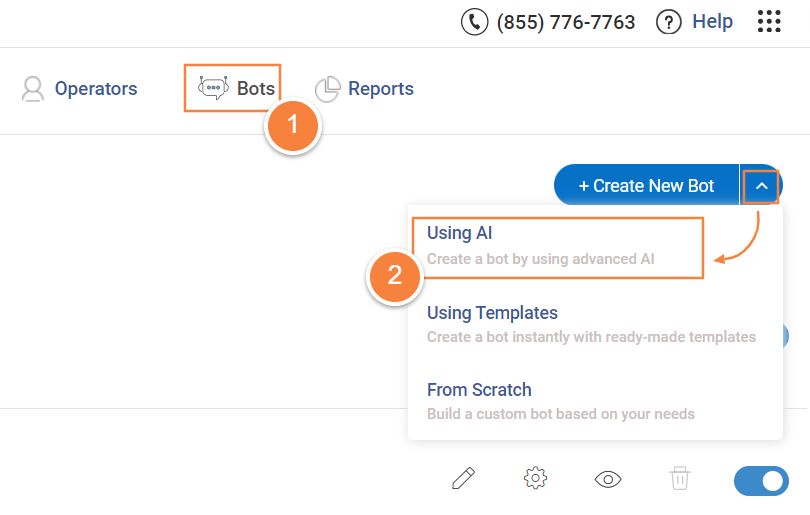
Now, you’ll need to enter the information source that your bot will use to learn and communicate with users.
Step 2: Setting up your bot with data
You have two ways to set up your bot:
URL: Enter your website or help center’s URL in the “Website URL” field. The system will scan your site to gather information, like FAQs and product details, to build the bot’s knowledge base around your content.
Text: If you don’t want to use your website or want to add extra details, you can manually input text. This option is great for adding specific information, such as instructions or policies, that you want your bot to understand and share with users.
After choosing your data source and entering the needed information, click “Process Data” to move forward.

Step 3: Once all the data is processed, your chatbot is automatically trained. As you can see below, you will find information presented in the form of FAQs that your bot can handle.
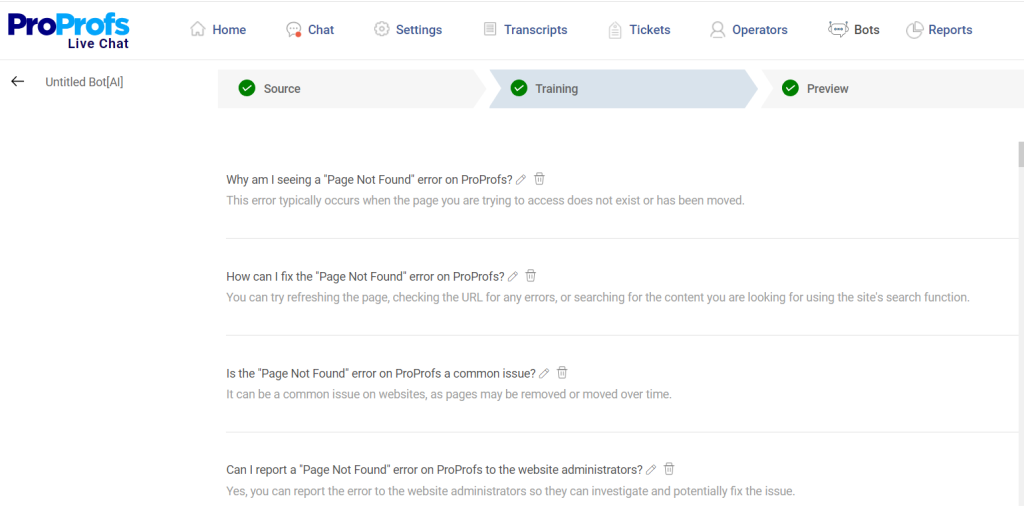
Step 4: Click “Preview” to see how your bot works. You can ask it sample questions to see how well it responds.
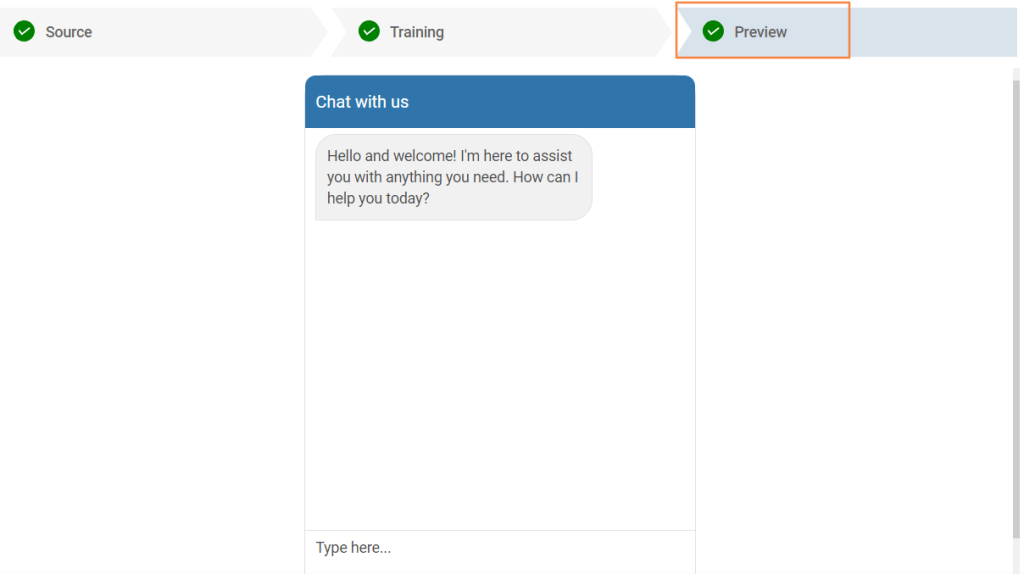
Congrats! Your bot is now set up and good to go!.
What Customer Service Chatbot Trends Will Shape the Future?
Customer expectations are evolving faster than ever. What worked for customer service chatbots a few years ago already feels outdated today. Businesses are no longer looking for simple auto-responders. They want intelligent, integrated systems that improve customer experience and operational efficiency at the same time.
Here are the top customer service chatbot trends that will shape the future:
| Trend | What It Means | What to Check in Your Shortlist |
|---|---|---|
| Generative AI Responses | Dynamic answers instead of scripted replies | Does the vendor use an LLM, or a rule-engine with NLP labeling? |
| AI + Human Hybrid | Seamless bot-to-agent handoff | Test the handoff in the demo — not just the bot |
| Omnichannel Integration | Unified inbox across all channels | Count how many channels are native vs. third-party add-ons |
| CRM & Help Desk Sync | Real-time data sharing with your stack | Ask if sync is bidirectional or read-only |
| Proactive Engagement | Bot initiates based on behavior triggers | Check trigger logic: page-based, time-based, or intent-based? |
| Voice-Enabled Chatbots | Voice + text in same platform | Most tools are 12–18 months away from production-ready voice |
| Multilingual Support | Real-time translation in conversation | Verify whether it's real-time AI translation or pre-built language variants |
| Analytics & Sentiment | Sentiment scoring + trend analysis | Ask for a sample analytics dashboard before signing |
Future-Proof Your Support With a Reliable AI Customer Service Chatbot
AI customer service chatbots are quickly becoming the backbone of modern customer service. Customers expect instant answers, and growing businesses need a smarter way to respond without stretching their teams too thin.
If you are planning to implement one, start by identifying the most common questions your team handles and train the bot around those first. Ensure there is a smooth handoff to a live agent so customers never feel stuck. Integrate the chatbot with your CRM and help desk, and keep refining responses using real chat insights over time.
When you want a solution that combines AI automation with reliable live support and easy customization, ProProfs Chat is a strong option. It helps unify conversations, streamline workflows, and deliver consistent support without added complexity.
Ready to elevate your customer support experience? It starts with the right chatbot.
Frequently Asked Questions

What is the difference between rule-based and AI chatbots?
Rule-based chatbots follow predefined scripts, while AI chatbots understand intent and generate dynamic responses based on training data and conversation context.
Can AI chatbots reduce customer support costs?
Yes. AI chatbots can automate repetitive queries and reduce ticket volume, helping businesses lower support costs while improving response times.
What is the best AI chatbot for small businesses?
The best option depends on budget, integrations, and automation needs. Tools like ProProfs Chat offer affordable plans with AI and live chat capabilities.
How long does it take to implement a customer service chatbot?
Most platforms allow deployment within minutes using plugins or code snippets. Training and optimization typically take a few days.
Is AI chatbot data secure and compliant?
Enterprise-grade platforms offer encrypted storage, access control, API authentication, and compliance support such as GDPR or HIPAA.
Can a chatbot integrate with CRM systems like Salesforce or Zoho?
Yes. Many AI chatbots offer direct CRM integrations to sync leads, transcripts, and customer data automatically.
Does an AI chatbot support WhatsApp and social media messaging?
Omnichannel chatbot platforms centralize WhatsApp, Facebook, Instagram, and website chats into one unified dashboard.
FREE. All Features. FOREVER!
Try our Forever FREE account with all premium features!

 We'd love your feedback!
What did you like & how can we make it even better?

 Thanks for your feedback!
 Ask Your Question
Have a question? Get expert help to make your decision easier.